



Test & Deploy (T&D) is a powerful feature available for Enterprise customers that lets you perform and test changes in one Pigment environment without impacting the others.
Once you’re happy with the testing, you can then deploy changes to your Prod Environment, where it will be visible by all users.
There are other resources dedicated to T&D, but if you need to remember one picture, use the one below:
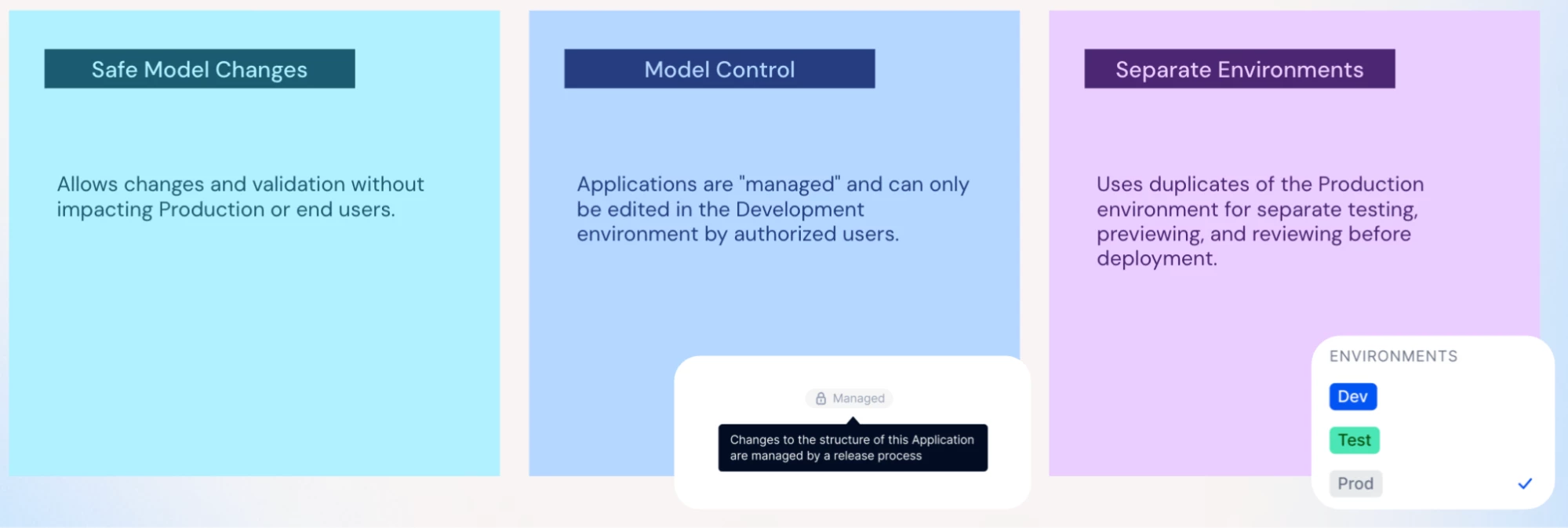
However, tighter Model Control can also mean that in case of emergency, you lose some of the flexibility to “fix in Prod”, which can be critical if you have, let’s say, a Board meeting in 5 minutes and you absolutely need that formula calculating EBIT to be modified.
In this article, we will provide examples of how the “Local Deployments” feature can be leveraged to lift limitations inherent to T&D.

This is everybody’s nightmare. You’ve consolidated figures in Pigment, have checked that everything made sense, and used the PowerPoint add-in to lock your presentation to the Board for the monthly closing. The meeting starts in 5 minutes, and you realize that something is wrong.
You could make the change in your Dev Environment, but given the data is not up-to-date, there’s a small risk your fix won’t cover all cases. This is a perfect use case for Local Deployment in Production, which will allow you to:
- Create a copy of your Production Application with the latest available data, and group applications in a custom deployment group,
- Perform changes in the application copy and confirm that everything is fine,
- Deploy changes from the copy to the live application, using the custom deployment group set-up.
After a few seconds, carefully tested changes are deployed in the Live Applications, everything is perfect, and you go into the Board meeting with the correct figures. You’ve saved the day, and avoided presenting wrong figures while still keeping tight control on the changes.
Also, ensure that after the Board meeting when you have time to breathe, you also replicate the changes from the Copy Application to your Dev Application. Otherwise, at the next Application deployment from Dev to Prod, you have the risk that your changes will be reverted.

Let’s imagine it’s now been a couple of months or years since you have implemented T&D, you’ve created a few new applications (congrats!) and also added blocks in your existing applications.
However, it’s now becoming difficult to manage all applications, and you think a big spring cleaning would be useful. One of the first things you want to tackle is to ensure some obsolete applications are emptied and deleted. These obsolete applications contain dimensions and Transaction Lists used everywhere else… How would you approach it?
You could:
- Make the changes directly in Dev. After all, what’s the worst that could happen? Maybe it’ll crash and you’ll lose some data.. In that case you’ll request a full refresh of your Dev. It’s not ideal, but it’ll do the trick.
- Make a set of Recovered Applications in Dev or in Prod, but… you’ll need to remake all changes manually, and some actions are also not possible in Recovered Applications.
- Make a copy of your Dev Applications, create a deployment group, make changes in the copies and if everything goes well, make a Local Deployment to the main Dev app.
I’m sure from now you’ve understood option 3 is the best option, as it:
- Allows you to make all modifications freely in applications copy, without a risk of breaking anything,
- And if you’re happy with the changes, you can safely Locally Deploy them from Copy to Dev, and after testing, from Dev to Prod.

You’ve done a few hundred changes in Dev, have carefully tested it with the available data, and you push the changes to Production. However, one thing you didn’t take into account is that an Application in Production takes data from your managed app, and the changes you’ve deployed have unintended consequences.
You could let your colleague who owns the application fix it, but given you’re a nice person, you’re looking for a way to help. Until now, the option would have been to manually revert your changes in Dev, and push to Prod to previous configuration. Unfortunately that won’t work, because you’ve not only modified and added metrics, but also deleted some of them…
You can now use Local Deployments from Recovered Applications to your Live Applications. What does it mean? That you can make Recovered Applications from the exact point of time before the deployment was done, and deploy those changes to the live app, as if you were reverting all changes deployed to Production.
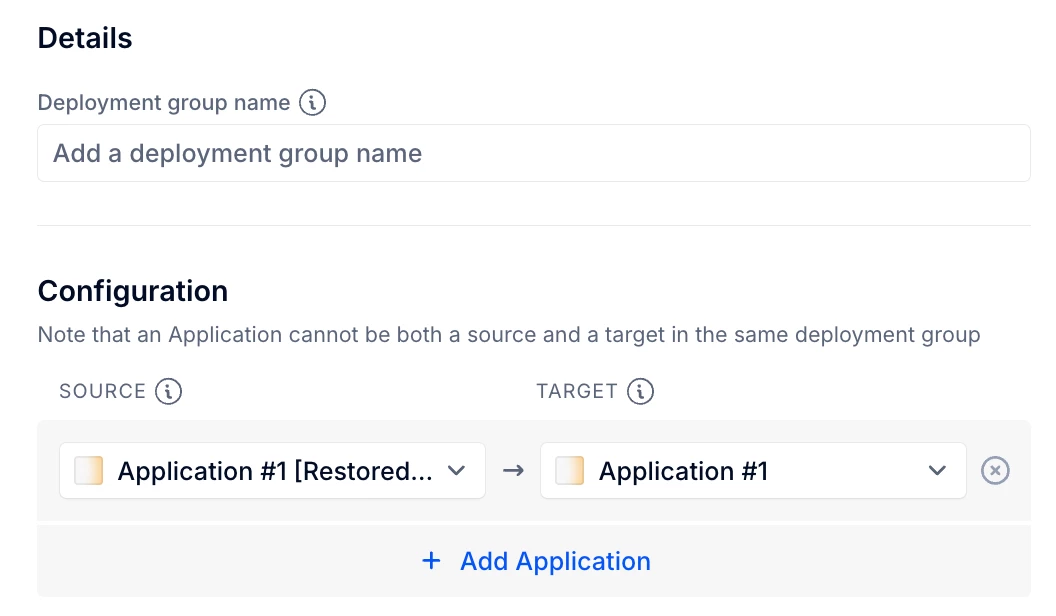
Things are now back to the original status for both you and your colleague, everything works and you’ve avoided possibly hours of rework for your organization. Well done !

Let’s imagine that you are in the process of spring cleaning in one of your application. To do so, you’d like to remove some of the unused Dimension Items, like Countries that are not anymore in your company scope and haven’t been used in a while.
You’ve checked that no formula was directly referencing this Country, and that it’s not being used as a default page selector in any widget or Boards, or being used to define specific Access Rights.
You go ahead with the deletion of the item, and everything is fine. But after 1 week, the Financial Director of a Business Unit comes asking why the country isn’t available in Pigment, because it needs to be added into the Budget due to a company strategic change. On top of this, the historical data needs to be available for YoY comparison. What can you do?
Luckily, it’s been only a week and you have a Recovered Application, so we will be able to get back the information thanks to the Local Deployment feature. But how to actually bring back the Dimension Item and its associated data?
- Step 1: Recover your applications
At the bottom left of your Workspace Homepage, click on “Recovered Applications”, “Recover Applications”, and let yourself be guided through the process of creating the Recovered Apps.
Keep in mind that Recovered Applications can take a bit of time to be up and running. Ensure you recover only what is needed, and not the full available list of applications, so that Recovering applications remains effective and that storage can be saved.
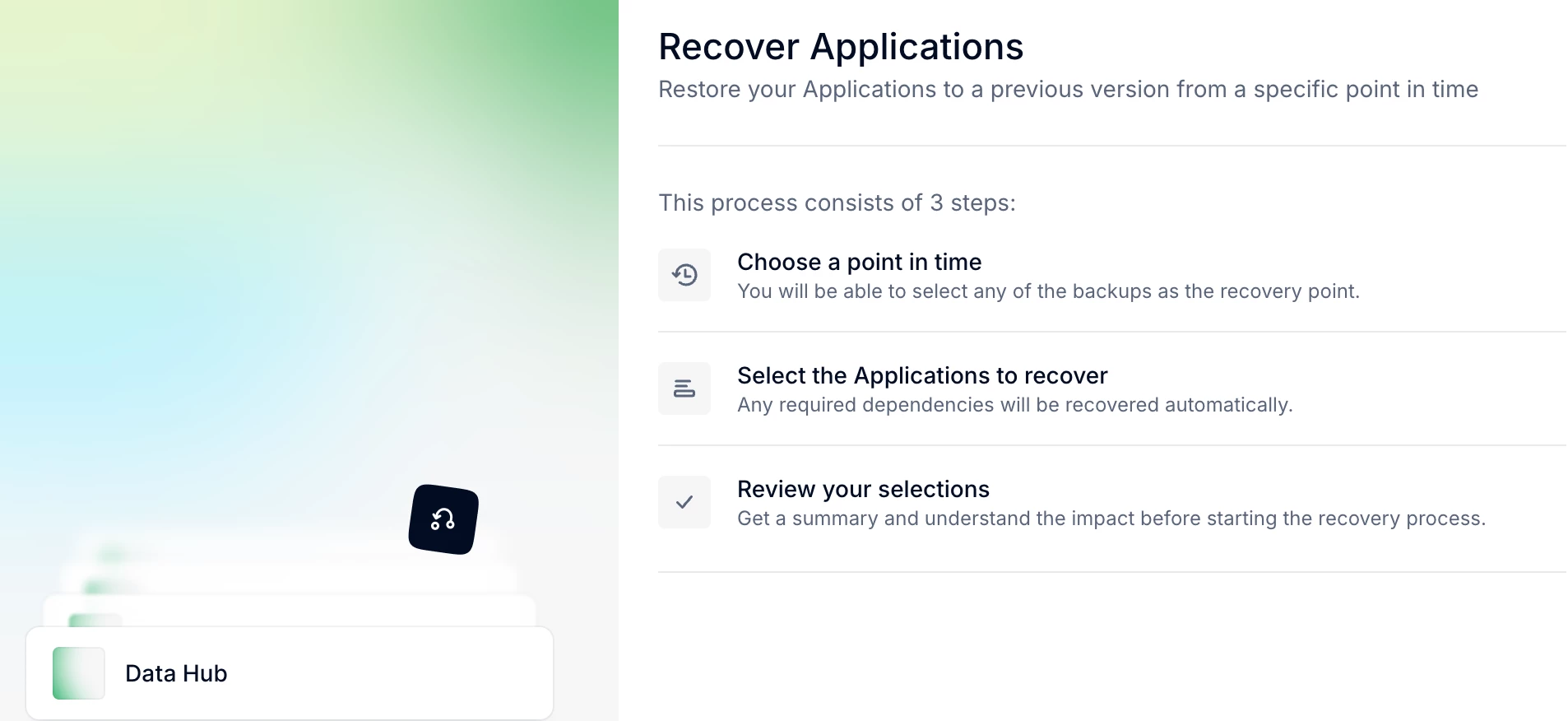
- Step 2: Create a Local Deployment Group
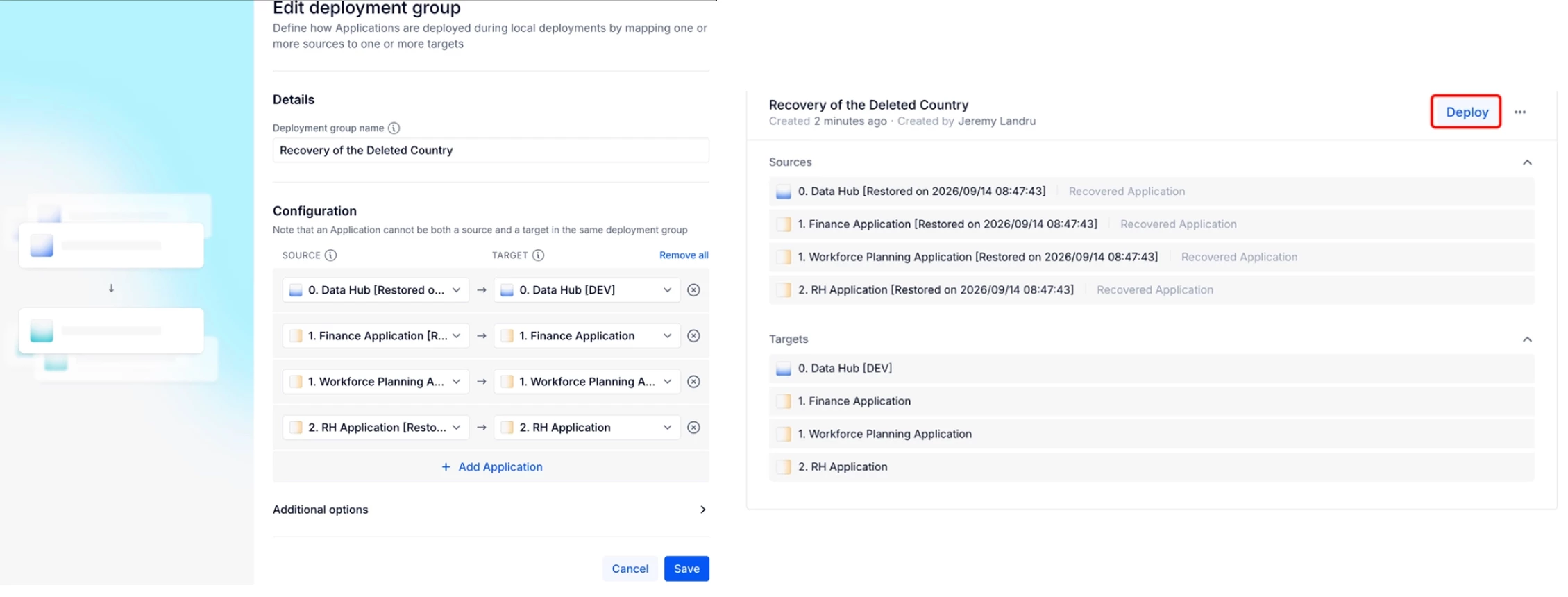
In your Workspace settings - go to Local Deployment - and create a new group. Source Application should be the Recovered App, and Target should be the live application. Bear in mind you can include more than one application in the scope, in case there are dependencies. Otherwise, the deployment will be blocked.
Once the Deployment Group is created, go back to the “Local Deployment” page in your workspace settings, and click on Deploy.
Pigment will then show you the “Diff”, which is the list of differences between both applications. In our case, we need the deleted country was part of the “Country Dimension”, so we still to select and deploy the change related to “List Data”. Warning: Pigment will not tell you which items will exactly be impacted by the deployment. It’s up to you to compare beforehand what the difference is. There’s also no possibility to deploy a single item of the list, all item differences will be deployed (whether it is modifying/creating/removing).
Review the changes, and then deploy from the source to the target
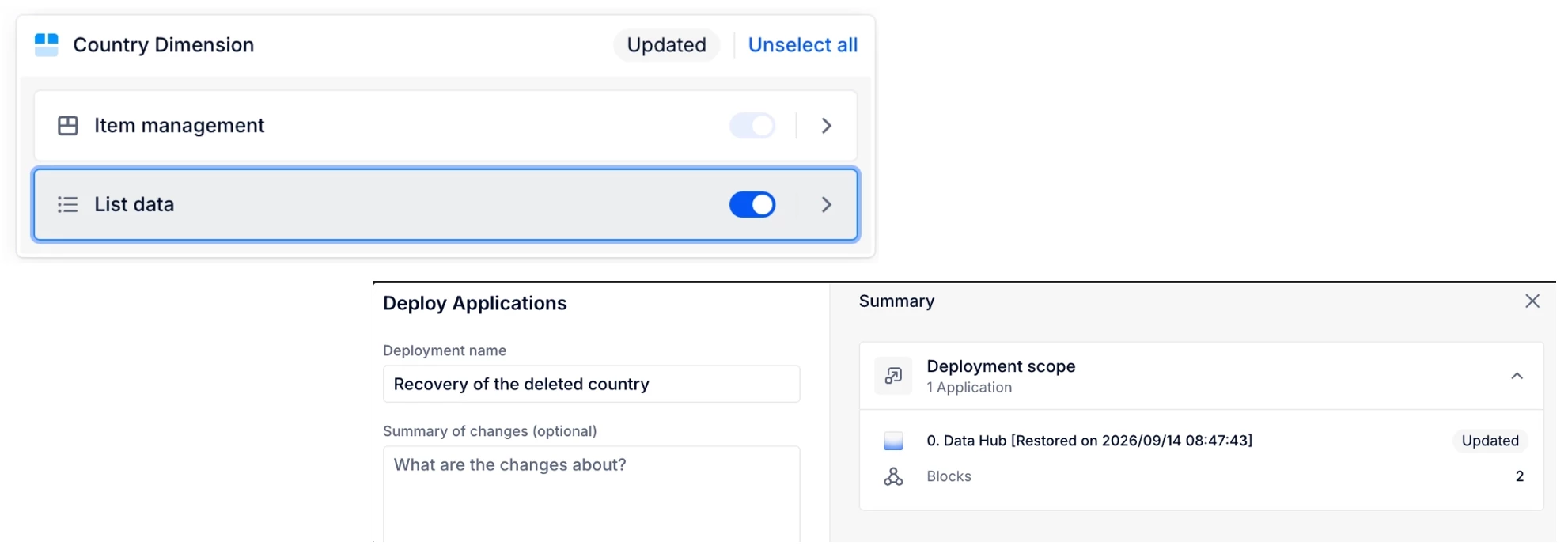
Once this is done, you can check in the Live application that things have gone according to the plan. The dimension Items have been recreated in your live application. But what about the data you had historized using P2P ? Those are still missing, how can you recover the data itself?
Luckily for you, by using a Local Deployment to recreate the Dimension Items, means the technical identifier of the Dimension are the same between the Recovered App and the Live App. Which means that you can now copy the data from recovered apps to the live app without any issues of mismatch.
- Step 3: Import from Recovered App to Live App
Go to the metric for which you’d like to recover data, click on Import Data, and select “Pigment Metric” as the source. Instead of selecting a live metric, click on “Use a metric from a snapshot or a recovered application”, and select the Recovered Application and the Recovered Metric where the data is currently sitting, and finally, set-up the import as you would set-up if it was a live metric. Click on import, and the data will be copied to the Live Metric.
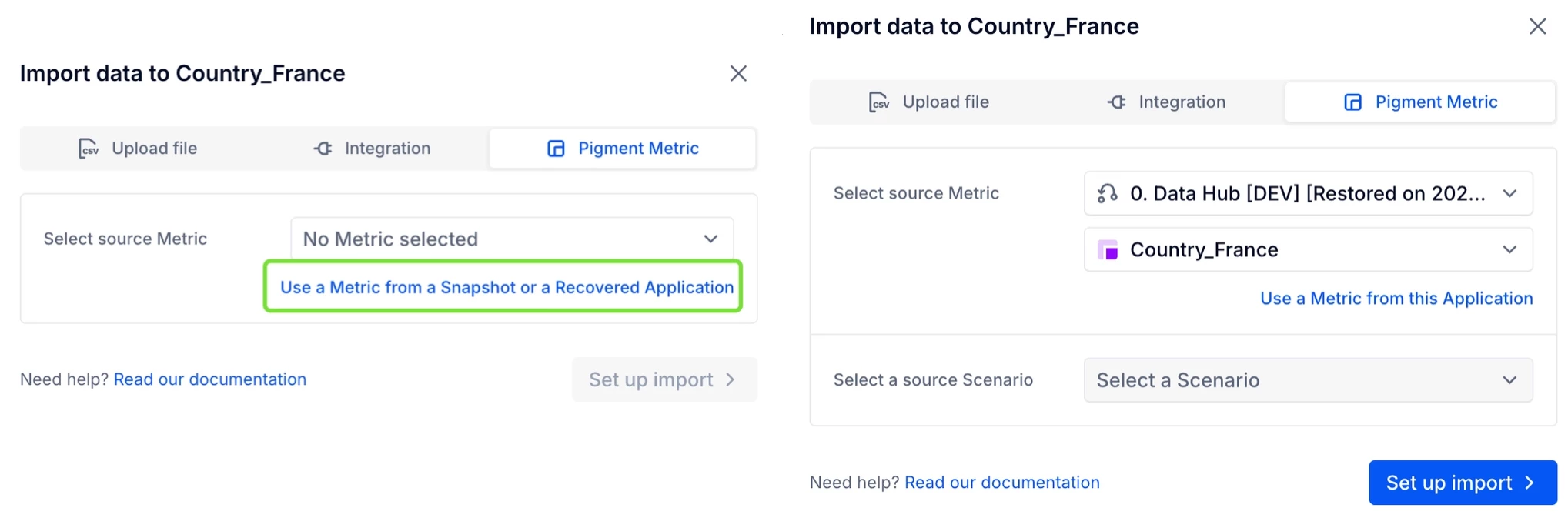
Well done! In this concrete exemple, you’ve seen that leveraging Recovered Application combined with Local Deployment, you were able to:
- Recover the Dimension Items you deleted,
- Recover the data that was loaded on those Dimension Items.
If you had used “Block Restore” functionality, this wouldn’t have been so easy, as the Restore Dimension would have different technical ID, and thus P2P would require a mapping step between the Live Dimension and the Restored Dimension.
For more documentation on the features:
- https://kb.pigment.com/docs/recover-an-application-from-backup
- https://kb.pigment.com/docs/understanding-local-deployment
- https://kb.pigment.com/docs/metric-import

As you’ve seen, there are multiple use cases for using the Local Deployment feature.
One key thing to keep in mind is that it does not replace the regular Deployments or Recovered Applications, but completes those features to make it even safer and more convenient for you to make changes.
You have additional use cases for this feature and would like to share them with the other members? Feel free to comment on this thread.