Is there a way to Create Automated task which deletes user inputs in bulk when trigger is met. I’d like to set it up in a way, than when Month becomes from Forecast to Actual, it would delete the new Actual month user inputs which were so far meant for Forecast, but Actual month value should come from formula.
I know how to set up task to notify, once this month changes and also how to set up one-time bulk deletion, when Month becomes Actual, but is there a possibility to combine these to so I could stop being middle-man?
Best regards Ott
Best answer by William Murray Brown
Hi Ott, I’m not aware of a way to automate the deletion in the way you’re looking for (but maybe someone else will reply with an idea).
But personally, I wouldn’t try to delete the inputs. I would manage the situation like this:
Let’s say you have a metic where users are entering revenue forecast numbers.
You also have a data load that gives you actual revenue numbers.
You also have a metric that identifies whether each month is an actual period or a forecast period
Now create a metric that has a formula along the lines of “if the period is acutalised, pull in the data from the actual metric, otherwise pull in the data from the forecast metric”.
Now it doesn’t matter if the obsolete forecast numbers remain in place, because your new metric will ignore them. You could use filtering to hide the obsolete inputs from users if you want to.
Hi Ott, I’m not aware of a way to automate the deletion in the way you’re looking for (but maybe someone else will reply with an idea).
But personally, I wouldn’t try to delete the inputs. I would manage the situation like this:
Let’s say you have a metic where users are entering revenue forecast numbers.
You also have a data load that gives you actual revenue numbers.
You also have a metric that identifies whether each month is an actual period or a forecast period
Now create a metric that has a formula along the lines of “if the period is acutalised, pull in the data from the actual metric, otherwise pull in the data from the forecast metric”.
Now it doesn’t matter if the obsolete forecast numbers remain in place, because your new metric will ignore them. You could use filtering to hide the obsolete inputs from users if you want to.
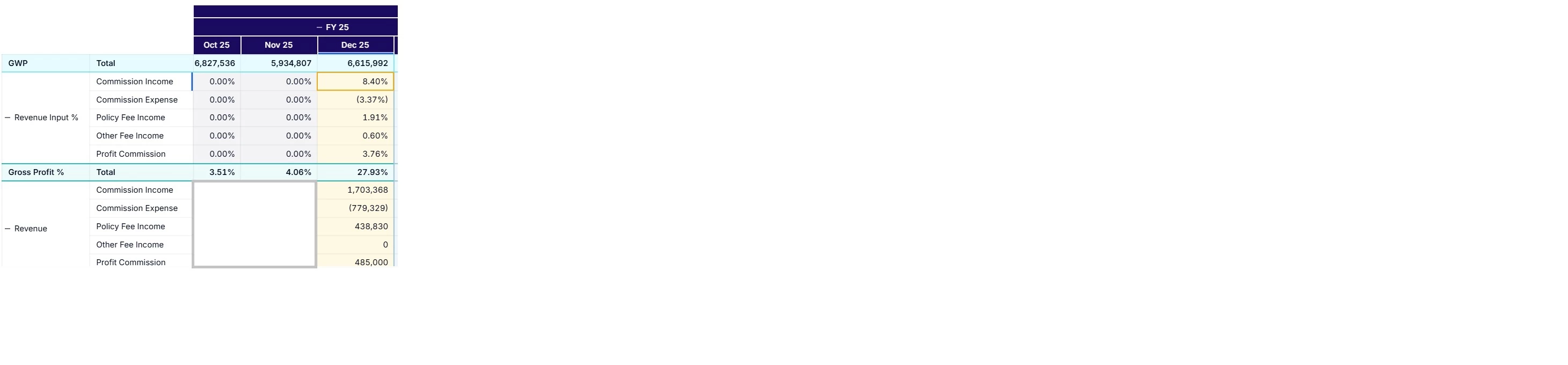
Hey @William Murray Brown , how would you automatically solve this case: On the screenshot Oct and Nov is Actual and Dec is Fcst. Metrics are on the rows. Month on the columns. We do not use Data Type to diff between actuals and forecast. Each underlying metrics has a formula that check if actual period, then bring in actual values, if forecast period, bring in forecast values.
User does ovewrite on Dec which is at the moment FCST period.
Next month when Dec becomes Actual period, overwrite still stays in Dec despite the actuals formula in the background.