


Solved

Count numbers of occurences over a period (month AND year)

  • January 22, 2026
  • 3 replies
  • 105 views

Sandy B
Apprentice Author
Forum|alt.badge.img

Hello, I want to create a table with some KPIs. One of them calculates the number of different suppliers over a period.


Transaction list: Invoice (properties: Nb of Invoice (text), Supplier (dim), Month (dim), Cost center (dim) and Value)
Dimensions: Supplier, Month, Cost center


I used this formula: 
Invoice.Supplier [BY COUNTUNIQUE: Invoice.supplier, Invoice.Month, Invoice.'Cost center'] 

It works well if I filter my view by month. But as soon as I select my entier year, it adds everything up (1,002) instead of counting the unique suppliers over the year (100). It's not the MAX function either, which would give me 98 as result.


I expect this result:
Jan 25    85
Feb 25    70
Mar 25    86
Apr 25    78
May 25    77
Jun 25    79
Jul 25    79
Aug 25    98
Sep 25    85
Oct 25    78
Nov 25    98
Dec 25    89
FY 25    100


Thanks for your help

Best answer by Min Li

You may want to convert month to year dimension instead of use the filter which would only do aggregator sum, avg. et al on these list of numbers.

Invoice.Supplier [BY COUNTUNIQUE: Invoice.supplier, Invoice.Month.year, Invoice.'Cost center'] 

3 replies

Min Li
Master Helper
Forum|alt.badge.img+13
  • Master Helper
  • Answer
  • January 22, 2026

You may want to convert month to year dimension instead of use the filter which would only do aggregator sum, avg. et al on these list of numbers.

Invoice.Supplier [BY COUNTUNIQUE: Invoice.supplier, Invoice.Month.year, Invoice.'Cost center'] 


Sandy B
Apprentice Author
Forum|alt.badge.img
  • Author
  • Apprentice Author
  • January 26, 2026

Hello ​Min Li

I was initially thinking of switching between monthly and yearly views on a single KPI. But I couldn't find a solution. I'll follow your advice and create two separate views: monthly ([BY COUNTUNIQUE: Invoice.Month]) and yearly ([BY COUNTUNIQUE: Invoice.Month.Year]).


Thank you


Nathan
Employee
Forum|alt.badge.img+12
  • Employee
  • January 27, 2026

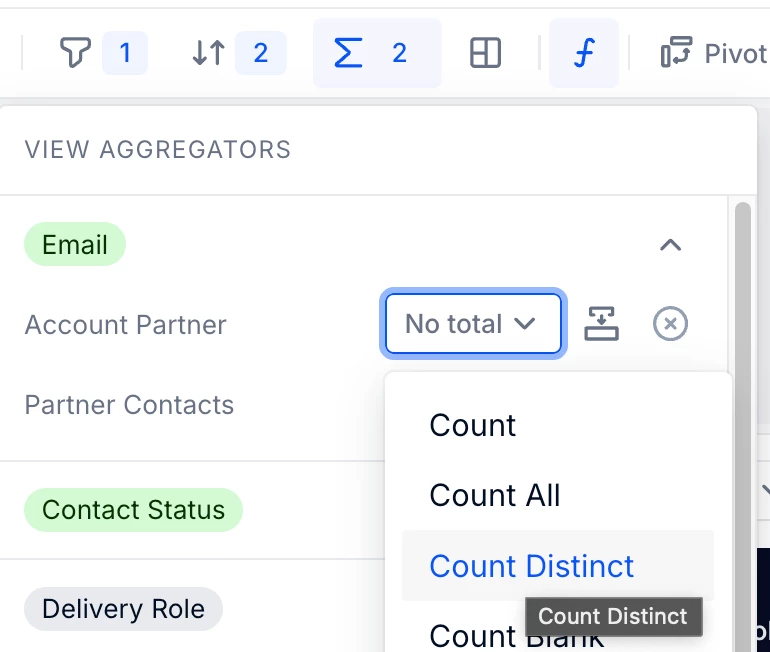
Hey,


In the view aggregators (the SUM icon) you can select how every dimension is being “aggregate”, with options similar to the formula modifiers