


Solved

Create a metric from a transaction with start and end date

  • Aug 27, 2025 8:56 AM UTC
  • 2 replies
  • 432 views

Forum|alt.badge.img+2

Hello,


I get a transaction from my ERP with not a specific date by line but a start and a end date

Employee Project Start End Hours
Emp001 Proj1 01/01/2024 05/01/2025 5
Emp001 Proj2 02/01/2024 04/01/2024 2


I need to create a metric with Employee/Project/Day dimensions in which for each dates between the start and end I put the number of hours


    01/01/2024 02/01/2024 03/01/2024 04/01/2024 05/01/2024
Emp001 Proj1 5 5 5 5 5
Emp001 Proj2   2 2 2  


Could you explain me the best way to do it ?
Best answer by Benoit

Hi,

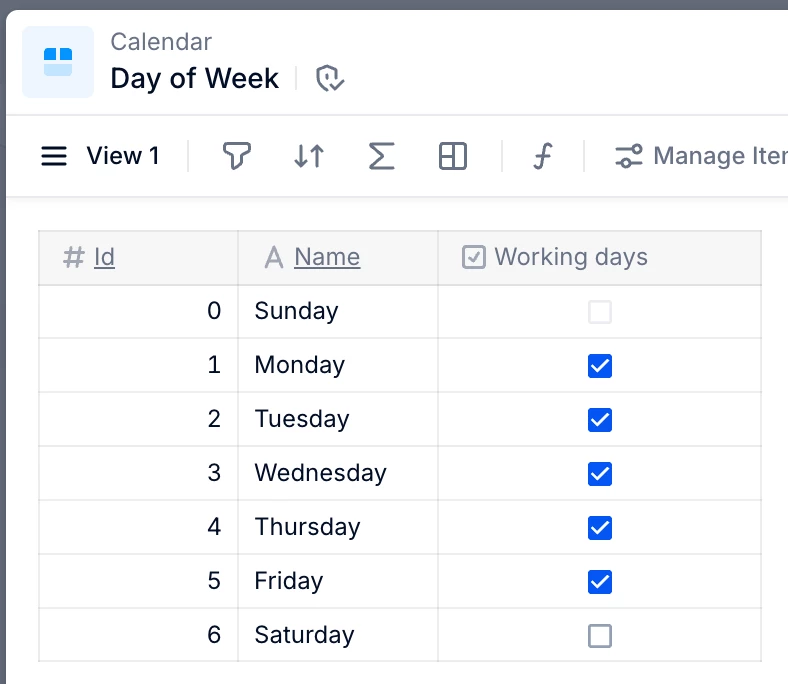
You can isolate the time frame using the start and end dates, and even consider only the working days.

if(

Day >= timedim(transaction.Start, Day)

and

Day <= timedim(transaction.End, Day)

and

Day.'Day of Week'.'Working days'

, transaction.Hours

)

[by sum: transaction.Employee, transaction.Project]


The TIMEDIM function transforms your dates into Day dimension to isolate the time frame.

The Working days boolean filters Days only on working days.

Then you return the Hours by suming them for each day of the time frame, dimensioned by Employee and Project.


Hope this helps.

Best,


View original

2 replies

Benoit
Community Manager
Forum|alt.badge.img+17
  • Community Manager
  • Answer
  • Aug 27, 2025 10:01 AM UTC

Hi,

You can isolate the time frame using the start and end dates, and even consider only the working days.

if(

Day >= timedim(transaction.Start, Day)

and

Day <= timedim(transaction.End, Day)

and

Day.'Day of Week'.'Working days'

, transaction.Hours

)

[by sum: transaction.Employee, transaction.Project]


The TIMEDIM function transforms your dates into Day dimension to isolate the time frame.

The Working days boolean filters Days only on working days.

Then you return the Hours by suming them for each day of the time frame, dimensioned by Employee and Project.


Hope this helps.

Best,


Forum|alt.badge.img+2
  • Author
  • Apprentice Author
  • Aug 27, 2025 11:39 AM UTC

Super thanks a lot, as I suspected it, it was easy :)