
Answer

Error: The formula reached 1 G cells during one of its execution steps, exceeding the maximum size allowed (1 G)

  • November 10, 2025
  • 3 replies
  • 56 views

I have imported a list of 1,914 employees into a dimension called “Ramp Users.”
In my Transaction List, I have two key properties:

  1. Description – this contains text fields that include employee names (e.g., “Airfare reimbursement – John Doe”).

  2. Ramp User – this is where I want to pull in the matching employee name from the Ramp Users dimension.

My goal is for the Ramp User property to automatically identify and display the employee name from the Ramp Users dimension if that name is found within the Description field of the Transaction List.

I tried using the following formula in the Ramp User property: IF(CONTAINS('Ramp User'.Name[BY:'PL GL Data'], 'PL GL Data'.Description), 'Ramp User'.'Ramp User Name')[REMOVE FIRSTNONBLANK:'Ramp User']

But I Received an error: “The formula reached 1 G cells during one of its execution steps, exceeding the maximum size allowed (1 G)”

Please help me resolve this.

Best answer by David Browne

Hi ​@Prarthana
I think we would be able to better help you with the specifics of your case via a Support Ticket. 
You can submit a ticket via our portal here. Please provide all the same details as above, along with links to the application and block in question, and our support team will do an investigation and get back to you with their findings!
Looking forward to hearing from you :) 

3 replies

Chahat
Master Helper
Forum|alt.badge.img+14
  • Master Helper
  • November 10, 2025

Hi ​@Prarthana ,

What is the size of the transaction list? i.e. how many total rows are there in the transaction list?

Can you try to use the below formula in the “Ramp User” property/column of your transaction list.
Please make sure the datatype of this property is of dimension: Ramp Users

IF(CONTAINS(‘Ramp Users’.'Name'[BY:-> 'PL GL Data'], 'PL GL Data'.'Description'), ‘Ramp Users’)[REMOVE FIRSTNONBLANK:’Ramp Users’]


“Ramp Users”​ : Dimension List having 1,914 employees
“PL GL Data” : Transaction List

2 Properties of transaction list:

  • Description (Data type: Text)
  • Ramp User (Data type: Ramp Users dimension)

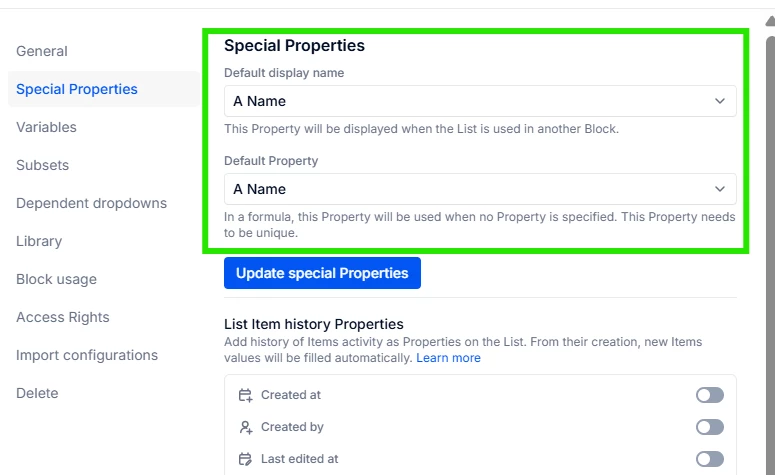
“Ramp Users” Dimension List must have the unique column namely Name .
Open settings of Ramp Users List → Special properties settings
 

‘Ramp Users’ dimension list

 ​​​​​​
Hope, it helps!


  • Author
  • Apprentice Author
  • November 11, 2025

Hi ​@Chahat 
Thankyou for your response. It is still not working. The transaction list has 5,73,480 rows.


David Browne
Employee
Forum|alt.badge.img+1
  • Employee
  • Answer
  • November 12, 2025

Hi ​@Prarthana
I think we would be able to better help you with the specifics of your case via a Support Ticket. 
You can submit a ticket via our portal here. Please provide all the same details as above, along with links to the application and block in question, and our support team will do an investigation and get back to you with their findings!
Looking forward to hearing from you :)