Solved

How to lookup text in list to pull list property? (Non-unique list)

  • January 30, 2026
  • 7 replies
  • 35 views

  • Apprentice Author

I have 2 lists, lets call them ‘list1’ and ‘list2’. ‘list2’ has two properties with all values populated: ‘name’ and ‘product’.
 

‘name’ is a text property with duplicative values and ‘product’ is a dimension ‘product L0’.


‘list1’ has the same properties, with only ‘name’ populated. What formula can I in the ‘product’ property from ‘list1’ to call ‘product’ from ‘list2’ by looking up ‘list1.name’ against ‘list2.name’?

Best answer by oliverlee

@gtt your input is data type ‘product L0’, dimensioned by ‘list2’. Your output is data type ‘product L0’, dimensioned by ‘list1’. To get from list2 to list1, you have a common text property ‘name’.

Since it’s a text property, a comparison via IF is probably the most straightforward solution (and would work for both, dimension and transaction lists - but I wouldn’t do it in larger transaction lists I think).

IF(list1.name = list2.name, list2.product)[REMOVE LASTNONBLANK: list2]

If we talk about dimension lists (which we are probably not, given that you said non-unique list), you could also create additional properties, e.g. a ‘list2’ property in your list1, that would have a formula of

MATCH(list1.name, list2.name)

Then your formula for ‘product’ in list 1 could be

list1.list2.product

You could also do this in one step probably

MATCH(list1.name, list2.name).product

7 replies

oliverlee
Master Helper
Forum|alt.badge.img+12
  • Master Helper
  • Answer
  • February 3, 2026

@gtt your input is data type ‘product L0’, dimensioned by ‘list2’. Your output is data type ‘product L0’, dimensioned by ‘list1’. To get from list2 to list1, you have a common text property ‘name’.

Since it’s a text property, a comparison via IF is probably the most straightforward solution (and would work for both, dimension and transaction lists - but I wouldn’t do it in larger transaction lists I think).

IF(list1.name = list2.name, list2.product)[REMOVE LASTNONBLANK: list2]

If we talk about dimension lists (which we are probably not, given that you said non-unique list), you could also create additional properties, e.g. a ‘list2’ property in your list1, that would have a formula of

MATCH(list1.name, list2.name)

Then your formula for ‘product’ in list 1 could be

list1.list2.product

You could also do this in one step probably

MATCH(list1.name, list2.name).product


  • Author
  • Apprentice Author
  • February 3, 2026

@gtt your input is data type ‘product L0’, dimensioned by ‘list2’. Your output is data type ‘product L0’, dimensioned by ‘list1’. To get from list2 to list1, you have a common text property ‘name’.

Since it’s a text property, a comparison via IF is probably the most straightforward solution (and would work for both, dimension and transaction lists - but I wouldn’t do it in larger transaction lists I think).

IF(list1.name = list2.name, list2.product)[REMOVE LASTNONBLANK: list2]

If we talk about dimension lists (which we are probably not, given that you said non-unique list), you could also create additional properties, e.g. a ‘list2’ property in your list1, that would have a formula of

MATCH(list1.name, list2.name)

Then your formula for ‘product’ in list 1 could be

list1.list2.product

You could also do this in one step probably

MATCH(list1.name, list2.name).product

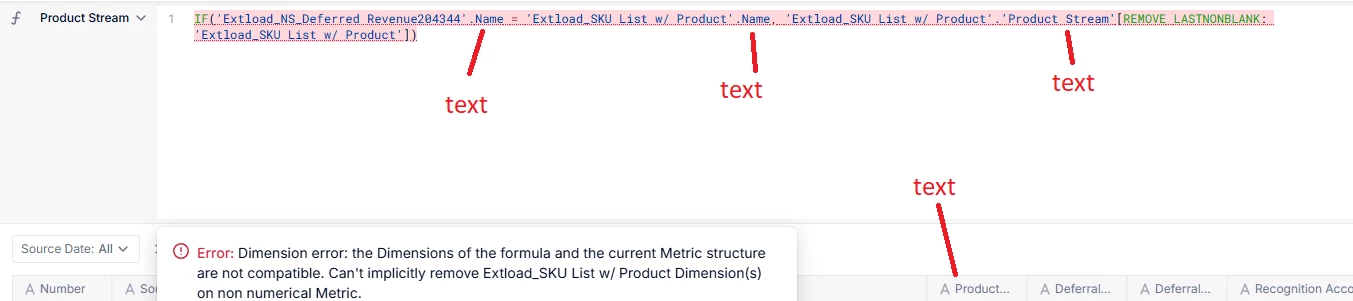
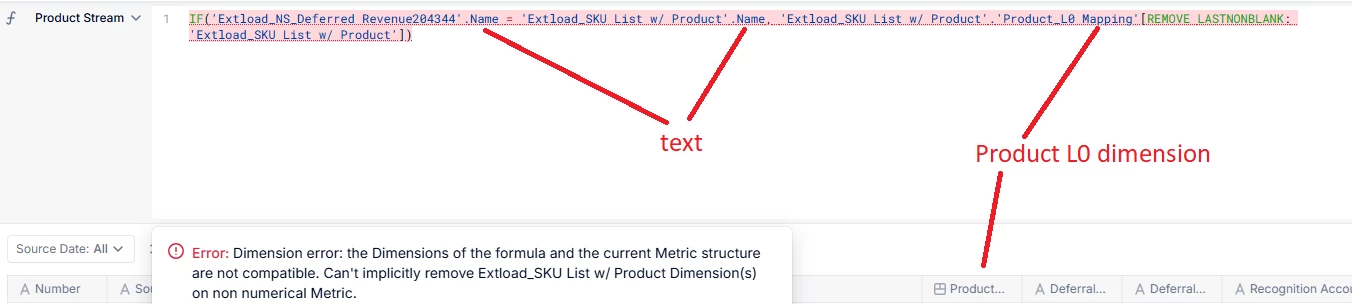
Thanks for the help. With the first formula, I am getting this error:
Error: Dimension error: the Dimensions of the formula and the current Metric structure are not compatible. Can't implicitly remove list2 Dimension(s) on non numerical Metric.

The two comparative properties are the same (text) and I’ve tried with both dimensioned (Product L0) and text outputs. The target property corresponded to the pull each attempt.


oliverlee
Master Helper
Forum|alt.badge.img+12
  • Master Helper
  • February 3, 2026

Hmm the [REMOVE LASTNONBLANK: list2] in the end should avoid the dimension error you mentioned. Can you double check your formula against the one provided? You are applying this formula in list 1, ‘product’ property, right?


  • Author
  • Apprentice Author
  • February 3, 2026

Hmm the [REMOVE LASTNONBLANK: list2] in the end should avoid the dimension error you mentioned. Can you double check your formula against the one provided? You are applying this formula in list 1, ‘product’ property, right?

Yes, I am applying it in list1. I have tried pulling both text fields of the name and the Product L0 dimension.


oliverlee
Master Helper
Forum|alt.badge.img+12
  • Master Helper
  • February 3, 2026

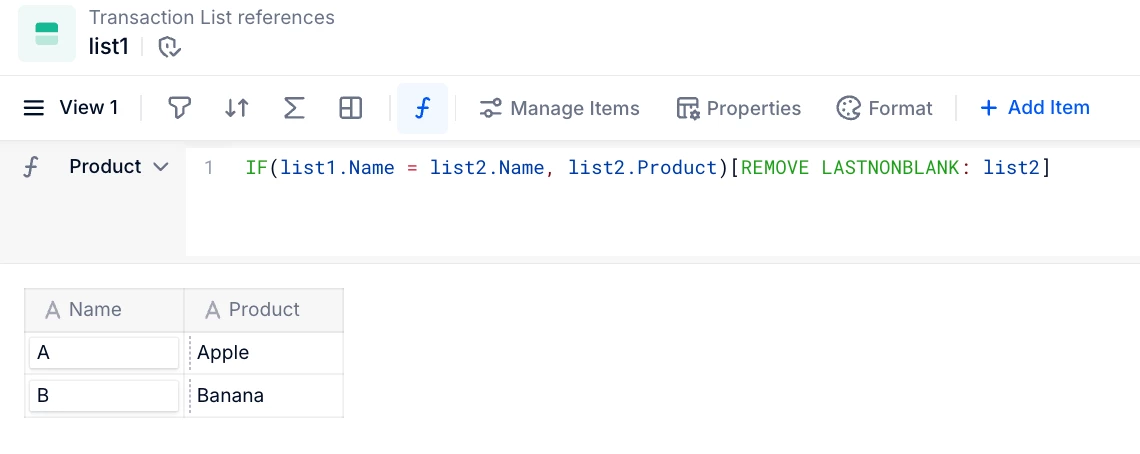
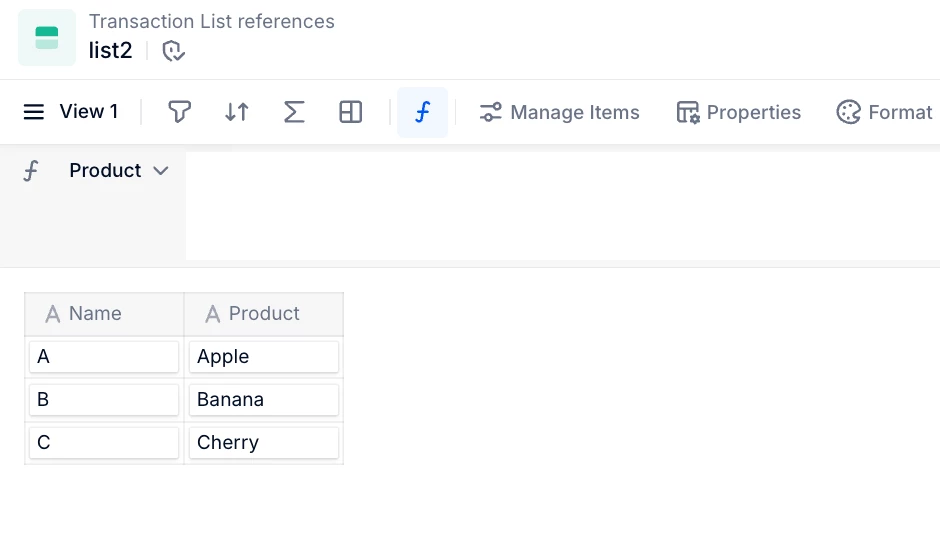
Not sure what’s wrong there, it might be in the wrong list or something. Here is what works for me:


oliverlee
Master Helper
Forum|alt.badge.img+12
  • Master Helper
  • February 3, 2026

Oh, you’re doing the REMOVE before the last bracket - it should come after


  • Author
  • Apprentice Author
  • February 3, 2026

Oh, you’re doing the REMOVE before the last bracket - it should come after

Thanks Oliver, it is working now!