


Hello,
Is it possible to change the format of a text Widget ?
→ Background color
→ Text Size
→ Text Color
→ Center the text in the box
If not, when do you plan to develop this feature ?
Thanks
Adèle

Hello,
Is it possible to change the format of a text Widget ?
→ Background color
→ Text Size
→ Text Color
→ Center the text in the box
If not, when do you plan to develop this feature ?
Thanks
Adèle
Best answer by Benoit
Hi Adele,
Today, only the text size is possible for now. To do so, you can double click on your text and use the H1 H2 H3 options.
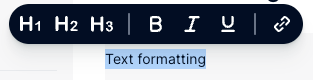
If you wish to have more text formatting options, the best way is to create an idea on the Community so other users can upvote. It will then be taken into account on our roadmap according to its priority.
Many thanks.
Benoit
No account yet? Create an account
Single Sign-On Need help?
Log in with your Pigment accountEnter your E-mail address. We'll send you an e-mail with instructions to reset your password.