

Question

YTD Item and Forecast Months

  • March 4, 2026
  • 7 replies
  • 40 views

Forum|alt.badge.img+3
  • Apprentice Author

Hello, 
 

I'm still pretty new to Pigment and I'm creating some BvA reporting. I'm trying to figure out how to do the below:

  1. Show YTD calcs that aligns with the months we have actuals for. In this case, we have actuals for Jan and Feb, so I'd like the YTD calcs to be for Actuals, Budget and the Variance. Actuals and Budget are versions and Variance is a calculated item.
  2.  Have a view that shows the latest actuals month and YTD calcs in the same table. Ideally it would be Actuals, Budget and Variance for Feb and Actuals, Budget and Variance for YTD. We probably need a view that includes all the trailing months broken out but I'd like to start with the above if possible.

Thank you!

7 replies

Min Li
Master Helper
Forum|alt.badge.img+14
  • Master Helper
  • March 6, 2026

You can create a separate metric for YTD using YEARTODATE() and put it together with the original to do variance analysis. So, if you select a specific month, you can see both actual amount and YTD amount in that month.


Forum|alt.badge.img+3
  • Author
  • Apprentice Author
  • March 6, 2026

Hi Min Li! 

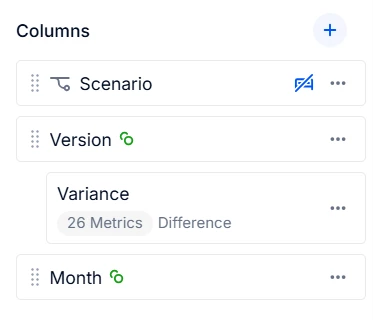
Thanks a bunch for the suggestion. What is the benefit of creating a separate metric vs using a calculated item? The P&L has 26 metrics on it currently so I'm not sure how that would look.


Forum|alt.badge.img
  • Apprentice Helper
  • March 7, 2026

Hi,


I have been working on the BvA reports in the last few weeks and have been in the same exact situation. The team wanted to have one single view of Month, QTD and YTD, variances at each level and also cumulated values as we go in the future months.


Here is how I achieved it:

  1. The first and very important step is to enable pigment to control flow of data based on your actual month. For that you need to create a metric with month dimension checked only until the actual month.
  2. Next goal was to create the month view - Budget, Actuals and Delta based on Step 1
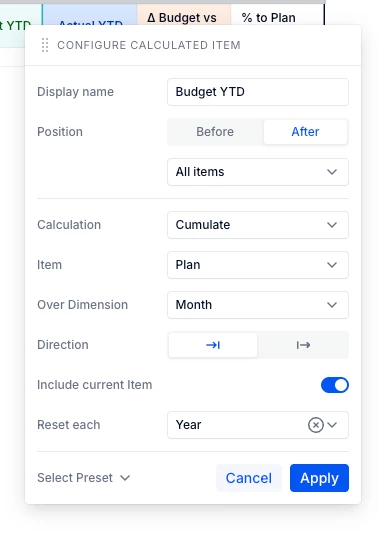
  3. Once I achieved it, I used the Calculated Item feature in pigment to cumulate these values at QTD and YTD level

    Create same calculated fields for YTD Actuals and YTD Delta, make sure to cumulate over month to date and reset each year.


GD


Forum|alt.badge.img+3
  • Author
  • Apprentice Author
  • March 7, 2026

Thank you, Ganesh! This breaks it down a bit more for me. I'll try to create the metric tonight. Does your reporting automatically update to the latest actuals month based on what you select in the Hub or are you manually selecting it each month?


Forum|alt.badge.img
  • Apprentice Helper
  • March 7, 2026

@MZW 

We have a staging built for actuals and we only pull only upto the Reporting month. 

Our reporting month is Current Month - 1. So I have created one other layer of data control with my metric in Step 1. As for the board, I have a dynamic variable in place for Reporting month to only show one month.


Happy to help!


Forum|alt.badge.img+3
  • Author
  • Apprentice Author
  • March 7, 2026

@GaneshD, thanks a bunch. This gives me some ideas on the direction we can go. 


Forum|alt.badge.img
  • Apprentice Helper
  • March 7, 2026

@MZW 


On the same path as you, do let me know if you have any other questions!


Also, do mark this as an answer if it works for you, will definitely help others.