



It’s natural to feel a bit nervous when you’re about to change a live model. You want to keep things stable for your users, but you also need to maintain or enhance your models.
Even when Test & Deploy (T&D) isn’t available, you can make thoughtful, safe changes in Pigment by following a few simple habits. Think of this as your guide to changing with confidence, not caution alone.

Before you change anything, take a moment to ask yourself “What could this impact?”
Most changes fall within one (or more) of these categories:
- Confusion for users (Minor risk):
renaming, moving or restructuring objects in a way that makes it harder for users to find what they need.
- Breaking an object (Medium risk):
deleting or changing a block (Dimension, Metric, Table) or a view so that any dependent object stops working and needs to be restored or recreated.
- Disrupting a process or model (Major risk):
changes that impact recurring workflows or generate errors that stop or slow down the application.
- Inaccurate results or data loss (Critical risk):
structural changes that alter calculations or clear data unexpectedly.
- Security or access issues (Critical risk):
adjusting access rights or permission in a way that exposes sensitive data or blocks people from doing their work.

A quick way to assess the risk is to ask four questions:
- Type: Use the above section to determine the type of risk and its severity.
- Scope: Is this change local (one Metric or Block) or broad (a Dimension, key driver, or integration)?
- Visibility: Who will notice this change? Will it be just modelers or a wide set of end users and stakeholders?
- Timing: Are you in the middle of a critical cycle (budget, forecasting, close) or is this a quieter period?
If the risk is major or critical and the impact is broad, highly visible, or happening in a sensitive window, treat it as a higher risk change and apply more safeguards using the recommendations listed in the next section.

These practices help you experiment safely without freezing progress.
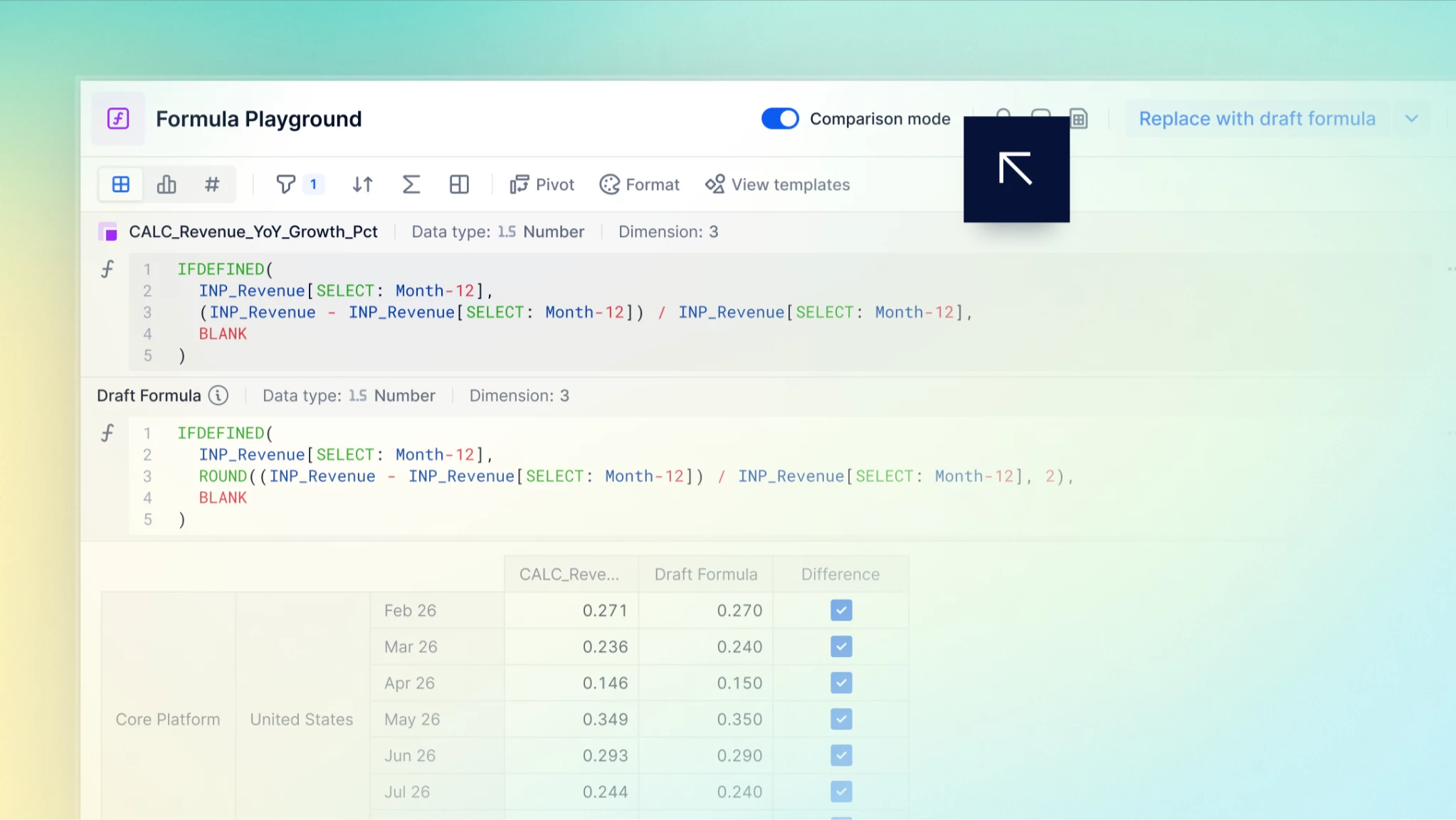
1. Use the Formula Playground as your first stop
Before updating a live formula:
- Test it in the Formula Playground to confirm results and behavior.
- Make sure the structure (Dimensions, Time, Versions, etc.) matches what you expect.
- Iterate there until you’re confident and then move it into your live Metric or Block
This keeps mistakes out of production while you’re still exploring.
2. Duplicate Metrics or Blocks before making a change
When you’re planning on a structural change:
- Duplicate the metric or Block you want to update
- Apply your new formula or structure to the duplicate
- Validate the results and behaviour
- Once you are satisfied, copy the new formula or structure into the original object.
- Don’t forget to delete your duplicated block.
This preserves existing dependencies and gives you a clean test space.
Tip: If the Metric contains user inputs, make sure the duplicate includes those inputs as well, so you can safely test without losing data.
3. Test changes in a duplicated Application
For changes that affect key blocks, processes or data flows (integrations, imports, key workflow changes):
- Duplicate the Application that runs the process.
- Apply your changes to the duplicated Application first.
- Run the process and observe the impact: does the data land where expected? Are boards and KPIs still consistent? Are there any errors?
- If you are on a Professional plan, we recommend you use a recovered application to duplicate the model and work on the recovered applications safely.
Only when the duplicated Application behaves as intended should you mirror those changes in production.
4. Compare old and new results
When you introduce a new logic or structure, validate the outcome:
- Create a comparison formula such as:
IF(new_metric <> old_metric, TRUE)
orIF(new_metric <> old_metric, new_metric)
orIF(new_metric <> old_metric, new_metric - old_metric)
orCOUNTOF(new_metric[EXCLUDE: ISDEFINED(old_metric)]) and COUNTOF(old_metric[EXCLUDE: ISDEFINED(new_metric)])
to actually count the intersections where either new_metric or old_metric has value but not the other - Review any unexpected values — these highlight where results differ from before.
- Confirm whether those differences are intentional improvements or unintended side effects.
This helps you catch subtle issues early.
5. Collaborate and communicate
You are not alone:
- For any change that involves or affects an object created by another builder, consult with the creator to understand the possible impact.
- Ask another builder or team member to review your planned changes and test results. A fresh pair of eyes often spots edge cases or user impact you might miss.
- For higher-risk changes, treat a peer review as part of your standard workflow, not a nice-to-have.
- Encourage users to use Pigment's native collaboration features for comments, as this helps pinpoint the relevant board, dimension context, and the specific data cell.
- Communicate about your changes to your users, raising their vigilance. This can avoid confusion later on.
6. Document what you change
Even light documentation goes a long way:
- Take screenshots of key formulas, settings, or board layouts before and after.
- Note what you changed, why you changed it, and when.
- Use
/*comments*/in the formula bar to explain the changes made to a formula, adding a date quickly informs users when the change occurred. - Store this in a dedicated Pigment board or in your existing documentation space (Confluence, Notion, internal wiki, etc.).
Clear traceability makes it easier to debug, explain decisions, and onboard new team members later.
7. Use Snapshots as your safety net
Snapshots are a powerful way to capture the state of your Applications:
- Take a Snapshot before significant structural changes.
- Optionally take another Snapshot after the changes, once you’ve validated them.
- This gives you a reference point, and peace of mind, if something behaves unexpectedly later.
- Remember to delete any unneeded snapshots and be mindful of your snapshot limit.
Whenever possible, schedule Snapshots outside of business hours so you avoid locking Applications during peak usage.
8. Think twice before deleting, deprecate first
For major clean-ups:
- Instead of deleting an Application, Board, or object immediately:
- Remove user access.
- Rename it with a clear prefix such as Obsolete_ or To_be_deleted_.
- Observe usage and feedback over the next 30–60 days.
- If no issues arise, you can safely delete it.
- To deprecate a metric -
- edit the formula by adding BLANK// at the beginning. This removes the calculation and results in a blank metric.
- Leaving the original formula in place (as a comment) preserves visibility and allows for quick recovery if needed.
- Update the metric name to include a standard prefix indicating it is commented out.
- This makes it clear to all modelers that the metric is deprecated and should not be referenced in other formulas.
- Never delete metrics from a table.
This approach reduces accidental loss of something that was still quietly in use.
9. Use Access Rights and Impersonation to stay secure
When you’re adjusting security or access:
- As a Security Admin, use Impersonation to see exactly what different users and roles can access.
- Use Role permissions and Access Rights rules to implement changes gradually and restrict access.
- Validate that users can still perform their tasks, and that sensitive data remains protected, before finalizing changes.
This helps you avoid both accidental overexposure and unnecessary access blocks.
10. Plan major changes outside business hours
For important, structural updates:
- Communicate upcoming changes to affected users in advance.
- Schedule the work outside business hours where possible.
- Combine this with scheduled Snapshots so you have a clear before/after state.
This keeps day-to-day work flowing smoothly while still giving you space to improve the model.
Bringing it all together
By building a few thoughtful habits like testing in the Formula Playground, duplicating before altering, using Snapshots, validating with comparisons, and leaning on peers, you create reliable guardrails for change. These practices help you keep your models stable, trusted, and continuously evolving as your business grows.
The goal isn’t to avoid change; it’s to make change feel thoughtful, traceable, and controlled.
For deeper guidance, you can explore:
- MP08 – How to Make Changes in Production
- ME04 – Take a Snapshot of your Applications at the end of each planning cycle
- Use Impersonation to Review User Access and Experience

You’ve made a change that needs to be reversed.
If you can’t revert it yourself, contact your Security Admins or Pigment Support as soon as possible for assistance.
What can be recovered?
| Object | How to recover it? |
| Self-served from the Block history |
| Self-served from the History tab > Block restore |
| Self-served form the Recovered Applications or Contact Pigment Support |
| Contact Pigment Support |
*from a contractual limited backup period
What can’t be recovered once deleted?
- Boards and board widgets
- Board comments
- Scenarios
- Import configuration
- API keys
- Formatting settings
- Groups
Now you’re all set to make confident changes in your environment!