





Starting September 28th, Frames opens to every customer with the Modeler Agent. Describe what you want to build and Frames builds it. No code required. Below: this month's other updates, from AI credit tracking to faster data flows, plus where to catch us on the road this fall.
Experience Pigment like never before with Frames
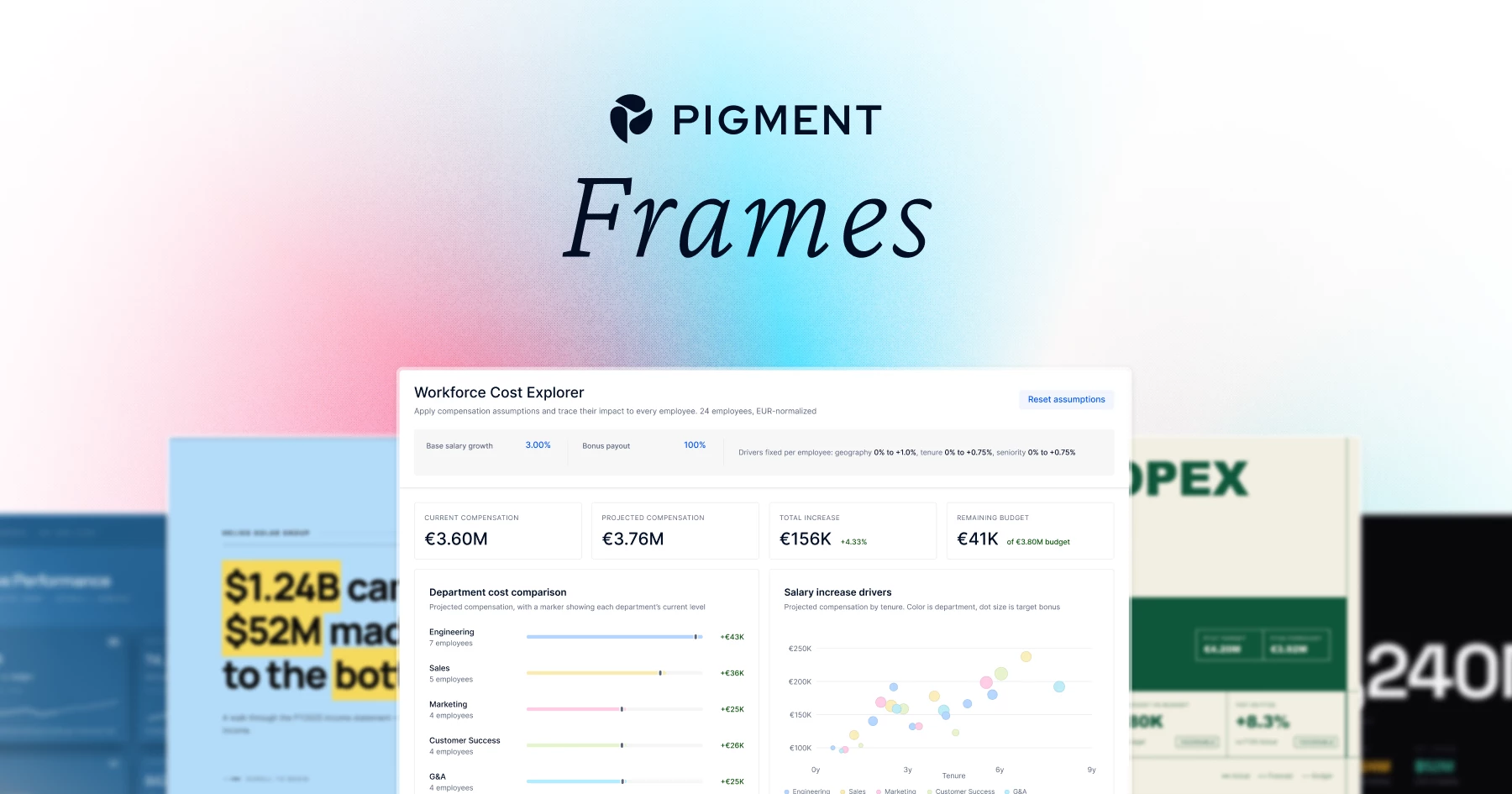
Frames are coming to everyone. Starting September 28th, Frames will be available in Open Beta to all customers who already have the Modeler Agent. If you can describe what you want to build, you'll be able to build it - no code required.
Think dense, beautiful visualizations built from a plain-language description: Sankey diagrams and tree maps that make complex flows click at a glance, interactive sliders and drag-and-drop controls that turn a static report into a live planning tool, executive-ready presentations that look like they took a design team a week - generated on the spot, running right on top of your Pigment data.
Want to see it before you build it yourself? Stephen Rituper (Head of Customer Experience) and Anna Schutt (Solutions Consultant) spoke to 200+ of our customers live on September 22nd to show Frames in action. Catch the recording here.
Want more? Read up on Getting Started with Frames and check out the Frames Inspiration Gallery, where anyone can post what they've built. It's a great place to get ideas and see what other people are creating.
Or explore the public Hall of Frames and watch "Frame It," our new video series featuring two of our customers, Uber and Glean, putting Frames to work. One more thing worth knowing before September 28th: Frames will launch as a beta feature. If you're not sure what that means for how you use it, we've laid it all out here: What does "beta" mean at Pigment?
We can't wait to see what Frames you all create - it will be inspiring.
Join the Pigment Community at an upcoming event!

Fresh from yesterday's London User Group, we're looking forward to bringing local Pigment users together in Paris, Berlin, and New York. Join us to meet fellow planning professionals, exchange practical advice, and get a firsthand look at our product roadmap and newest features.
North America
Europe
Looking for something broader? Pigment Catalyst is a half-day event for planning professionals. See our suite of Agents in action, hear directly from Pigment customers, and meet peers tackling similar planning challenges.
Catalyst is visiting the cities above, as well as Dallas on October 7.
You can register for multiple Catalyst events through the same page. Simply select the events you'd like to attend in the form.
Pigment AI
See what's driving AI credit consumption
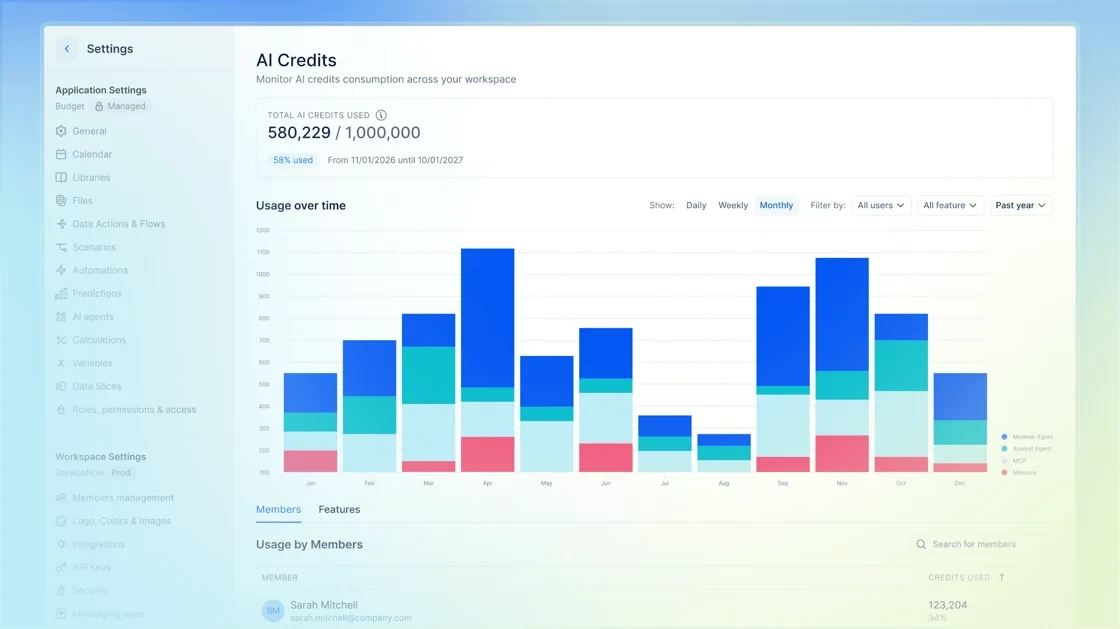
Admins can now use the AI Credits page to monitor credit consumption across their Workspace in real time. View your quota and usage for the current period, then explore daily, weekly, or monthly trend charts. Break down consumption by Member or AI feature to see what's driving usage.
Data and Visualization
Fine-tune your chart formatting
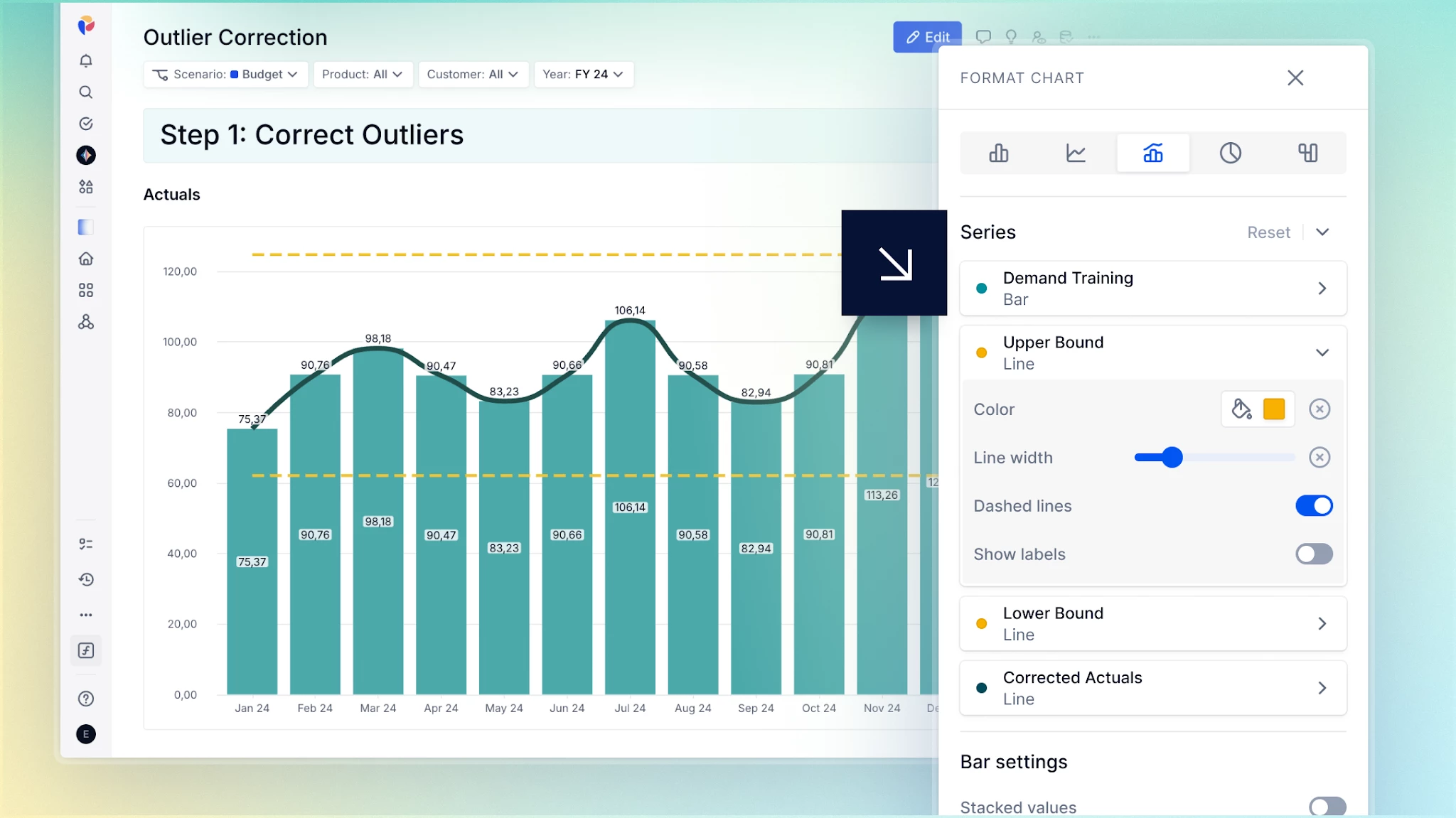
Now you have more control over how individual data series appear in your charts. Customize the style and width of each line in Line and Combined charts, and choose which series display data labels across Line, Combined, Bar and Pie charts. This makes it easier to distinguish between series and focus on what matters.
Bring consistency to every View
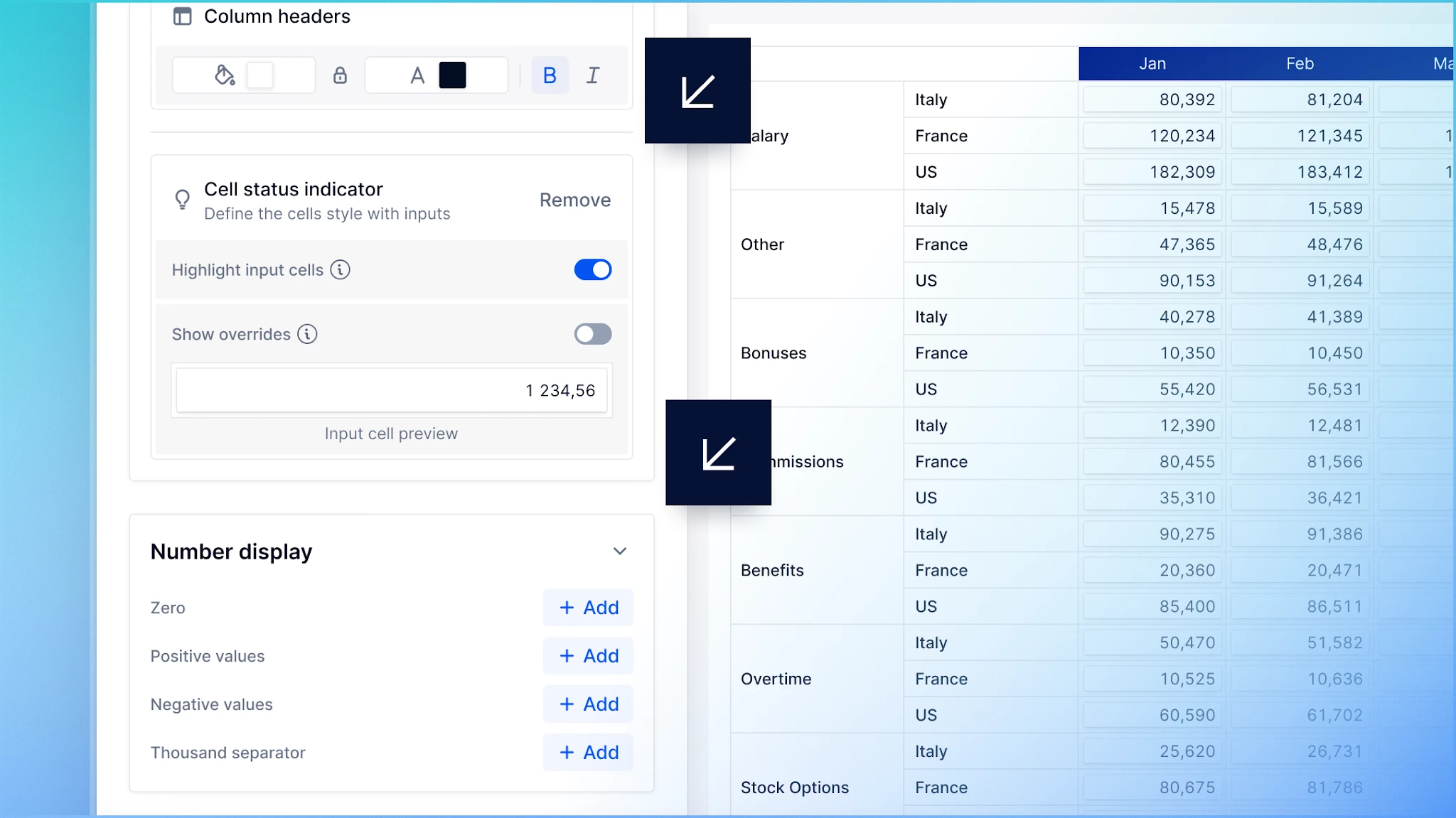
View Templates now offer more ways to create consistent, reusable formatting. Highlight input cells with status indicators, and control layout and number display, including thousands separators and positive or negative value display. Modelers can set a Simple View Template as the default for new Views, while users can still choose a different template per View.
Synchronize grid scrolling on Boards
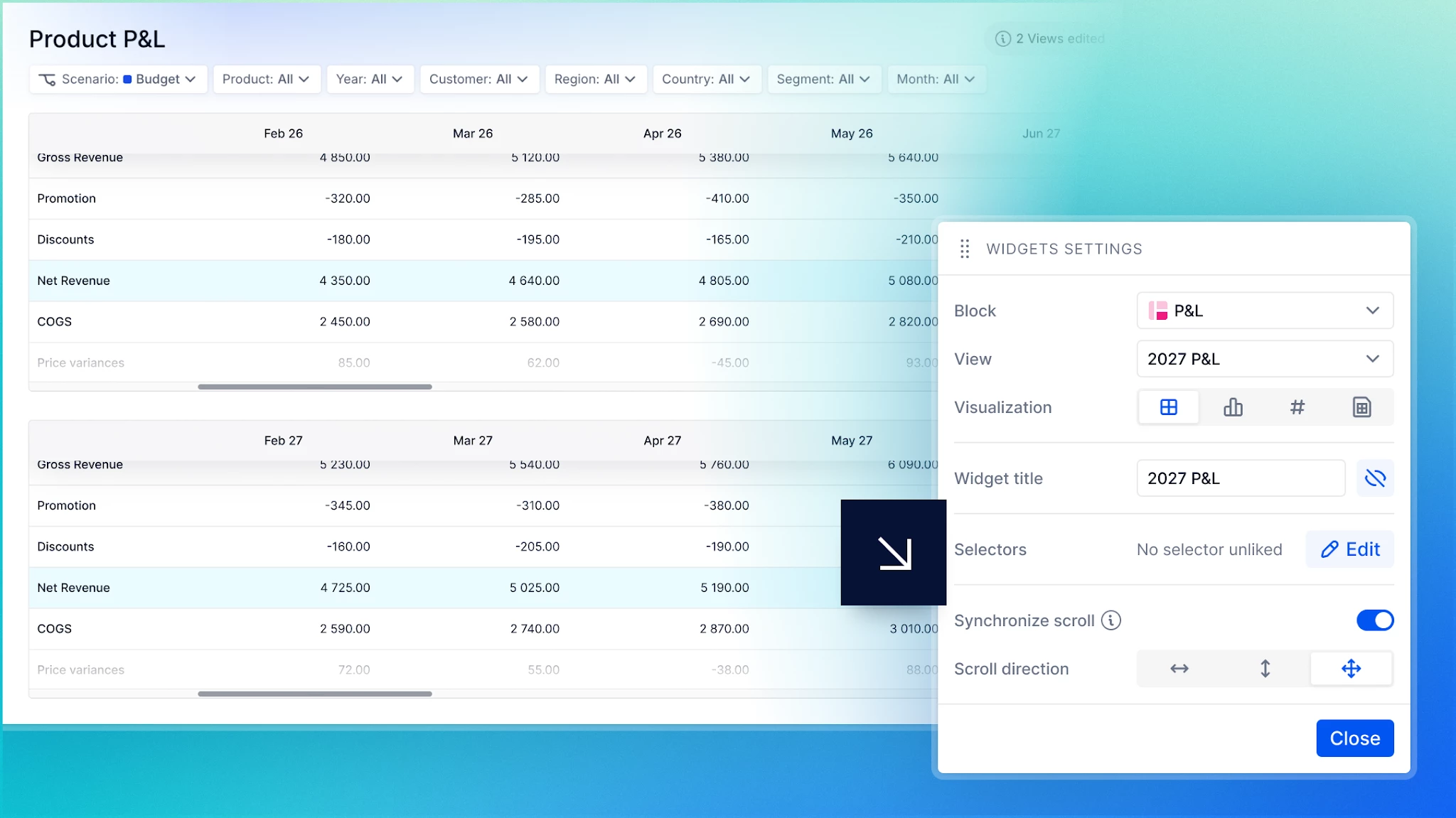
Scroll one widget and move them all with Synchronize scroll, making side-by-side comparisons faster and easier as you navigate a Board. Choose whether to synchronize horizontally, vertically, or in both directions from each grid's widget settings. Corresponding rows and columns stay aligned across any number of grids, and the setup is saved with the Board.
Data Flows and Integrations
Import List data from Recovered Applications
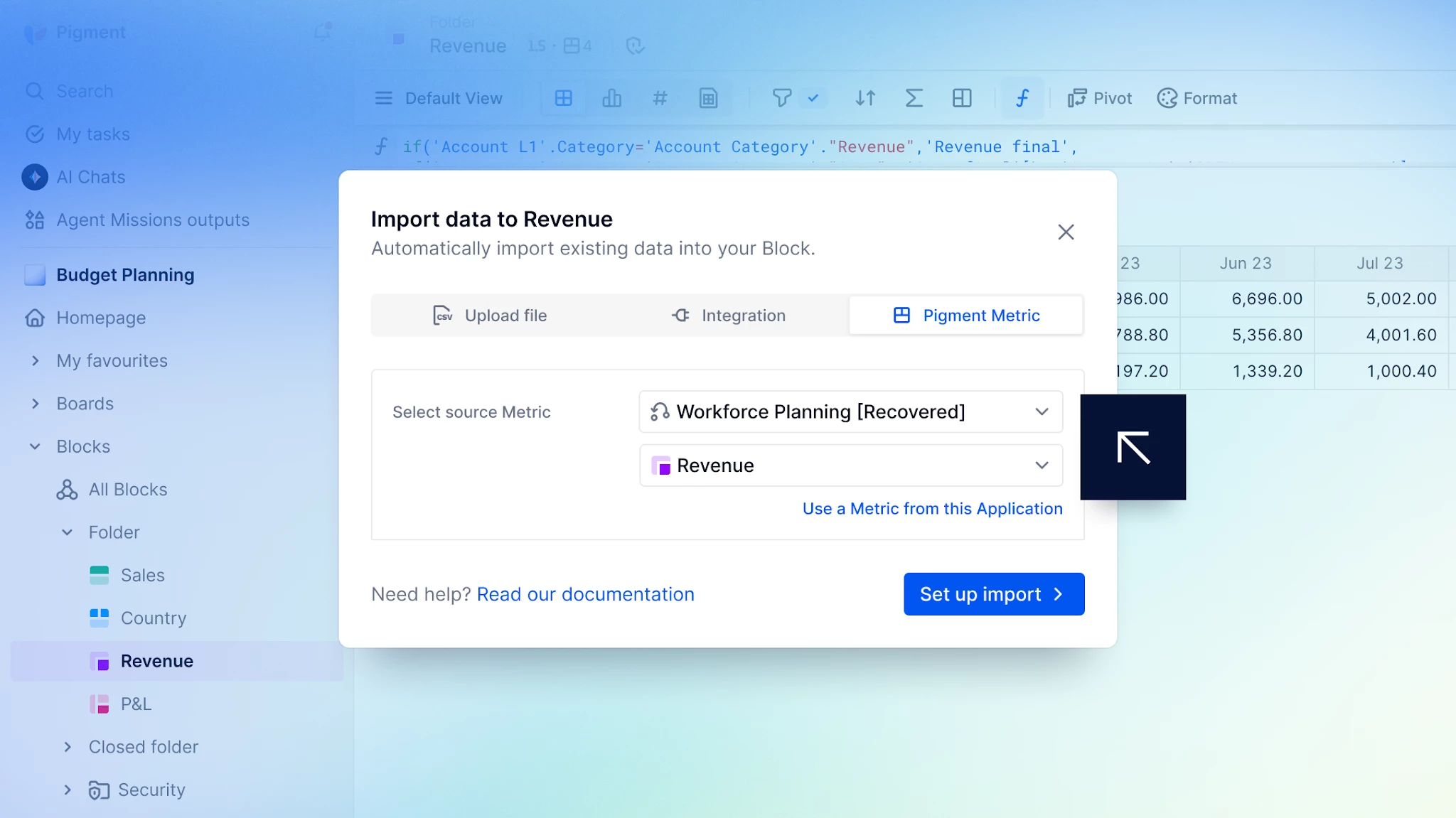
You can now select a Recovered Application as the source for a List-to-List import. Restore List data from a recent point in time directly into your live Applications after accidental changes or technical issues, all without downloading and reuploading files manually.
Manage Application files with the Pigment API

You can now use the Pigment File Storage API to manage Application files without switching to the Pigment interface. Upload files from external systems, retrieve file details, and download stored content for use in downstream processes — all programmatically, making it easier to integrate file management into your existing workflows.
Automate Data Flows from external systems

Integrate Pigment Data Flows into your external workflows using the new Data Flows API. Trigger multi-step imports programmatically, then track the overall execution and status of each Data Action as it runs. This makes automated import processes easier to monitor, manage, and troubleshoot end-to-end.
Test and Deploy
Deploy Board access configurations across environments
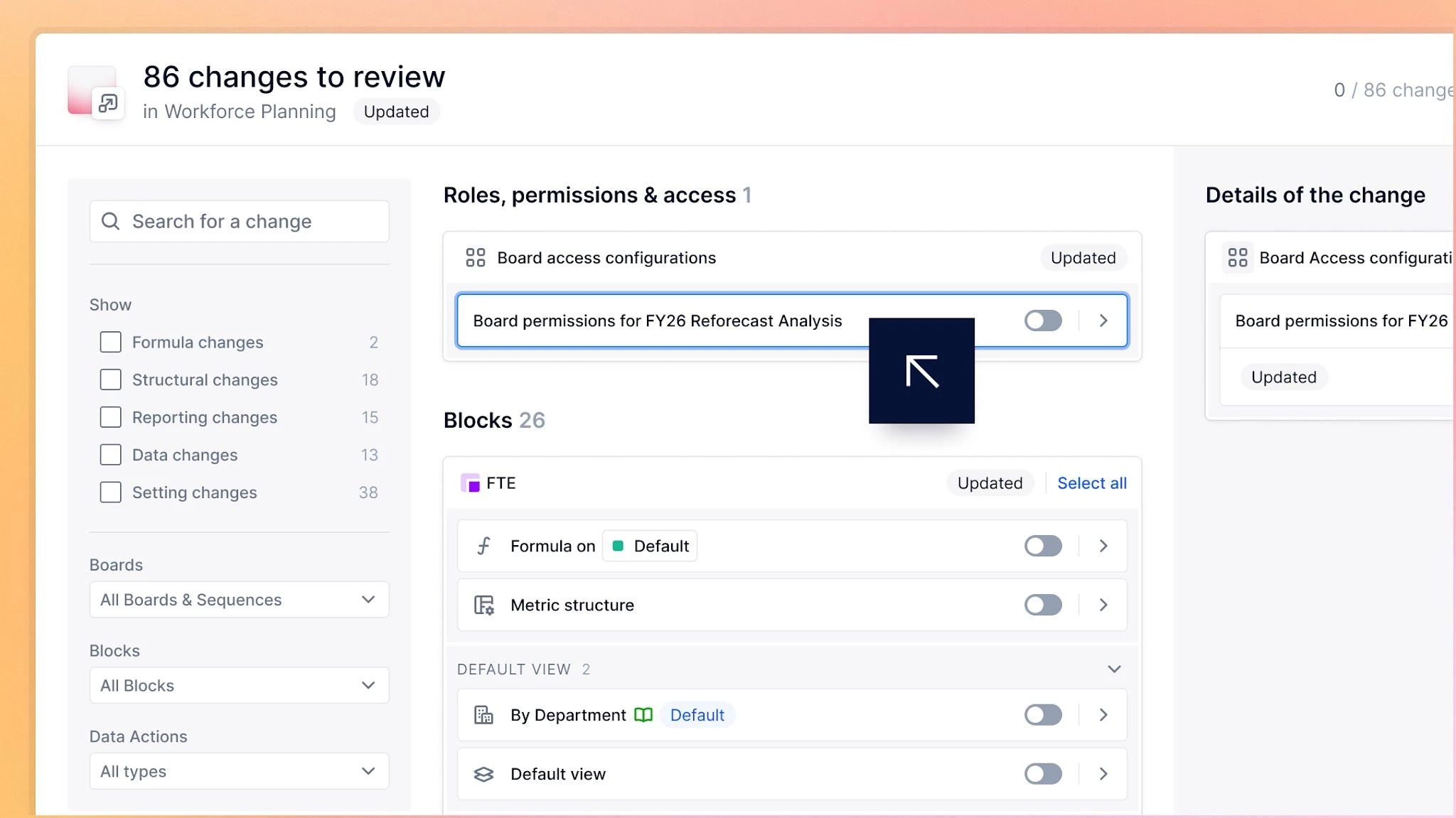
You can now deploy Board access configurations from Development or Test environments to Production alongside other Application changes. Review new, updated, and removed permission rules before deployment, then include them with Select All Changes or choose individual updates using granular deployment for clearer visibility and control.
Security and Administration
Manage Snapshots across your Workspace
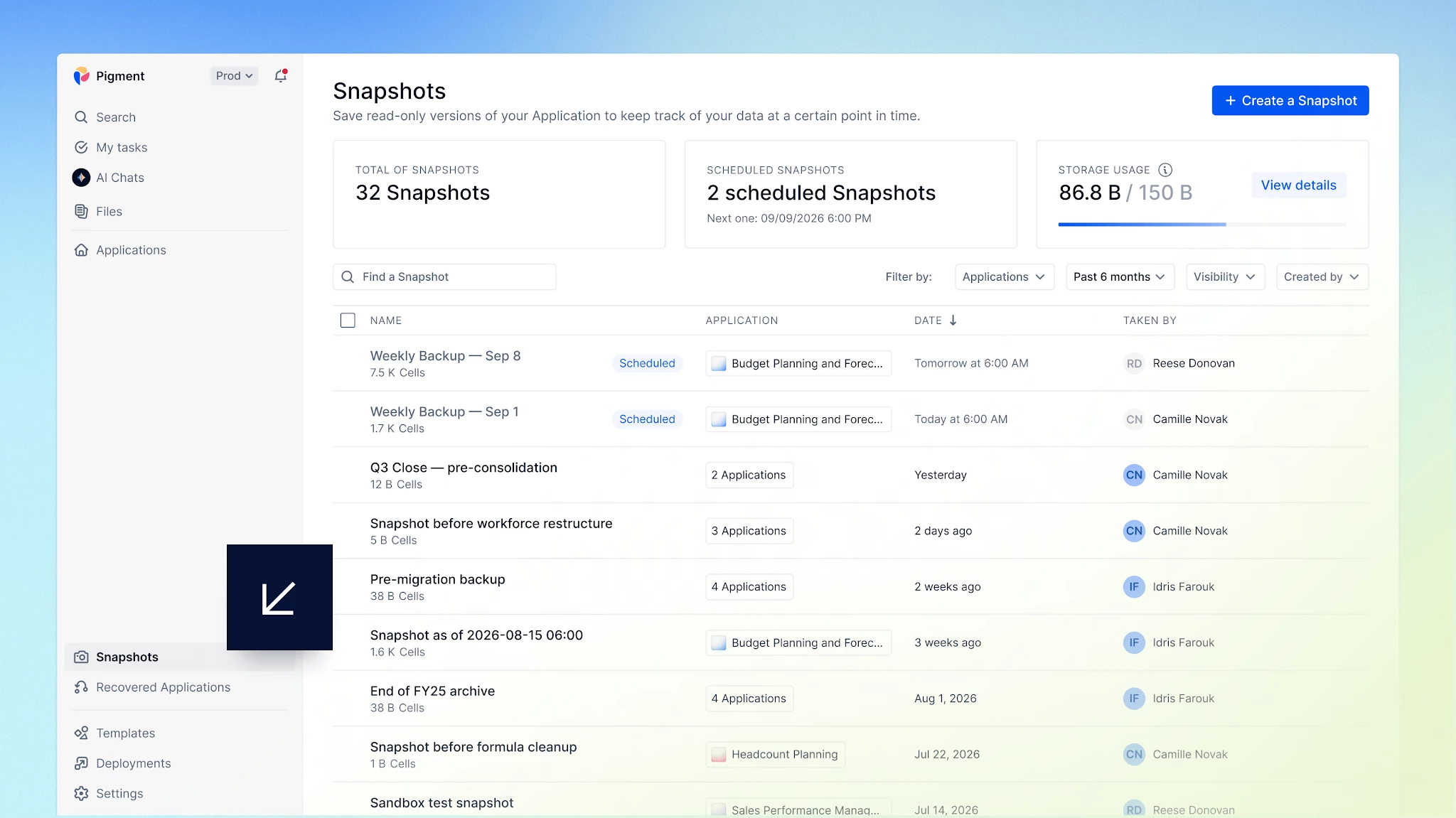
Now you can oversee every Snapshot in your Workspace from one central page, with a clear view of usage across Applications. See current usage and upcoming Snapshots at a glance. Find the Snapshot you need and manage it directly from the page, or create a new one without opening individual Applications.
New import permissions are here
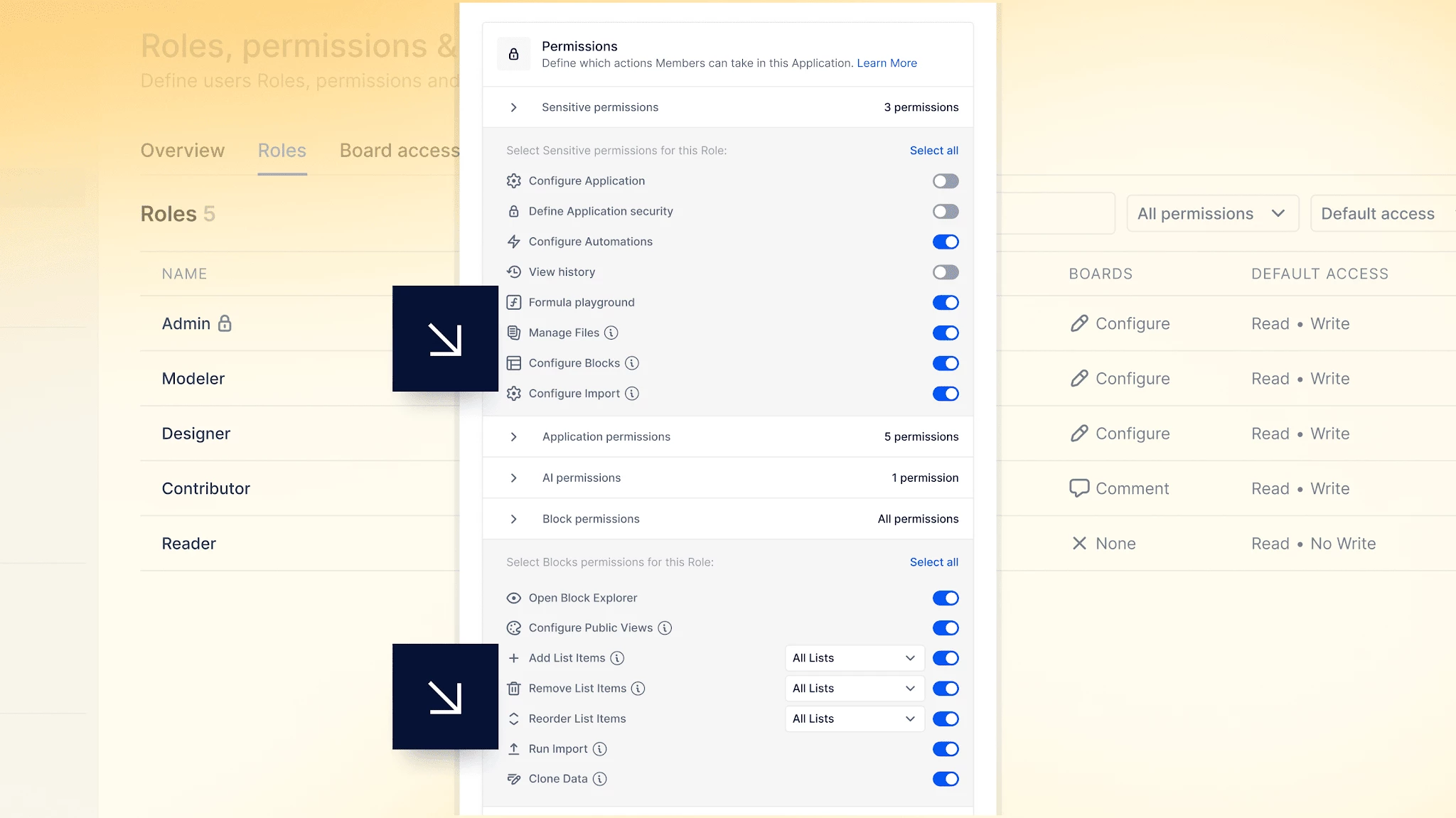
Control who configures imports and who runs them with two independent permissions, replacing Import Data. Configure Imports lets Members create and manage import configurations, while Run Imports lets them run saved configurations manually, from Action widgets or through the API. Scheduling imports requires both permissions.
Compare usage across your Workspaces
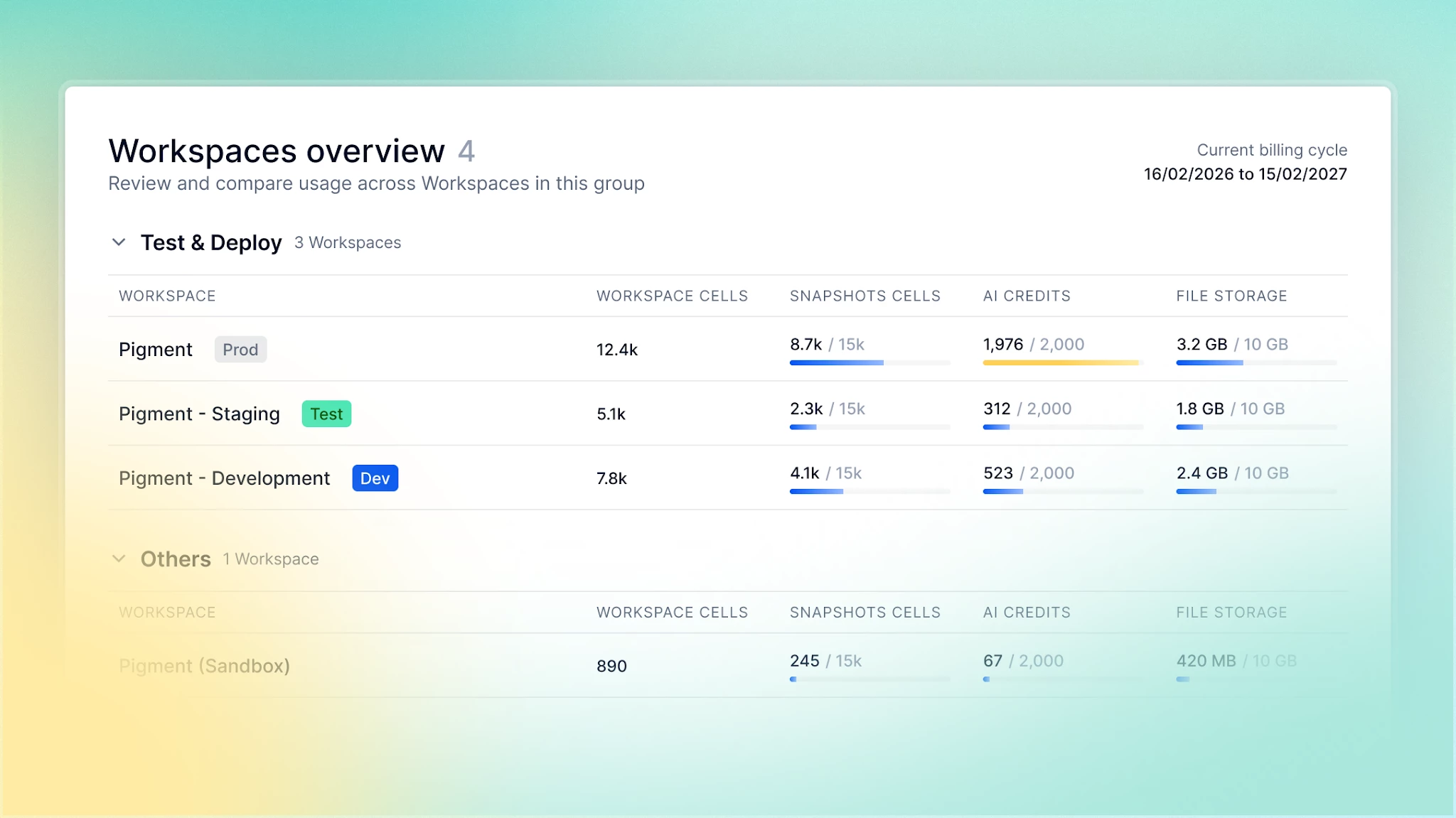
Workspace Admins can now see and compare usage across every Workspace from one centralized overview. Monitor Workspace cells, Snapshot cells, AI credits, and file storage without opening individual usage pages. Test and Deploy environments are grouped separately, and warnings flag Workspaces nearing a usage limit, so you can spot capacity constraints at a glance.
Pigment's Partner Network Reaches New Heights

Representing 50+ organizations worldwide, Pigment's top Partners recently gathered in Boston and Paris to hear updates from Pigment executives and cross-functional leaders. These trusted Partner advisors bring domain and use-case expertise to over 90% of Pigment projects. The revamped Partner Network Program provides resources and incentives to combine that expertise with the latest Pigment updates. Connect with a Partner today!
A new Portraits story is here

Explore the latest episode of Portraits by Pigment, featuring Gurneet Kaur, Go To Market Finance and Strategy Leader at Block. Discover how she approaches planning to create greater visibility across teams, support faster decision making, and turn planning into a lever for agility. Hear her perspective on building trust and autonomy, using AI in decision making, and staying ready to adapt as the business evolves.
Don’t miss it — check out this month’s LinkedIn Round-Up! ⬇
We're always looking to improve, so please don't be shy and share your comments via email, by contacting your Customer Success Manager, or here on our Community!
All the best from everyone at Pigment.
