





Purpose
Ask the Stencil agent. If you remember nothing else from this article, remember that.
Every phase of Pigment Stencil assumes you're already talking to the agent. This guide is what makes that real:
- the difference between an agent that has to guess what you need
- versus one that gives you the plan, the draft or the answer tailored to this customer, this use case, this stage
That difference is the value case for Stencil itself: faster time-to-value because nobody starts from a blank page, more consistent delivery because the agent applies the same rigor every time and knowledge that compounds instead of resetting.
What is the Stencil agent?
- What it is: a Pigment agent that guides a project through delivery. Ask it about any stage, Discovery through Launch, and it knows the deliverables, the gates and the approach to get there.
- What it isn't: a decision maker. It drafts, evaluates and recommends; every decision, approval and sign-off still belongs to a named human.
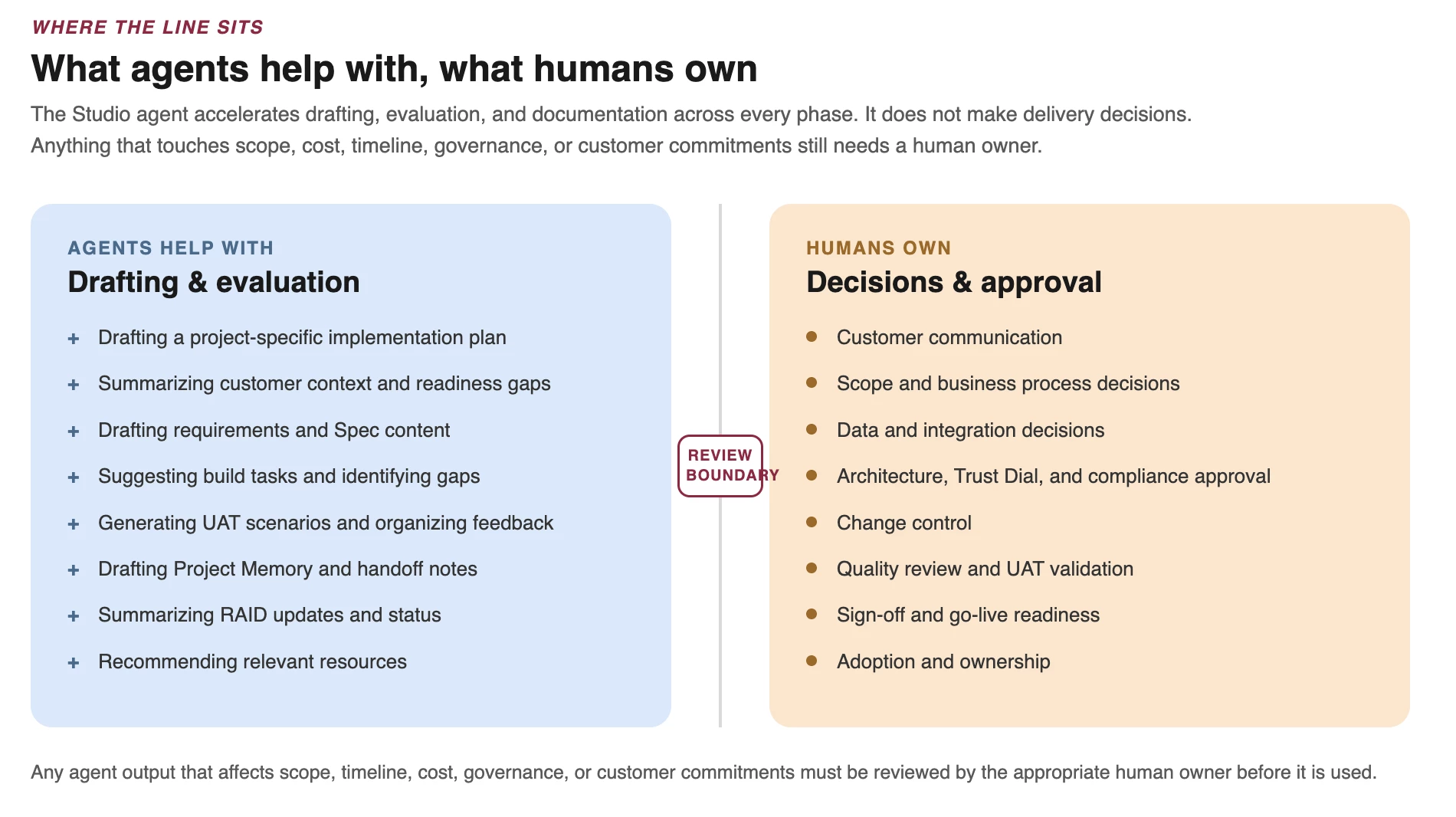
How Stencil agents fit into delivery
The other seven articles describe what good delivery looks like. This one is about making the agent do it, at your customer's actual scale, data and timeline, not the generic version.
How to prompt the Stencil agent
Good prompts give the agent enough context to tailor the answer. Include:
- customer name or industry
- use case
- project stage
- scope and MVP priorities
- timeline or constraints
- data sources and integrations
- customer team structure
- known risks or open questions
- compliance considerations
- and the output needed
Questions to ask the Stencil agent
| Need | Example question |
| Understand the stage | "What should we focus on in this stage for this customer and use case?" |
| Create a plan | "Create a stage plan with key activities, owners, customer actions, risks and required outputs." |
| Identify gaps | "Review this project context and identify what is missing before we move forward." |
| Prepare customer actions | "What does the customer need to prepare before the next stage?" |
| Review scope | "Compare this request against the SOW, MVP scope, Design Doc, Architecture and Spec." |
| Draft an artifact | "Draft the first version of this artifact using the project context below." |
| Evaluate an artifact | "Review this artifact and identify gaps, assumptions, risks and unclear decisions." |
| Prepare sign-off | "Create a sign-off checklist for this stage using the approved scope and validation criteria." |
| Summarize status | "Summarize progress, risks, actions, issues, decisions, blockers and next steps." |
| Update Project Memory | "Update Project Memory using these decisions, build notes, test outcomes and known limitations." |
| Find resources | "Which Pigment Stencil resources are most relevant for this stage, role and artifact?" |
Stage-specific example prompts
| Stage | Example prompt |
| Discovery + Onboarding | "Create a Discovery plan using the customer context, SOW, prototype notes, data landscape, timeline and known risks." |
| Design | "Turn these Discovery notes and workshop outputs into requirements, assumptions, open questions, validation criteria and a draft Design Doc outline." |
| Build | "Break this approved Spec into build tasks by workstream, including dependencies, validation checks, risks and sign-off criteria." |
| Test | "Generate UAT scenarios from this Design Doc and Spec, organized by use case with expected outcomes and retest tracking." |
| Launch | "Create a Launch + Sustain hand-off package using the Design Doc, Spec, RAID log, UAT results, known limitations, support needs and ownership model." |
Using Stencil in practice
Use the Stencil agent as the first stop to apply Pigment Stencil to a project.
When to ask for help. Ask your Project Lead, Solution Architect, CSM, or Partner Lead when:
- scope, timeline, cost or credit expectations may change
- the customer is not aligned on ownership, decisions or priorities
- the Design Doc, Architecture or Spec is unclear
- UAT feedback suggests redesign rather than validation
- compliance or security requirements are unclear
- go-live readiness is uncertain
- or the Stencil agent output seems incomplete, risky or inconsistent with project context.
The Stencil agent helps teams move faster. The project team is still responsible for making sure the work is accurate, aligned, approved and ready for the customer.
Recommended practices
- Start with context: better input produces better output.
- Ask for project-specific guidance, not generic methodology.
- Use agents to accelerate drafts, not bypass review.
- Ask the agent to identify gaps, risks and missing decisions.
- Use the agent throughout the project so Project Memory, RAID updates, testing summaries and hand-off materials stay current.
Finding resources
Ask the Stencil agent which resources are relevant for your project stage, role, use case and artifact. For example:
- "Which resources should I use for Discovery + Onboarding?"
- "Which templates apply before Design Sign-Off?"
- "Which resources should a partner review before Build?"
- "Which resources support Project Memory and Launch hand-off?"