



Purpose
Build is where the Spec becomes real:
- the agent breaks approved work into tasks
- evaluates output against the Spec
- and flags what needs a steering decision, so the team spends its time reviewing and directing instead of drafting from scratch
This stage answers: What needs to be built by workstream or use case? Does the build align with the approved Spec? What needs to be evaluated, corrected, or escalated? Which changes require scope review or change control? Is functionality ready for broader testing?
Use the Stencil agent
Ask the Stencil agent to turn the signed-off Design Doc, Architecture and Spec into a working Pigment solution. See the Stencil Agent Guide for an example prompt for this stage.
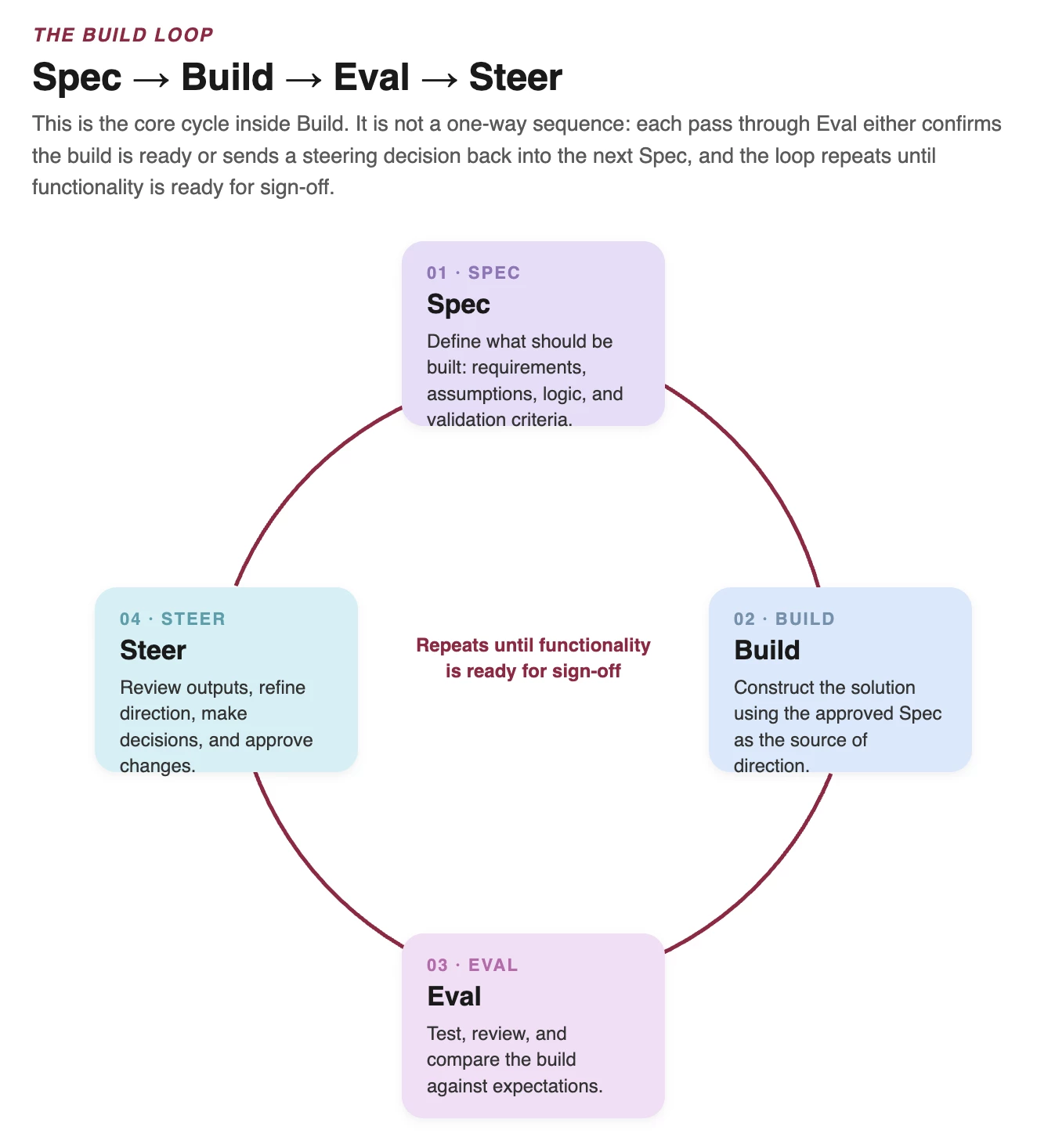
The Build Loop (Spec -> Build -> Eval -> Steer)
This is the core cycle inside Build. It is not a one-way sequence: each pass through Eval either confirms the build is ready or sends a steering decision into the next Spec, and the loop repeats until functionality is ready for sign-off.
Key activities, ownership, and customer actions
| Activity | Owner | Purpose | Customer action |
| Plan change management | Customer Change Champion | Start preparing impacted users and stakeholders for what's changing, ahead of go-live | Confirm who owns change management for this engagement and begin communication and training planning |
| Review approved design outputs | Solution Architect / Solution Modeler | Confirm the Design Doc, Architecture and Spec are ready for Build | |
| Plan build workstreams | Project Lead / Solution Architect | Organize build activities by use case, dependency and timeline | |
| Configure solution | Solution Modeler / Solution Architect | Build applications, model logic, boards, workflows, data flows and access | Participate in validation sessions |
| Apply Spec → Build → Eval → Steer | Solution Architect / Solution Modeler | Evaluate outputs against the Spec and adjust intentionally | Provide timely feedback and decisions |
| Validate with SMEs | Customer Business Leads / SMEs | Confirm functionality aligns with business expectations | Confirm whether functionality aligns with the approved design; distinguish defects from new requests |
| Project Governance | Project Lead / Customer Project Owner | Assess new requests against MVP, timeline, cost and governance. Broader governance, risk, budget and steering cadence, runs continuously; see 03. Roles, Ownership & Governance | Review change impacts when scope shifts |
| Update Project Memory | Delivery team | Capture build decisions, model logic, known limitations and support context | |
| Complete Functionality / Use Case Sign-Off | Customer Business Leads | Confirm completed functionality is ready for Test (see Roles, Ownership & Governance) | Prepare UAT owners, scenarios, and data for Test |
Required outputs and definition of done
| Required output | Done when |
| Configured solution | In-scope functionality is built according to the approved Spec |
| Data flows and integrations | Required data is loaded, connected, and technically validated |
| Boards, workflows, and access | User-facing experience and permissions are configured for testing |
| Build evaluation notes | Gaps, corrections, decisions, and steering actions are documented |
| Updated RAID log | Build risks, actions, issues, and decisions are captured |
| Updated Project Memory | Build logic, decisions, assumptions, and known limitations are documented |
| Functionality / Use Case Sign-Off | Complete (see Roles, Ownership & Governance) |
Recommended practices
- Always review AI-generated logic before it ships
- Build from the signed-off Design Doc, Architecture, and Spec.
- Validate as functionality is built, not only at the end.
- Use the Spec → Build → Eval → Steer loop intentionally.
- Keep MVP scope protected through change control.
- Update Project Memory throughout Build, not after the fact.
Resources
- Build Workstream Plan
- Spec-to-Build Checklist
- Pigment Palette
- Board Inspiration
- User Access Template
- Model Maintenance Guidance
- Eval Checklist
- Project Memory Template
- UAT Preparation Checklist
- Build-to-Test Readiness Checklist
- Modeler Agent Audit Prompts