
Question

Board Access

  • April 4, 2026
  • 4 replies
  • 37 views

Hi, My Our consolidated P&L is broken up into different boards and metrics. If I lost access to certain boards, how do I re-establish my access? I go through the dependency diagram to a board and it says I have admin access, but I can’t see a specific metric within that board. Is there some piece of the access piece I’m missing? Can I grant myself access back or does a system admin need to do it?

4 replies

  • Author
  • Apprentice Author
  • April 4, 2026

Sorry I’m really stuck. 

  1. I have a P&L Board
  2. I’m missing access to certain metrics so I’m missing aspects of the P&L
  3.  I go into a specific metric let’s say its called Opex.
  4. Traced the dependency diagram back to it’s source within a board.
  5. In that board I’m an admin and I have read/write access. (Also checked that the metric has specific access so I went into the security folder to check my access there)
  6. I’m not sure what to do from here because that’s what I can see. 

Forum|alt.badge.img+2
  • Trendsetter
  • April 5, 2026

Hi ​@User123456 ,


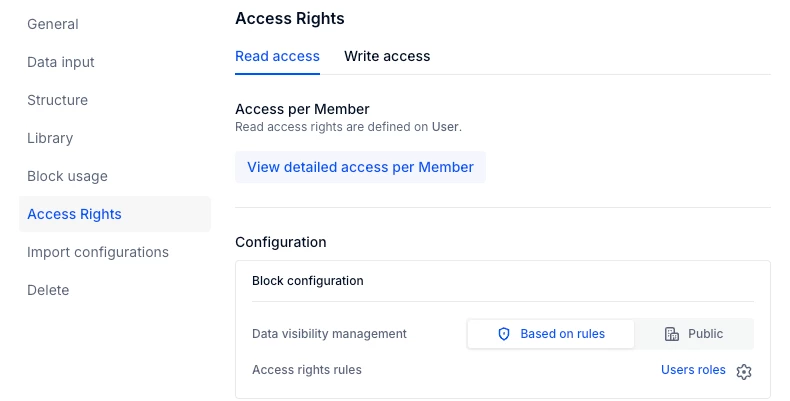
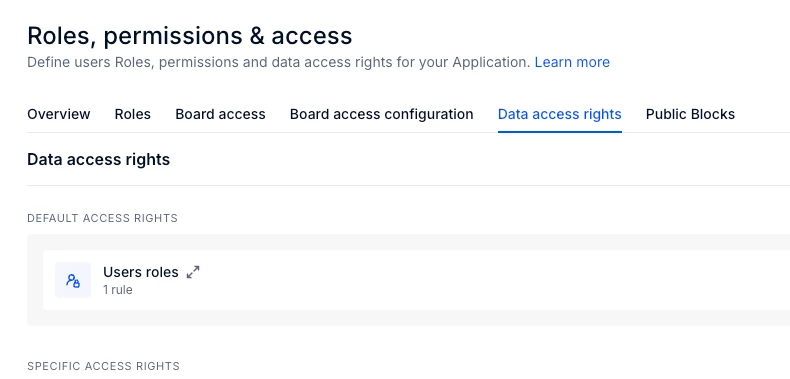
I would encourage you to look into the Rule Based block configurations that might be restricting data visibility. You can find them in the Metric settings as User roles (you can find that metric in the Security folder of the Blocks) and you can view the details of the rule in the Data Access rights of the Roles and permission settings. 

Do ensure that the rules applied and the access given to you is aligned and ensures data visibility.


Julie Guérin
Employee
Forum|alt.badge.img+8

Hi ​@User123456,

Please note that access to a board and access rights to the data within specific blocks or widgets are governed by different rules.

I recommend opening a widget where the data doesn’t appear as expected, then accessing the Dependency Diagram and enabling “Show access rights.” This will allow you to see how data flows between blocks and highlight the access rights by user - blocks will appear in green for Full Access, yellow for Partial Access, and red for No Access. From there, you can identify where the access starts being restricted (yellow and red blocks), navigate to the first block, and review its Access Rights settings as suggested by ​@GaneshD.

It’s also possible that access rights are being inherited between blocks. In that case, you can either disable inheritance at the application level or use the RESETACCESSRIGHTS function within your formula to override it.


Hope this help!


  • Author
  • Apprentice Author
  • April 7, 2026

Thanks for the feedback. 


  1. I got access from one our other admins in our system, but we have certain confidential blocks that don’t appear to me, when they were building there one of the metrics that flowed downstream restricted my access in the overall P&L.
  2. I got stuck with the above 2 points because the dependency diagram and access rights don’t point to the owner unless I missed it?
  3. I could see that a lot of the dependency diagrams pointed back into a hidden block from me so moving forward I would need to reach out to that block owner for access. 

Thanks for the insight! Has anyone built a specific master access block to streamline access issues like this rather than tracing each access issue through a dependency diagram?