

Question

Budget comparison table with Snapshots

  • November 27, 2025
  • 1 reply
  • 143 views

Forum|alt.badge.img+2

I want a table that has costs actual ytd, costs budgeted ytd, costs ytd variance, costs full year budget, and costs YTG (i.e. total year budget less actuals YTD).

However, my budget is captured as a scenario snapshot. Is this possible?

1 reply

Forum|alt.badge.img+2
  • Trendsetter
  • April 10, 2026

Hi ​@MKSMPB ,


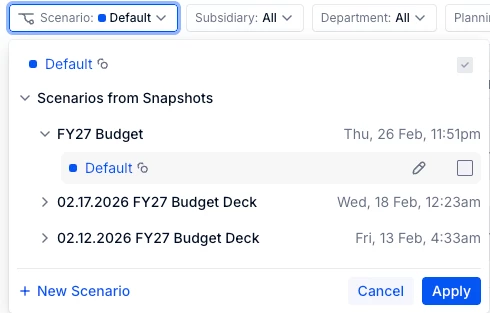
Step 1: Create a snapshot of the Plan Scenario., which you already have - CY26 plan scenario. (Remember to check the Scenario you plan to use here within that table) *Renamed Default as FY27 Budget Scenario in my example*

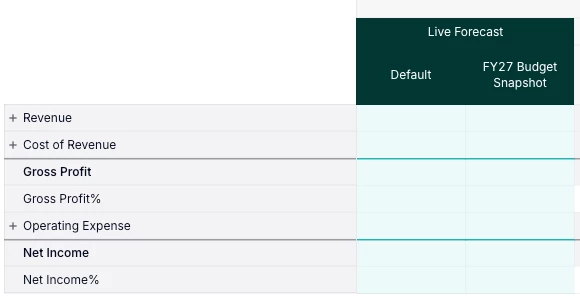
Step 2: Create a table with metrics to only flow in Plan numbers from the Live Forecast version. So now your table will have a live forecast column with Plan Scenario numbers. It would look like Default scenario with Plan numbers and Created scenario with snapshot numbers under Version.

Step 3: Add Scenario in the columns section under Versions

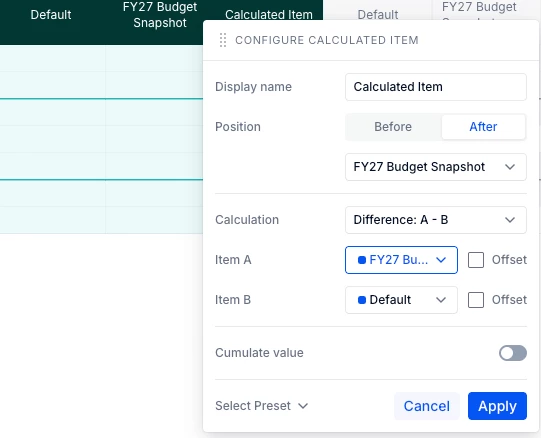
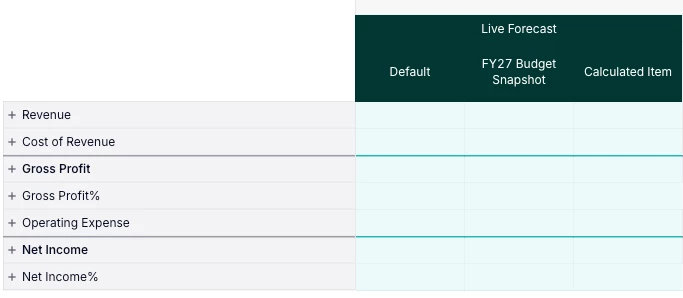
Step 4: Now create a new Calculated item column which compares Plan Scenario and Snapshot numbers