


Answer

Can I Apply Conditional Formatting to All Columns of a Calculated Item?

  • October 11, 2022
  • 2 replies
  • 248 views

Forum|alt.badge.img+6

I have a budget & forecast vs actuals table as shown below.  Actual, Current Budget, and Current Forecast are Version Type dimensions that are associated with the Version dimension as properties.  The 5 columns within the red box are calculated items.  I applied conditional formatting to the variance calculated items.

However, when the month changes, the formatting goes away as shown below:

 

The intent for the above views is to associate the month dimension with an application variable of “Last Closed Actuals Month” - dynamically updating to show stakeholders their monthly and YTD variances.

Is there any way to apply the conditional formatting across the entire calculated item?  Or a different approach to BvA views entirely?  The approach shown above contains 6 conditional formatting rules (3 columns x2 rules each), so doing this for every month doesn’t seem viable.  Thanks!  
Best answer by Elliot

Hi @Justin Groover 

Good question !

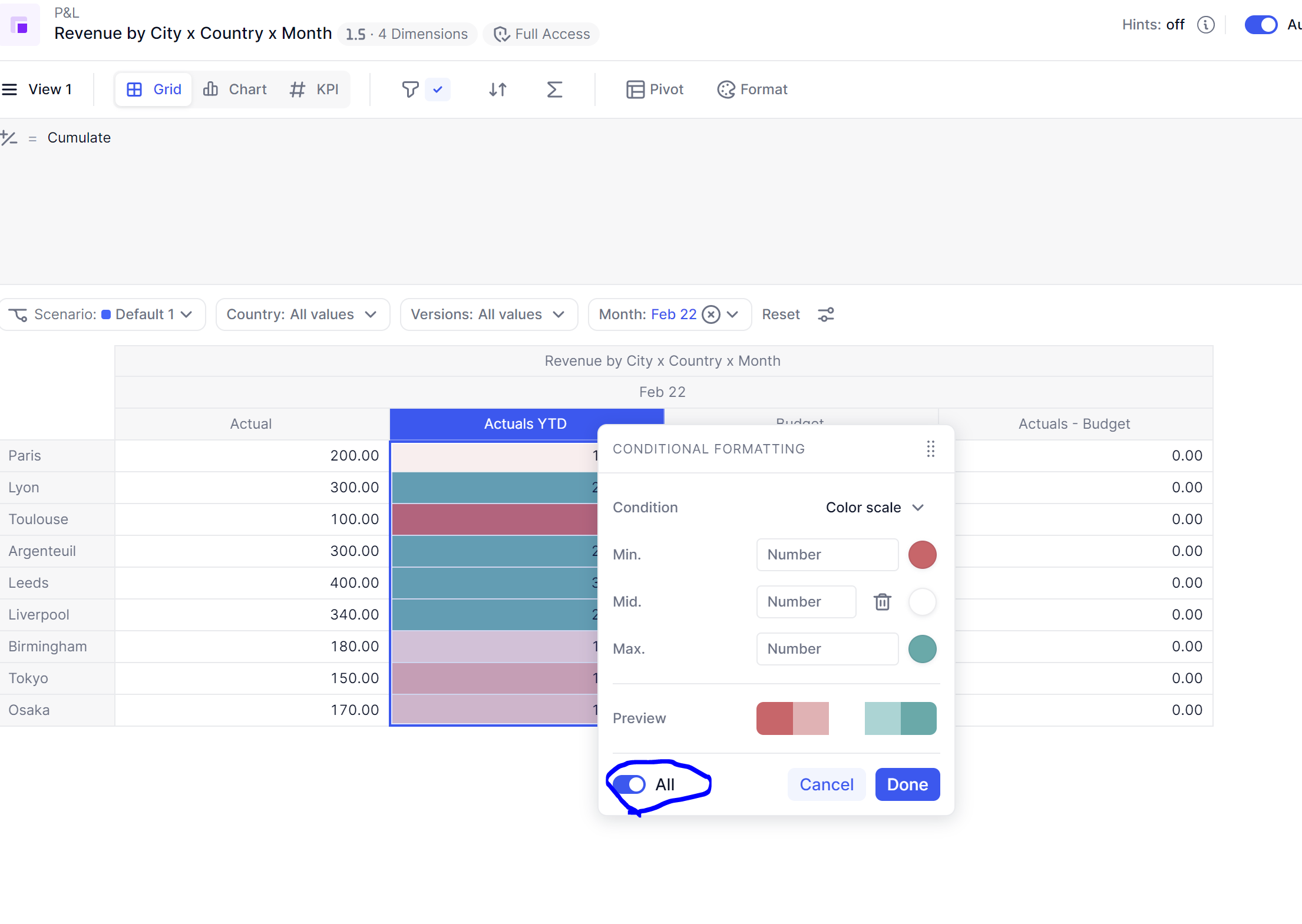
When applying conditional formatting, you should toggle “All” option to apply the conditional formatting to all items of that dimension.


Let me know how you get on.

Thanks

2 replies

Elliot
Employee
Forum|alt.badge.img+9
  • Employee
  • Answer
  • October 13, 2022

Hi @Justin Groover 

Good question !

When applying conditional formatting, you should toggle “All” option to apply the conditional formatting to all items of that dimension.


Let me know how you get on.

Thanks


Forum|alt.badge.img+6
  • Author
  • Master Trendsetter
  • October 13, 2022

Elliot, perfect, thank you!  This looks to work as desired.  I could be wrong, but I don’t recall the “All” option being available for calculated items in particular when I created the post.  If so, kudos and thank you all for the rapid fix!