
Good afternoon!
I have a question whichs regards the combination of two measures within a P&L setting.
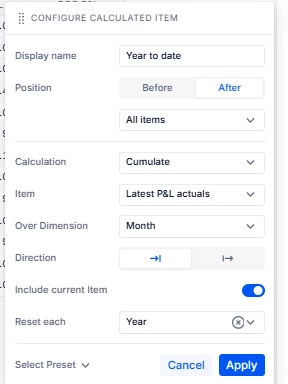
First measure: A Year To Date cumulative calculated item. Sums all the values of a line item in the P&L untill the most recent period, within the current fiscal year.
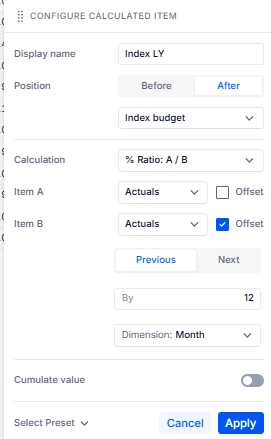
Second measure: An index vs LY measure. Should take the index of the actuals against the actual values of last year.
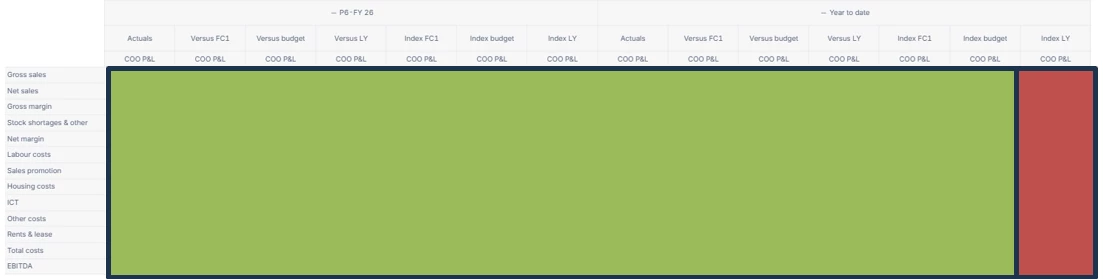
In this P&L, the columns are seperated in two groups, as visible in the first snippet: first 7 monthly measures, then 7 Year to date measures. Each of the columns are currently filled with accurate calculations, except for the very last one: Year to date → Index LY.
I have put my current Year to Date and Index LY calculations in the attachment as well. To clarify: both the Index LY as well as the Year to date measure on its own are working just fine. It really is about the combination of both calculations in the last column.
Does anybody have a clue how to solve this error? I have tried the Pigment AI tools but these were not helpful in this case.