


Solved

Displaying a Dimension's Property Instead of the Name in Page Filters

  • November 27, 2025
  • 3 replies
  • 94 views

Forum|alt.badge.img
  • Apprentice Author

Hi everyone,


I hope you’re doing well !


I have a question regarding displaying properties in Pigment. In my model, every dimension has both a Name and a Display Name property.


When I place a dimension on a row or a column, I can choose to show either the code (name) or the Display Name by using the “Update header labels” feature, which works perfectly.
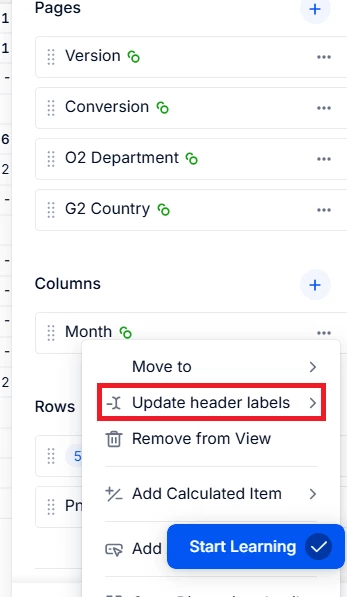


However, this feature does not exist when a dimension is used as a Page Filter. As soon as the dimension is placed in Pages, the option to display Display Name disappears.
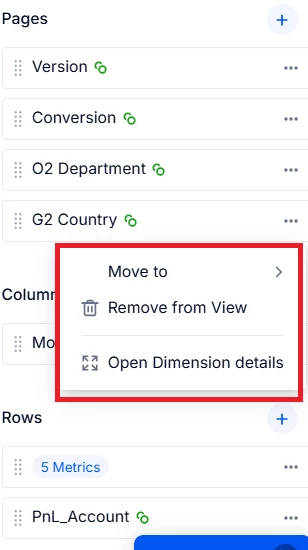
As far as I can see, the only current workaround would be to modify the dimension so the Display Name becomes the Name which isn’t ideal.


Is there any way to display the Display Name in Page Filters without modifying the dimension?


Thanks in advance for your help!


Best regards,
Best answer by Chahat

Hi ​@Amel ,

There is a way in Pigment:
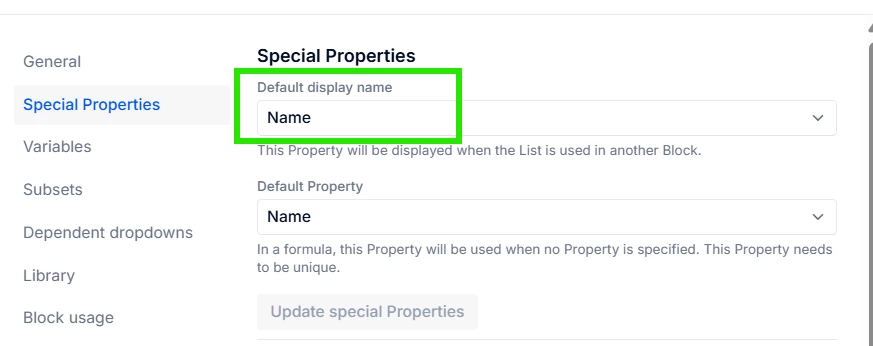
Open the dimension list → Settings → Default Display Name → Choose ‘Display Name’ here
Note: It will show the display name wherever you are using this list as the filter OR as a metric’s datatype 


3 replies

Chahat
Master Helper
Forum|alt.badge.img+16
  • Master Helper
  • Answer
  • November 28, 2025

Hi ​@Amel ,

There is a way in Pigment:
Open the dimension list → Settings → Default Display Name → Choose ‘Display Name’ here
Note: It will show the display name wherever you are using this list as the filter OR as a metric’s datatype 


Forum|alt.badge.img
  • Author
  • Apprentice Author
  • November 28, 2025

Hi ​@Chahat,


Thank you so much for your reply. The setting you showed me works perfectly.

Really appreciate your help.


Amel.


Chahat
Master Helper
Forum|alt.badge.img+16
  • Master Helper
  • November 28, 2025

Glad, it helped!