



Question

How to mass delete lists items ?

  • August 26, 2026
  • 3 replies
  • 49 views

Forum|alt.badge.img+1

Hi Hive Mind, 

I need to delete 1500 items form a list (following creating of thousands of duplicated entries “thanks to” the possibility to bypass the uniqueness constraint using a formula and then removing it…).

On one hand, I see only right click on a single item and press delete… x by 1500 times.

On the other hand The transactions lists allow to “manage items”, filters, mass check and bulk delete manually.

How can I avoid repeating thousand times the same action ?
3 replies

Forum|alt.badge.img+1
  • Author
  • Author
  • August 26, 2026

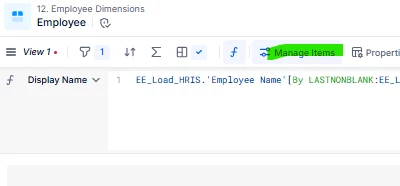
Found it 5 minutes later.. The same option to managing items is available also on list blocks


Veniamin
Helper
Forum|alt.badge.img+1
  • Helper
  • August 28, 2026

Exactly, you may use that function “Manage Items” in combination with filters to do deletes in bulk for some specific groups of items.


Forum|alt.badge.img+3
  • Employee
  • August 28, 2026

Hi there!

Yes, as you’ve seen you can bulk delete these items using Manage Items from the List block header.

Apply a filter to identify the duplicates, select them using the checkboxes, then click Delete.

This works for both Dimension and Transaction Lists.