
Solved

import update

  • December 23, 2025
  • 4 replies
  • 251 views

Hi everybody, 


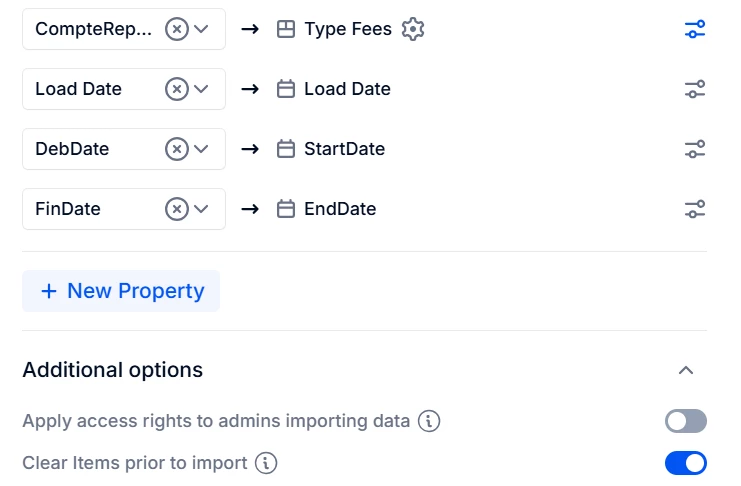
Could someone help me understand why the “type fees” dimension was not updated, even though I selected “delete all items” for my transaction during the load from the Azure SQL table?

Many thanks,

 

Best answer by Chahat

Hi ​@Huyen ,
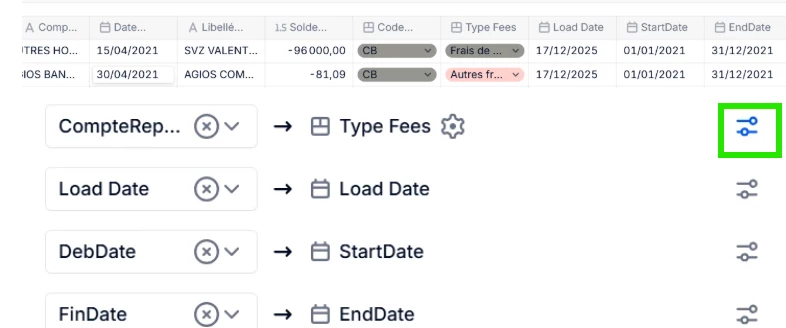
 

  • Whenever a new type fees will come, if the toggle (for that mapping) says “Automatically create new items” , then the type fees Dimension list will be updated automatically. | Refer image below
  • “Clear items prior to import” : It will clear/blank out the transaction list entirely and then will update the Transaction list based on import configuration.
  • “Clear items prior to import” : Looks like you have applied it on the transaction list, hence dimension list of “type fees” will not automatically remove those “type fees” which no longer exist in any of the rows of the Transaction List > “Type Fees” column


4 replies

Chahat
Master Helper
Forum|alt.badge.img+17
  • Master Helper
  • Answer
  • December 24, 2025

Hi ​@Huyen ,
 

  • Whenever a new type fees will come, if the toggle (for that mapping) says “Automatically create new items” , then the type fees Dimension list will be updated automatically. | Refer image below
  • “Clear items prior to import” : It will clear/blank out the transaction list entirely and then will update the Transaction list based on import configuration.
  • “Clear items prior to import” : Looks like you have applied it on the transaction list, hence dimension list of “type fees” will not automatically remove those “type fees” which no longer exist in any of the rows of the Transaction List > “Type Fees” column


Chahat
Master Helper
Forum|alt.badge.img+17
  • Master Helper
  • December 24, 2025

Hope it helps!


Forum|alt.badge.img+1

Hey ​@Huyen 

@Chahat already shared a very thorough and spot-on answer, we honestly could not have explained it better ourselves 🙂

If you still have any open questions, feel free to submit a support ticket. We will be happy to review your transaction list and import configuration in more detail before advising you further.


  • Author
  • Apprentice Author
  • January 5, 2026

@Tanya Krytsyna

Thank you for your feedback.
In fact, the “Clear items prior to import” option does not completely delete the transaction list.

For example, when the line with -96,000 above was updated in the Azure DWH table with Type Fees = “Autres...”, this change was not reflected in Pigment after the import.

Do you know why this might be happening?
I assume that Pigment is configured to update existing rows, so this should not be a merge logic issue.
What I am trying to achieve is to completely clear the transaction list before re-inserting all the data from the DWH.


Thanks ,