


Answer

Modifiers not applying as expected

  • March 7, 2023
  • 3 replies
  • 225 views

Trever Leavenworth
Master Trendsetter
Forum|alt.badge.img+5

Hello!


I’m attempting to aggregate my metrics into a full P&L with actual and forecast views.


I have data coming from a Shared_IS_Actuals dimension, several Revenue and COGS dimensions already mapped, a Shared_WF_Plan dimension, and a Shared_Opex_Plan dimension.


I’ve been able thus far to successfully have Actuals for all IS accounts pull in, and have Revenue, COGS, and WF (payroll, benefits, taxes) appear in a single metric.


However, when I try to add my Shared_Opex_Plan data using the formula below, my Actuals stay, my revenue and cogs disappear, my WF_Plan stays, and my Opex_Plan disappears, leaving me with only the WF_Plan.
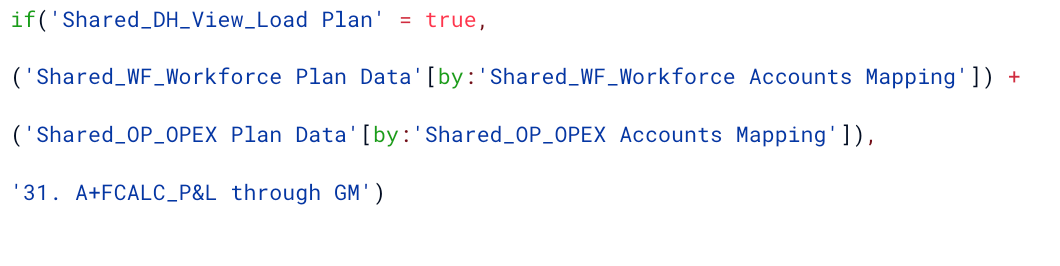


It’s like the first by modifier to map the WF_Plan to the CoA is applying to everything?


What am I missing? 

 

Best answer by francois

I 100% agree with Nathan, it looks like your Opex and WF metrics do not share the same dimensions.

Here’s a great article that explains what happens when you add two metrics with different dimensions together :


Try to align both metrics using REMOVE, ADD or BY depending on your use case to try and have the result you expect.

3 replies

Nathan
Employee
Forum|alt.badge.img+12
  • Employee
  • March 8, 2023

Hey Trevor,


firstly, you do not need the ( ) around your Metric[modifier], they apply in priority to the metric they are right after.

I can’t tell from the formula but it is VERY likely that the 4 parts (the 4 metrics) of the formula do not have the same dimensionality, Pigment doesn’t manage to align manually and you end up with a weird result.


francois
Employee
Forum|alt.badge.img+13
  • Employee
  • Answer
  • March 8, 2023

I 100% agree with Nathan, it looks like your Opex and WF metrics do not share the same dimensions.

Here’s a great article that explains what happens when you add two metrics with different dimensions together :


Try to align both metrics using REMOVE, ADD or BY depending on your use case to try and have the result you expect.


Sharon Conroy
Wallflower
Forum|alt.badge.img+8
  • Wallflower
  • February 12, 2025

This article has since been updated - here is the new link :)