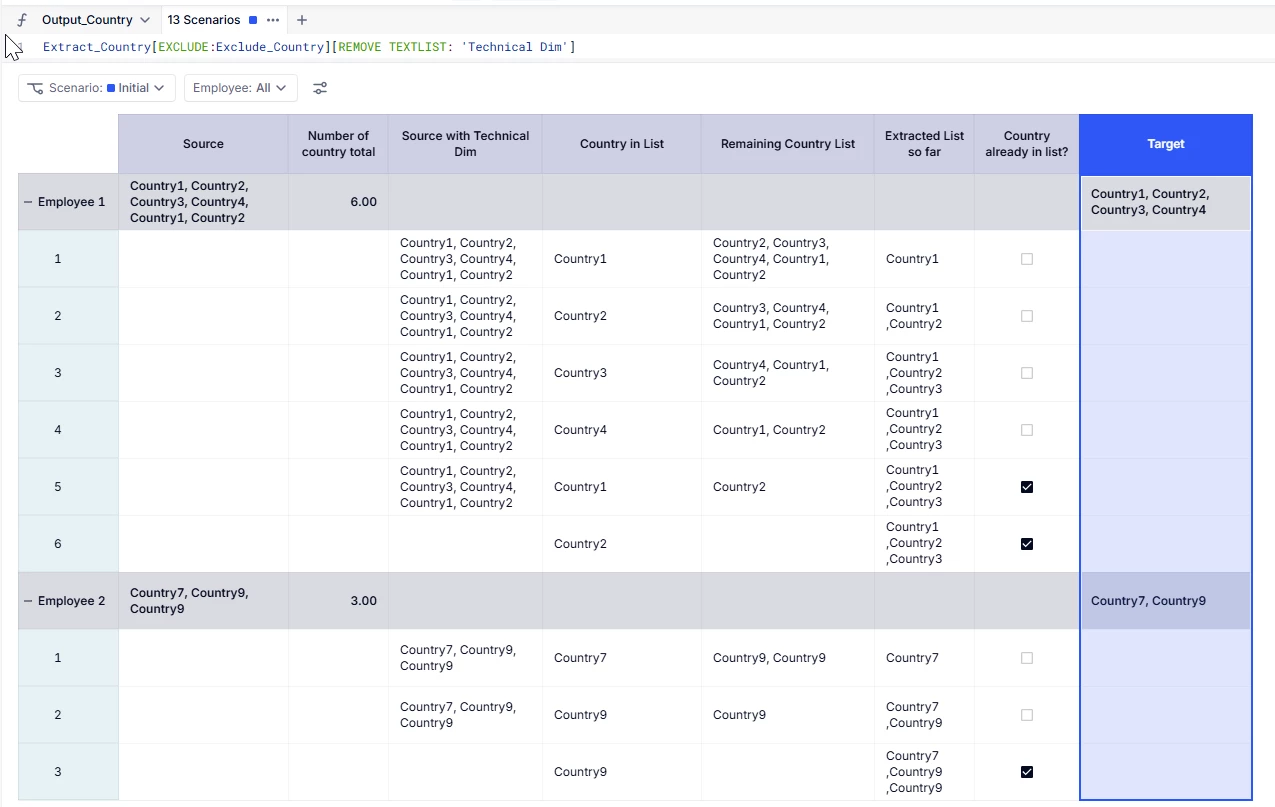
Hi @Chahat ,
However you can achieve this with some other functions and intermediary metrics.
Here is the details of the metric I used :
Country_Source : Data Type : Text Employee dimension (note you can add any dimension you want, in your case Year) Count_Number_Country : Data Type : Numeric Employee dimension This one count the number of total country you have in the list Formula : (LEN(Country_Source)-LEN(SUBSTITUTE(Country_Source,",","")))/LEN(",")+1
Country_With_Techinal_Dimension : Extract_Country : Data Type : Text Employee dimension and Technical Dimension This metric extracts one country at a time and stores it into the technical dimension Formula (with iteration) : IF('Technical Dim'='Technical Dim'."1",
Extract_Country_Remaining : Data Type : Text Employee dimension and Technical Dimension This metric stores the remaining list to extract Formula (with iteration) : IF('Technical Dim'='Technical Dim'."1",
Extracted_List : Data Type : Text Employee dimension and Technical Dimension This metric stores the total list extracted (note it could be optional) if you don’t care about the order of the output. Formula : IF('Technical Dim' = 'Technical Dim'."1",
Exclude_Country : Output_Country : I know it’s not straight forward but it should work.
Hope this helps