Solved

UNIQUE/ DISTINCT Function

  • May 19, 2026
  • 2 replies
  • 27 views

Chahat
Master Helper
Forum|alt.badge.img+18

Is there any Pigment function or keyword available to retrieve distinct/unique values?
(apart from COUNTUNIQUE

For Example:
There’s a metric of datatype “text”.
Dimensionality/Structure of metric: Employee and Year

Some values for FY 2025 (Source-metric)

  • Employee 1: Country1, Country2, Country3, Country2, Country1
  • Employee 2: Country7, Country9, Country9

Required Output (Target metric) :

  • Employee 1: Country1, Country2, Country3
  • Employee 2: Country7, Country9
     

Both the source and target metrics are having same dimensionality.

Best answer by CDALMAY

Hi ​@Chahat ,

I don’t think there is a Pigment function or keyword available to do this directly.

However you can achieve this with some other functions and intermediary metrics.
 

Here is the details of the metric I used :

  • Country_Source :
    • Data Type : Text
    • Employee dimension (note you can add any dimension you want, in your case Year)
  • Count_Number_Country :
    • Data Type : Numeric
    • Employee dimension
    • This one count the number of total country you have in the list
    • Formula :
      (LEN(Country_Source)-LEN(SUBSTITUTE(Country_Source,",","")))/LEN(",")+1


  • Country_With_Techinal_Dimension :
    • Data Type : Text
    • Employee dimension and Technical Dimension (which is just a running list)
    • Formula :
      Country_Source[ADD:'Technical Dim'][FILTER:'Technical Dim'.ID<Count_Number_Country]


  • Extract_Country :
    • Data Type : Text
    • Employee dimension and Technical Dimension
    • This metric extracts one country at a time and stores it into the technical dimension
    • Formula (with iteration) :
      IF('Technical Dim'='Technical Dim'."1",
      LEFT(Country_Source_With_Tech_Dim,FIND(",",Country_Source_With_Tech_Dim)-1),
      IF('Technical Dim'.ID < Count_Number_Country,
      LEFT(PREVIOUSOF(Extract_Country_Remaining),FIND(",",PREVIOUSOF(Extract_Country_Remaining))-1),
      PREVIOUSOF(Extract_Country_Remaining)
      )
      )


  • Extract_Country_Remaining :
    • Data Type : Text
    • Employee dimension and Technical Dimension
    • This metric stores the remaining list to extract
    • Formula (with iteration) : 
      IF('Technical Dim'='Technical Dim'."1",
      MID(Country_Source_With_Tech_Dim,FIND(",",Country_Source_With_Tech_Dim)+2,LEN(Country_Source_With_Tech_Dim)),
      MID(PREVIOUS('Technical Dim'),FIND(",",PREVIOUS('Technical Dim'))+2,LEN(Country_Source_With_Tech_Dim))
      )


  • Extracted_List :
    • Data Type : Text
    • Employee dimension and Technical Dimension
    • This metric stores the total list extracted (note it could be optional) if you don’t care about the order of the output. 
    • Formula :
      IF('Technical Dim' = 'Technical Dim'."1",
      Extract_Country,
      PREVIOUS('Technical Dim') & " ," & Extract_Country
      )[FILTER:'Technical Dim'.ID<=Count_Number_Country]


  • Exclude_Country :
    • Data Type : Boolean
    • Employee dimension and Technical Dimension
    • This metric specify if the country is already in the list or not so we keep only once occurrence. If you don’t care about the order of the output you can use Extract_Country_Remaining instead of Extracted_List.
    • Formula 
      IF(CONTAINS(Extract_Country,Extracted_List[SELECT:'Technical Dim'-1]),TRUE)


  • Output_Country :
    • Data Type : Text
    • Employee dimension
    • This metric is the output you are expected, it will have the same dimentionality as the source metric.
    • Formula :
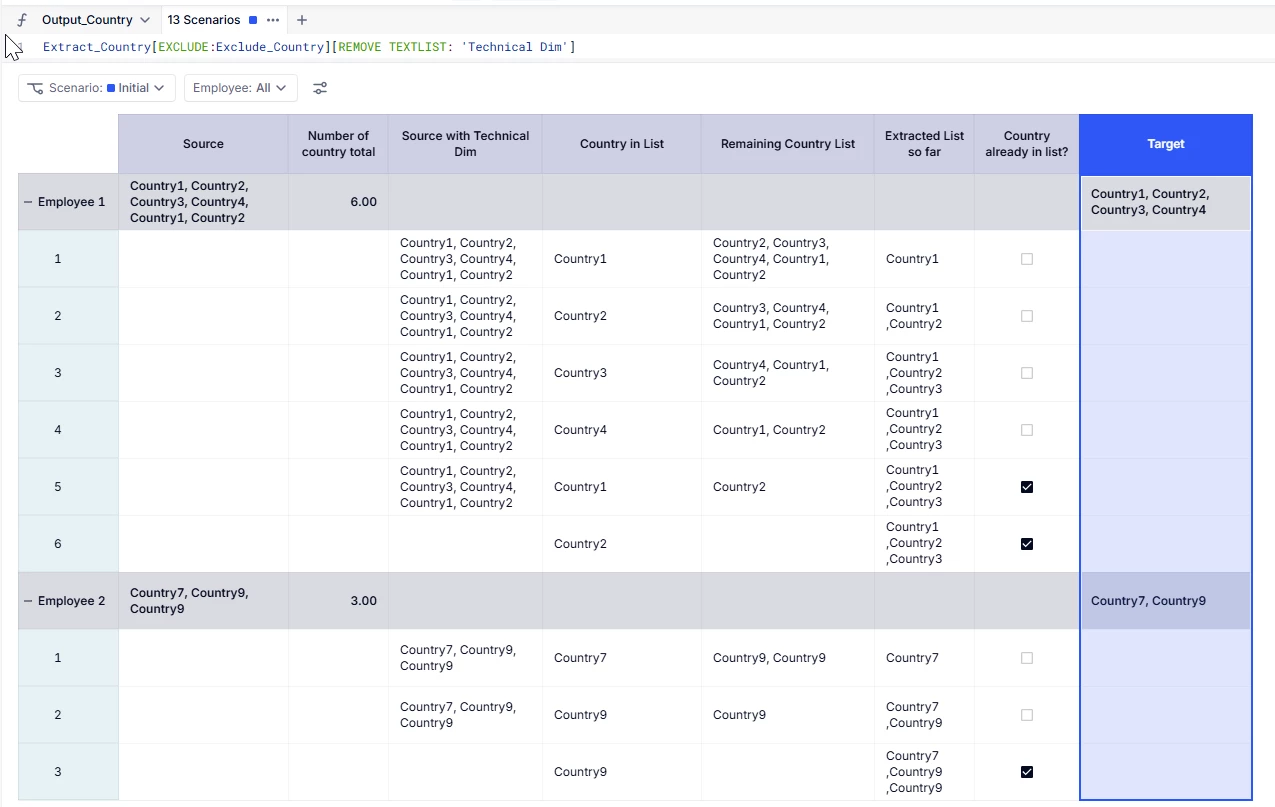
      Extract_Country[EXCLUDE:Exclude_Country][REMOVE TEXTLIST: 'Technical Dim']


I know it’s not straight forward but it should work.

Hope this helps

2 replies

CDALMAY
Master Helper
Forum|alt.badge.img+16
  • Master Helper
  • Answer
  • May 20, 2026

Hi ​@Chahat ,

I don’t think there is a Pigment function or keyword available to do this directly.

However you can achieve this with some other functions and intermediary metrics.
 

Here is the details of the metric I used :

  • Country_Source :
    • Data Type : Text
    • Employee dimension (note you can add any dimension you want, in your case Year)
  • Count_Number_Country :
    • Data Type : Numeric
    • Employee dimension
    • This one count the number of total country you have in the list
    • Formula :
      (LEN(Country_Source)-LEN(SUBSTITUTE(Country_Source,",","")))/LEN(",")+1


  • Country_With_Techinal_Dimension :
    • Data Type : Text
    • Employee dimension and Technical Dimension (which is just a running list)
    • Formula :
      Country_Source[ADD:'Technical Dim'][FILTER:'Technical Dim'.ID<Count_Number_Country]


  • Extract_Country :
    • Data Type : Text
    • Employee dimension and Technical Dimension
    • This metric extracts one country at a time and stores it into the technical dimension
    • Formula (with iteration) :
      IF('Technical Dim'='Technical Dim'."1",
      LEFT(Country_Source_With_Tech_Dim,FIND(",",Country_Source_With_Tech_Dim)-1),
      IF('Technical Dim'.ID < Count_Number_Country,
      LEFT(PREVIOUSOF(Extract_Country_Remaining),FIND(",",PREVIOUSOF(Extract_Country_Remaining))-1),
      PREVIOUSOF(Extract_Country_Remaining)
      )
      )


  • Extract_Country_Remaining :
    • Data Type : Text
    • Employee dimension and Technical Dimension
    • This metric stores the remaining list to extract
    • Formula (with iteration) : 
      IF('Technical Dim'='Technical Dim'."1",
      MID(Country_Source_With_Tech_Dim,FIND(",",Country_Source_With_Tech_Dim)+2,LEN(Country_Source_With_Tech_Dim)),
      MID(PREVIOUS('Technical Dim'),FIND(",",PREVIOUS('Technical Dim'))+2,LEN(Country_Source_With_Tech_Dim))
      )


  • Extracted_List :
    • Data Type : Text
    • Employee dimension and Technical Dimension
    • This metric stores the total list extracted (note it could be optional) if you don’t care about the order of the output. 
    • Formula :
      IF('Technical Dim' = 'Technical Dim'."1",
      Extract_Country,
      PREVIOUS('Technical Dim') & " ," & Extract_Country
      )[FILTER:'Technical Dim'.ID<=Count_Number_Country]


  • Exclude_Country :
    • Data Type : Boolean
    • Employee dimension and Technical Dimension
    • This metric specify if the country is already in the list or not so we keep only once occurrence. If you don’t care about the order of the output you can use Extract_Country_Remaining instead of Extracted_List.
    • Formula 
      IF(CONTAINS(Extract_Country,Extracted_List[SELECT:'Technical Dim'-1]),TRUE)


  • Output_Country :
    • Data Type : Text
    • Employee dimension
    • This metric is the output you are expected, it will have the same dimentionality as the source metric.
    • Formula :
      Extract_Country[EXCLUDE:Exclude_Country][REMOVE TEXTLIST: 'Technical Dim']


I know it’s not straight forward but it should work.

Hope this helps


Chahat
Master Helper
Forum|alt.badge.img+18
  • Author
  • Master Helper
  • May 20, 2026

Thank you for the detailed explanation, ​@CDALMAY.

Although this approach was not the most direct or straightforward, but it worked.
Also, I had to configure iterative calculations.