



Solved

Visual Grouping/Indentation of Independent Metrics on Boards

  • February 16, 2026
  • 2 replies
  • 48 views

Madhu
Apprentice Author
Forum|alt.badge.img

Hi Everyone,

I am looking for a way to visually group and indent independent Metrics on a Pigment Board to create a hierarchy, similar to a traditional P&L view.

The Setup: I have four separate Metrics, each calculated using its own formula:

  1. Other Operational expenses (The parent/total)

  2. Warehouse expenses

  3. Transportation cost

  4. Other expenses

The Goal: I have added these four metrics to a Pivot table. I want to arrange them so they appear grouped together, with the sub-categories indented under the total, like this:
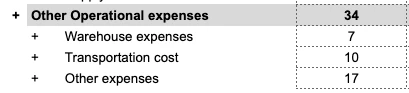
 

The Question: Is there a way to achieve this visual "parent-child" grouping directly on a Board or Pivot table without creating an additional "Reporting" dimension or a mapping metric? I’m trying to keep the model lean and avoid manual maintenance of a consolidation dimension if possible.

Are there any "Display" settings or Pivot configurations that allow for custom indentation or visual nesting of independent Metrics?

Thanks in advance for the help!

Best answer by Julie Guérin

Hi ​@Madhu,


No, you can’t create a custom parent → child hierarchy across independent metrics using only Display or Pivot settings. Expand/collapse and grouping behaviour are only available when driven by a dimension hierarchy, not standalone metric relationships.


To enable nesting, use a dimension with hierarchical properties, place the properties in rows or use breakdown, and enable tree display.


Visual alternatives (without expand/collapse):

  • Naming conventions: (e.g., 01 Revenue, 01.1 Product) to create a grouped visual effect but without true nesting.
  • Formatting: borders, colour coding to visually indicate levels.

For full expand/collapse functionality, the reporting dimension with a hierarchy or a mapping metric remains the recommended approach.

2 replies

Julie Guérin
Employee
Forum|alt.badge.img+8

Hi ​@Madhu,


No, you can’t create a custom parent → child hierarchy across independent metrics using only Display or Pivot settings. Expand/collapse and grouping behaviour are only available when driven by a dimension hierarchy, not standalone metric relationships.


To enable nesting, use a dimension with hierarchical properties, place the properties in rows or use breakdown, and enable tree display.


Visual alternatives (without expand/collapse):

  • Naming conventions: (e.g., 01 Revenue, 01.1 Product) to create a grouped visual effect but without true nesting.
  • Formatting: borders, colour coding to visually indicate levels.

For full expand/collapse functionality, the reporting dimension with a hierarchy or a mapping metric remains the recommended approach.


CDALMAY
Master Helper
Forum|alt.badge.img+16
  • Master Helper
  • March 3, 2026

Hi ​@Madhu,

You could get to this visual by using the blank ASCII character : https://www.compart.com/en/unicode/U+2800

Using it, you can rename your metrics like this (the child ones have this blank character leading and not space)
+ Other Operational expenses
⠀⠀+ Warehouse Expense

⠀⠀+ Transportation Cost

⠀⠀+ Other Expenses

Note : you cannot use space at the beginning of the name and you need to use this “⠀” blank character otherwise the renaming automatically remove the leading space.


Otherwise, as you pointed out and as ​@Julie Guérin mentioned you could get a technical dimension and merge the 4 metrics into one and use dimension roll-ups, depends on what you prefer.

Hope this helps