



Question

Visual Grouping/Indentation of Independent Metrics on Boards

  • February 16, 2026
  • 2 replies
  • 37 views

Madhu
Apprentice Author
Forum|alt.badge.img

Hi Everyone,

I am looking for a way to visually group and indent independent Metrics on a Pigment Board to create a hierarchy, similar to a traditional P&L view.

The Setup: I have four separate Metrics, each calculated using its own formula:

  1. Other Operational expenses (The parent/total)

  2. Warehouse expenses

  3. Transportation cost

  4. Other expenses

The Goal: I have added these four metrics to a Pivot table. I want to arrange them so they appear grouped together, with the sub-categories indented under the total, like this:
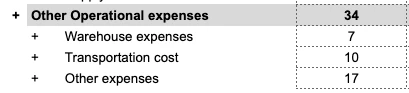
 

The Question: Is there a way to achieve this visual "parent-child" grouping directly on a Board or Pivot table without creating an additional "Reporting" dimension or a mapping metric? I’m trying to keep the model lean and avoid manual maintenance of a consolidation dimension if possible.

Are there any "Display" settings or Pivot configurations that allow for custom indentation or visual nesting of independent Metrics?

Thanks in advance for the help!

2 replies

Julie Guérin
Employee
Forum|alt.badge.img+8

Hi ​@Madhu,


No, you can’t create a custom parent → child hierarchy across independent metrics using only Display or Pivot settings. Expand/collapse and grouping behaviour are only available when driven by a dimension hierarchy, not standalone metric relationships.


To enable nesting, use a dimension with hierarchical properties, place the properties in rows or use breakdown, and enable tree display.


Visual alternatives (without expand/collapse):

  • Naming conventions: (e.g., 01 Revenue, 01.1 Product) to create a grouped visual effect but without true nesting.
  • Formatting: borders, colour coding to visually indicate levels.

For full expand/collapse functionality, the reporting dimension with a hierarchy or a mapping metric remains the recommended approach.


CDALMAY
Master Helper
Forum|alt.badge.img+16
  • Master Helper
  • March 3, 2026

Hi ​@Madhu,

You could get to this visual by using the blank ASCII character : https://www.compart.com/en/unicode/U+2800

Using it, you can rename your metrics like this (the child ones have this blank character leading and not space)
+ Other Operational expenses
⠀⠀+ Warehouse Expense

⠀⠀+ Transportation Cost

⠀⠀+ Other Expenses

Note : you cannot use space at the beginning of the name and you need to use this “⠀” blank character otherwise the renaming automatically remove the leading space.


Otherwise, as you pointed out and as ​@Julie Guérin mentioned you could get a technical dimension and merge the 4 metrics into one and use dimension roll-ups, depends on what you prefer.

Hope this helps