




When setting up Access rights, there are multiple different ways to achieve the same result. This article will provide tips on how to optimize your access rights configurations for the best performance.
This article applies tips to the current version of access rights while comparing some of the differences to the Legacy
Table of contents
How to optimize performance with access rights?
In general, the most optimized way to build access rights on the current access rights system is to have multiple rules to be applied, each of them independent and as ‘small’ in cardinality as much as possible.
Cardinality refers to the number of distinct values in a set or a column of a database. In simpler terms, it is a measure of how many different unique items or elements are present in a particular group or category.
Managing cardinality
Ensure that the cardinality of the rules isn't too large. This involves keeping the number of dimensions in each rule to a reasonable and manageable level. It's important to avoid creating rules with a large number of dimensions, as this can lead to complex computations and potentially slow down the system.
How to calculate maximum cardinality?
In the block Settings > Access Rights, the dimensions of the access rights are given by clicking on View detailed access by Members, you can see the different dimensions that are being applied. This depends on both the direct rules and the inherited part if any.

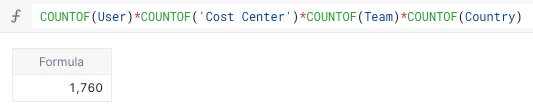
In our example, we can see we have the User, Cost Center, Country and Team dimensions. We can use the COUNTOF function to get a count and multiply them together.
COUNTOF(User) * COUNTOF('Cost Center')* COUNTOF(Country)* COUNTOF(Team)
Building multiple independent rules
Instead of creating a single rule with many dimensions, it's better to create several rules that can be applied independently. This helps in simplifying the access rights structure and makes it easier to manage.
Working with the same example as above, here is what it would look like if we broke it down into four different rules.
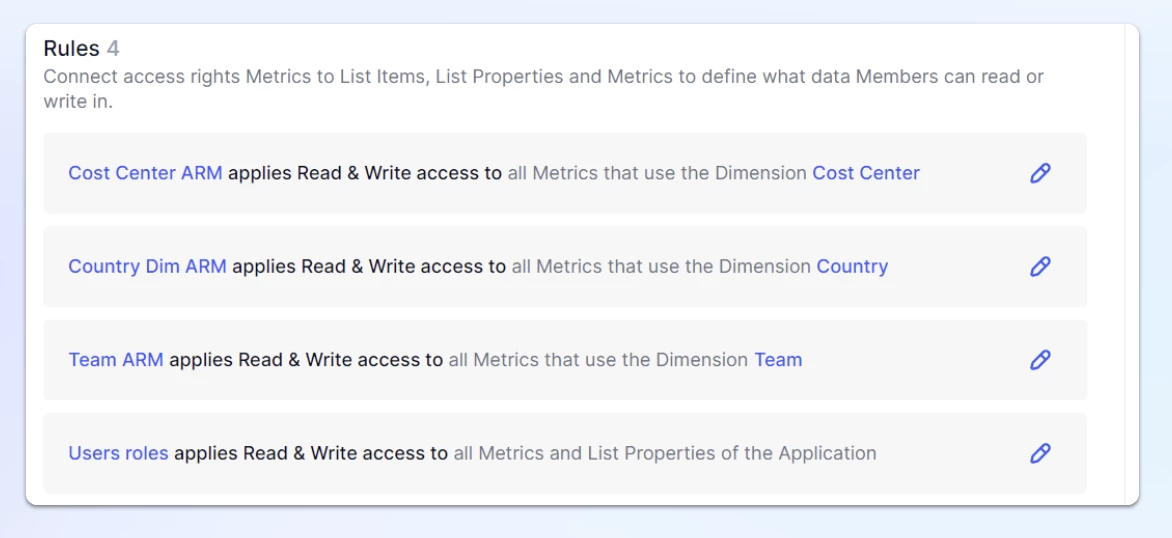
Then the maximum cardinality becomes the max cardinality of each of the rules (when no inheritance is involved):
COUNTOF(User)* COUNTOF('Cost Center')= 440COUNTOF(User)* COUNTOF(Country)= 440COUNTOF(User)* COUNTOF(Team)= 440COUNTOF(User)= 220
So the max cardinality is 440 here instead of being 1760
Realistically, we are going to want to combine so here is that same example with Country and Team dimensions combined into one rule.
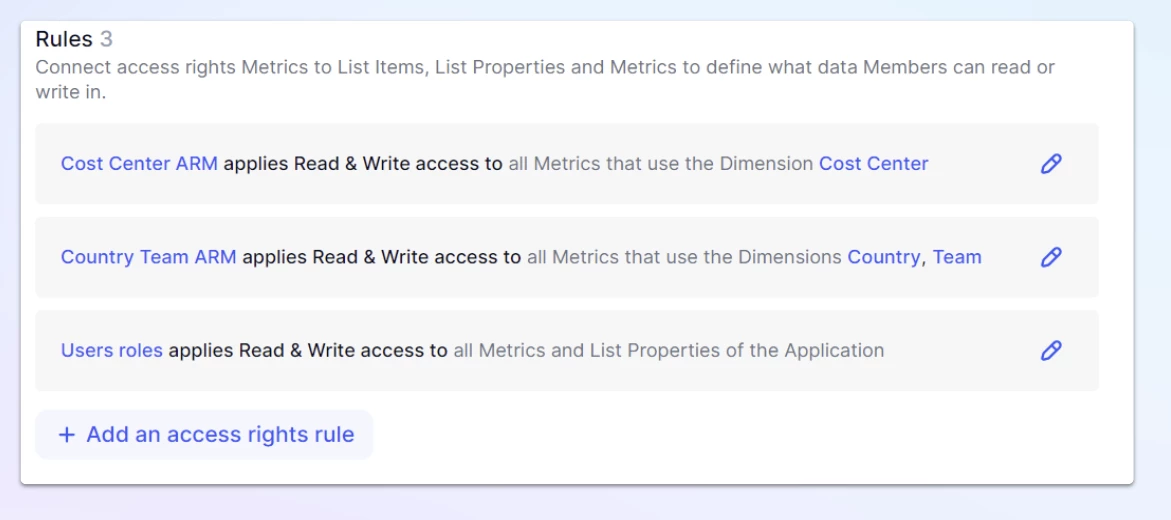
COUNTOF(User)* COUNTOF(Team) * COUNTOF(Country)= 880COUNTOF(User)* COUNTOF('Cost Center')= 440COUNTOF(User)= 220
So the max cardinality becomes 880, which is still an improvement compared to 1760.
Keeping dimensions small
Make sure that each of the dimensions within the rules has a small cardinality. This means that the number of unique items or values within each dimension should be kept relatively low. This practice helps in simplifying the computations and processing of the access rights.
Using BLANK instead of FALSE
When applying Access Rights in formulas, use BLANK instead of FALSE wherever possible. By doing so, you can make the underlying Metric sparse, which helps in avoiding the storage and consideration of irrelevant values during computation. This practice can optimize the performance of the system and improve efficiency.
How is this an improvement over Legacy access rights?
In Legacy Access rights, we compute all the possible access for every user and the dimensions required by the security rules (+ possible extra dimensions due to inheritance), before applying those rules to the block.
This can lead to what we call “cardinality issues”: there are too many combinations to calculate which often leads to timeouts in the AR model.