




⚠️ Important
Please ensure you carefully review the instructions related to customer requests and the required scoping process to support a successful launch.
Once the initial scoping is complete, Product Support will accept requests submitted by the Solution Architect or Partner Consultant assigned to the project.
If the customer is not actively working with a Solution Architect or Partner, please reach out to the Support team for guidance on how to proceed.
This document provides guidance for Customer Success and Implementation teams on how to manage Test & Deploy requests and successfully set up the feature for customers.
Test & Deploy is available exclusively to Enterprise customers as part of their Pigment agreement.
Customer Success and Implementation teams are responsible for ensuring customers derive value from this feature within a scope that aligns with their specific needs, while also adhering to the feature capabilities and constraints.
Refer to the sections below for a detailed overview of these processes:
The schematic below provides a high-level overview of the end-to-end Test & Deploy process, from initial request and scoping through to final implementation.
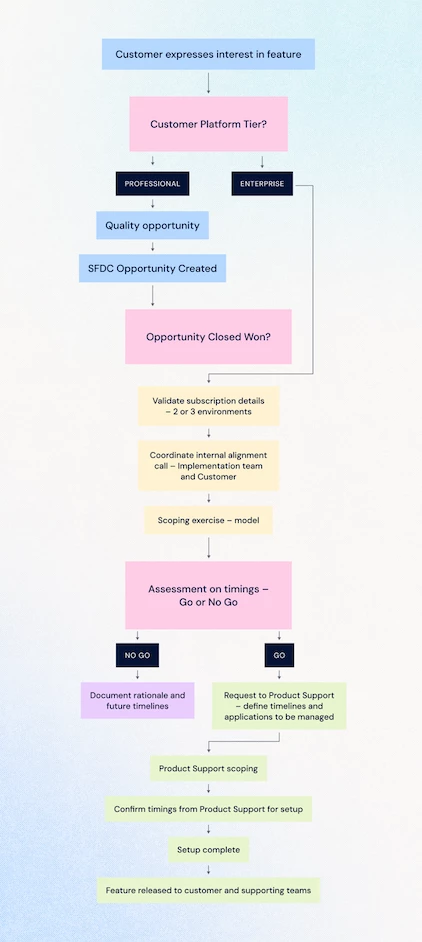
I’m a CSM and my customer is interested in Test & Deploy - what do I do?
When a customer expresses interest in Test & Deploy (T&D), your role as a CSM is to guide them through scoping, education, and (if required) commercial validation to ensure a smooth and successful rollout.
Below is a step-by-step guide to help you navigate the process.
1️⃣ Scoping
What’s included by default?
The Enterprise plan offering for Test & Deploy includes:
- Development (DEV) and Production (PROD) workspaces
- 25% of Production data replicated in Development (default setup)
Optional Add-Ons
Depending on customer requirements, additional options are available:
-
A third environment (Test) structured as:
Development → Test → Production
-
100% of Production data replicated in Development
These options are not mutually exclusive. However, they are costed separately.
As customers mature in their use of Pigment, their Test & Deploy needs may evolve. They should reach out to their CSM to reassess scope and requirements as needed.
⭐ For Newly Onboarded Customers
Ideally, customers outline their desire for Test & Deploy at the start of implementation.
This allows Solution Architects to:
- Incorporate T&D into the implementation strategy
- Build the model with the feature in mind from the outset
Test & Deploy can be introduced before go-live, with the ideal timing being the start of User Acceptance Testing (UAT).
Introducing T&D during UAT:
- Allows further changes within the T&D framework
- Helps modelers become familiar with the process
- Encourages refinement of ways of working before launch
⭐ For Existing Customers
For customers with established models and active user groups, additional scoping may be required.
Test & Deploy introduces structural changes, meaning:
- End users may need to refamiliarize themselves with updated workflows
- Change management considerations may apply
Key discussion points:
- Align on the customer’s goals for Test & Deploy
- Establish a realistic timeline
- Avoid implementation during business-critical periods
- Identify which Applications will be managed under Test & Deploy (if applicable)
2️⃣ Introduction & Demo
Before moving forward, ensure the customer understands the feature and how it applies to their use case.
Recommended Flow
-
Job Aid👉 Test & Deploy Job Aid
If they wish to proceed, guide them through the Job Aid:
This can be completed independently or in collaboration with their CSM.
-
Additional Learning Resources👉 Academy Courses👉 Community Articles
All Academy members can access Test & Deploy courses — even if the feature is not yet enabled in their workspace:
We also recommend reviewing relevant documentation in Community:
Encouraging customers to review these resources in advance helps ensure a smoother implementation.
3️⃣ Contract & Costing
Non-Enterprise Customers
If the customer is not on Enterprise:
-
Qualify the opportunity to upgrade to Enterprise
or
-
Review pricing and opportunity details in Salesforce
Enterprise Customers Requesting Additional Options
If an Enterprise customer requests:
- A third environment
- 100% Production data in Development
- Or both
You should:
- Validate pricing terms and opportunity information in Salesforce
- Request a scoping assessment with a Solution Architect or approved Partner
✅ Summary Checklist
When a customer expresses interest in Test & Deploy:
☐ Confirm current platform tier
☐ Align on business goals and scope
☐ Review timing (avoid critical periods)
☐ Share Academy resources
☐ Engage SA/Partner for scoping if required
I’m a Solution Architect/Partner working with a customer interested in Test & Deploy - what do I do?
Once the initial scoping (led by the CSM) is completed, an additional scoping phase is required to align with the client’s specific needs and model requirements.
1️⃣ Scoping
⭐ New Customers
With support from an internal Solution Architect or a Partner, Test & Deploy enablement should ideally be implemented ahead of User Acceptance Testing (UAT). This allows adequate time to review implementation considerations and provides flexibility to establish any required data connections.
It is recommended to complete this phase early in the build process, before the majority of development work begins. This ensures that model compatibility with the feature is considered from the outset, reducing the need for amendments at a later stage, which may add additional build time.
Enablement of the feature should also be completed prior to the initial main data loads into Production. Doing so ensures that the data volume in the Development environment remains lower than the expected Production volume, enabling more efficient testing and deployment.
In most cases, it is recommended to begin the build with Test & Deploy enabled, starting with an empty Development environment. This approach supports the considerations outlined above and ensures that process workflows are incorporated and evaluated throughout the implementation project.
This approach allows customers to:
- Adjust their workspace configuration early
- Maximize the effectiveness of Test & Deploy from the outset
⭐ Existing Customers
The timeline to go live with Test & Deploy depends on several factors:
- Final scope (Applications) to be managed
- Available resources to conduct the scoping exercise
- Customer readiness from a business process perspective
- Current business activity (avoid critical periods or deadlines)
2️⃣ Implementation considerations
Once scoping is complete, the implementation phase begins. The following considerations are key to ensuring a smooth enablement of Test & Deploy:
| Consideration | Advice |
|---|---|
| Dimension Management |
⚠️ Avoid typing a property on a managed Dimension with a non-managed Dimension (common deployment failure) |
| Formula Design (Avoid Hardcoding) | Replace hardcoded values with Boolean properties Instead of:
Use:
|
| Data Management Across Environments | Optimize DEV environments with reduced datasets Consider:
|
| Data & Imports | Connected Lists Ensure no import in PROD automatically creates new items in connected lists If this occurs:
|
| User Dimension Constraints | Never use User Dimension items directly in formulas Instead:
Avoid using User Dimension as a data type in connected lists If required:
|
| Release Readiness Checks | Before deploying, validate:
|
| Boards Deployment |
|
3️⃣ Trial Setups
In some cases, a trial setup can be requested.
Purpose
- Duplicate the workspace with Test & Deploy enabled
- Simulate deployments to identify required model changes
🚫 Do not make changes in the trial environment
Instead:
- Use it to identify issues
- Apply required fixes in the live environment
4️⃣ Resources for Solution Architect and Partner
5️⃣ Data Volume Considerations (25% Development Agreements)
If the customer’s agreement includes 25% Production data volume in Development, the initial setup will provision 100% of Production data.
At this stage:
- The Solution Architect or Partner are responsible for the revision and approval of the Development environment before go-live
- Historic data is manually reduced
We typically recommend retaining the most recent year of data to ensure relevance while minimising storage footprint.
Pigment monitors:
- Production environment size
- Typical usage patterns in the weeks prior to implementation
This ensures capacity is appropriately assessed.
6️⃣ Post-scoping questions
If further clarification is needed:
Internal Users
- Raise in Slack: #feature-test-and-deploy
Partners
- Coordinate with the CSM to escalate internally
✅ Summary Checklist
Before You Start
☐ Confirm which areas (Applications) will be managed
☐ Ensure your team is available to support the setup
☐ Avoid starting during critical business periods
Getting Your Workspace Ready
☐ Identify where flexibility is needed in your data (e.g. user-managed lists)
☐ Ensure your setup is consistent across environments (DEV & PROD)
☐ Avoid hardcoding values—use configurable fields instead
Data & Processes
☐ Make sure data updates are controlled and predictable
☐ Avoid making structural changes directly in Production
☐ Keep your test environment (DEV) simple and efficient
User Setup
☐ Avoid relying on specific users in calculations
☐ Use roles or attributes instead of individual names
Before Going Live
☐ Validate that everything works as expected in testing
☐ Check access rights and security settings
☐ Ensure dashboards/boards are ready to be deployed
If Using a Trial Environment
☐ Use it to test and identify improvements
☐ Make changes in your main environment (not in the trial)
Both CSM and Solution Architect / Partner scoping exercises are done. What’s next?
Once all scoping has been completed and the customer has been fully prepared for Test & Deploy, the next step is to request setup through Product Support.
This request must be submitted by a Solution Architect (SA) or an approved Partner.
⚠️ Requests submitted by CSMs will only be accepted if an SA or Partner is not on the project.
1️⃣ Submitting a Test & Deploy Request
To raise a request, use the appropriate portal and select “Test & Deploy Request.”
-
Solution Architect Portal:
👉 https://internal-support.pigment.com/en/support/tickets/new?ticket_form=test_%26_deploy_request
-
Partner Portal:
👉 https://partner-support.pigment.com/en/support/tickets/new?ticket_form=test_%26_deploy_request
Partners and internal Solution Architects must use the portal aligned with their role.
2️⃣ Information Required in the Ticket
When submitting the request, the following details must be provided:
1. Name of the Customer Workspace
Provide the full name of the Workspace exactly as it appears in Pigment.
2. Number of Environments
This depends on the agreed scope and contractual terms. Options include:
- Two environments: Development and Production
- Three environments: Development, Test, and Production
Ensure this aligns with what has been scoped and agreed commercially.
3. Applications to Be Included in Development
List all Applications that should be included in the Development environment.
⚠️ Important considerations:
- All connected Applications that share Libraries or Blocks must be included.
- If the customer does not want to carry over specific connected Applications, they must first remove any shared Libraries or Blocks from those Applications.
Failure to do so may delay setup.
4. Customer Business Hours
Test & Deploy setup is completed outside of business hours to minimise disruption while connections are established between environments.
Please specify:
- Business days
- Business hours (including timezone)
Providing this information ensures implementation can be accurately scheduled.
Setup Scheduling Guidelines
-
Live Models (Existing Customers):
Setups should be completed Monday–Wednesday to ensure sufficient support coverage from both Pigment teams and implementation partners in the days immediately following deployment.
-
New Customers:
Setups can be scheduled on Thursday–Friday, provided there is no risk of end-user disruption.
5. Users to Be Added to New Environments
Typically:
- Builder role (or higher) → DEV / TEST environments
- Responsible for applying and testing structural changes
- Standard Members / business users → PROD environment
- Consume tested and deployed changes
Account types remain consistent (“like-for-like”) across all environments at the time of set up.
3️⃣ What to Expect After Submission
Scoping Timeline
Product Support scoping can take up to one week - Please inform the customer accordingly.
We aim to complete scoping as efficiently as possible while ensuring all technical considerations are reviewed and validated.
Once scoping is complete, we will respond to the ticket with available implementation dates. Our team will enable the feature between Monday and Wednesday weekly - this is to ensure adequate coverage from Product Support and Implementation teams in the days following enablement.
4️⃣ Completion Confirmation
Once setup is complete:
- Product Support will update the ticket
- The requestor will be notified
- The Test & Deploy environments will be ready for use
✅ Summary Checklist
Before submitting a request, ensure:
☐ Scoping is fully complete
☐ Commercial terms are validated
☐ Workspace name is confirmed
☐ Applications list is accurate and dependencies reviewed
☐ Business hours are specified
☐ User access roles are clearly defined