
Question

Combining a cumulate (YTD) metric with an Offset vs LY metric

  • August 18, 2026
  • 2 replies
  • 29 views

 Good afternoon!


I have a question whichs regards the combination of two measures within a P&L setting.

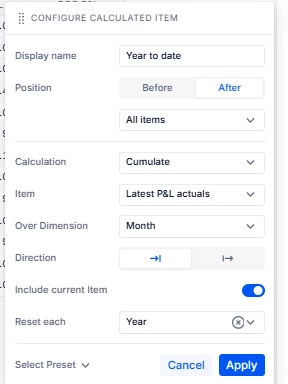
First measure: A Year To Date cumulative calculated item. Sums all the values of a line item in the P&L untill the most recent period, within the current fiscal year.

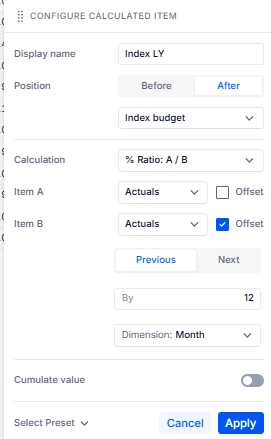
Second measure: An index vs LY measure. Should take the index of the actuals against the actual values of last year.


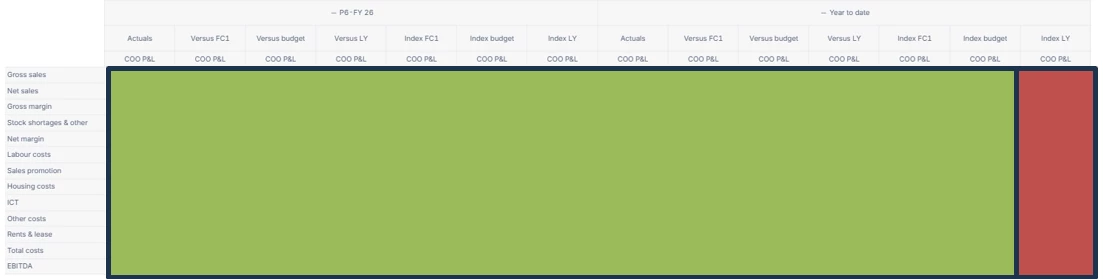
In this P&L, the columns are seperated in two groups, as visible in the first snippet: first 7 monthly measures, then 7 Year to date measures. Each of the columns are currently filled with accurate calculations, except for the very last one: Year to date → Index LY.

 I have put my current Year to Date and Index LY calculations in the attachment as well. To clarify: both the Index LY as well as the Year to date measure on its own are working just fine. It really is about the combination of both calculations in the last column.


Does anybody have a clue how to solve this error? I have tried the Pigment AI tools but these were not helpful in this case. 


2 replies

Forum|alt.badge.img+3
  • Employee
  • August 20, 2026

Hi there,


Thanks for sharing the details!


In this case, the issue is likely due to combining two view-level calculations: YTD / Cumulate and Index vs LY / Offset. These can work separately, but may not evaluate correctly when stacked together in the same view.


The best workaround is to move the combined logic into dedicated metrics instead, for example:


Actual YTD = YEARTODATE(Actual) LY YTD = Actual YTD[SELECT: Month - 12] Index LY YTD = Actual YTD / LY YTD

If you want the result as an index, you can multiply the final metric by 100.


This should give a more reliable result than chaining the calculations directly in the view.


Hope this helps!


Veniamin
Apprentice Helper
Forum|alt.badge.img+1
  • Apprentice Helper
  • August 21, 2026

You can also do both operations inside a single calculated item, and then the stacking never happens. Keep your Index LY configuration as it is, % Ratio: A / B with Item B offset Previous 12 over Month, and switch on Cumulate value at the bottom. Set its Over Dimension to Month and Reset each to Year so it matches your existing YTD item. Both sides of the ratio cumulate before dividing, which gives you YTD actuals over YTD last year rather than a cumulated ratio.
It's the same combination the docs use for Year over Year growth, where Item B is offset by 12 and Cumulate value is on: https://kb.pigment.com/docs/compare-data-calculated-items