


Question

Exclude 'old' months from page selector options

  • March 15, 2026
  • 1 reply
  • 21 views

Bas
Master Author
Forum|alt.badge.img+9
  • Master Author

Good afternoon,

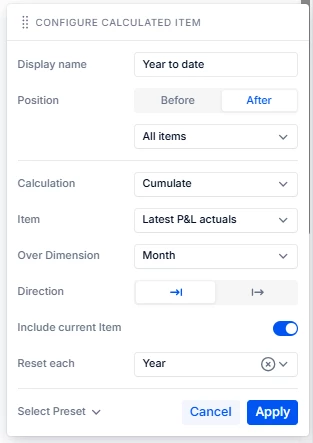
Is there a way to exclude ‘old’ months from the available items in page selectors? Currently I have a P&L that uses a dynamic variable (‘latest month’) as a source for the YTD calculation in a calculated column. Users can change the value of this variable in their sessions. 

Like so:


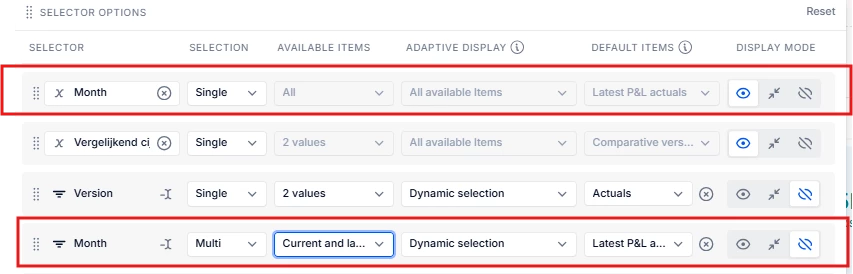
I have my month dimension in the page selector and set the default as the dynamic variable so that the P&L is automatically filtered on the latest month. 

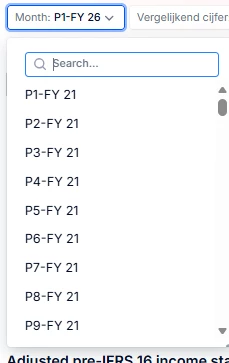
But the ‘problem’ now is that the visible page selector shows all the available months but I want to limit this to only the last year and current year only. 

Is there a way to limit the page selector options to only the recent months while keeping the dynamic variable for the YTD calculation intact?


1 reply

Luiza
Employee
Forum|alt.badge.img+1
  • Employee
  • March 16, 2026

Hi Bas,

You can limit the months shown in the page selector by using filters to only display the months you want (for example, the last year and the current year).

You can keep your dynamic variable for the YTD calculation as is. Applying the filter will not impact the variable, so users can still change it freely.

Implementation steps:

1 - In your Metric or Table, click the Filter icon.

2 - Select “+ Add a Filter.”

3 - Configure the filter to include only the desired months (e.g., last year + current year).

» Make sure the filter is applied to the month dimension used in the page selector.

You can find more information on this article:
https://kb.pigment.com/docs/filter-data-pigment

Best,

Luiza