

Question

Previous() Override

  • January 22, 2026
  • 4 replies
  • 203 views

Forum|alt.badge.img+8

Hi,

I have a metric that pulls data from previous version and has metric override on. In current version, is there a way to delete data that came over from previous version without that cell reverting back to formula based result even if I don’t input any value.

 

4 replies

Min Li
Master Helper
Forum|alt.badge.img+13
  • Master Helper
  • January 22, 2026

You can try to use another metric to control which cell you want to use previous function.


Forum|alt.badge.img+8
  • Author
  • Master Author
  • January 28, 2026

@Min Li , I don’t want the previous values to populate current version based on a condition. I only want to add the flexibility to delete a particular comment so that after deleting it remains blank.


Forum|alt.badge.img+1

@tjain02, could you overwrite the data with a zero? You could avoid opening further sparisity by using FILTER in any subsequent metrics 


Julie Guérin
Employee
Forum|alt.badge.img+4

Hi there,

This behaviour is expected - when you override a formula with a value, the manual value takes precedence. However, a blank is not considered a value, so the formula is applied again.

For numeric fields, you can enter 0, as suggested by ​@William Seath, and adjust your formula to exclude zeros if needed. This will prevent the subsequent calculation from being triggered.

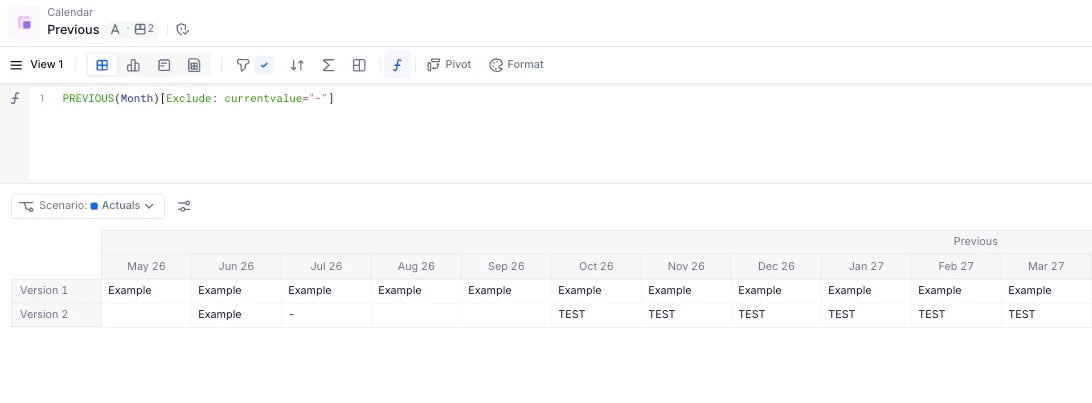
For text fields, you could enter a placeholder such as “-” and similarly exclude it in your formula. The initial entry will remain as it is an override rather than a formula-driven result.

Hope this helps!