

First, thank you Pigment team for listening to users’ feedback and create this new aggregator,
However when trying this out I have some questions:
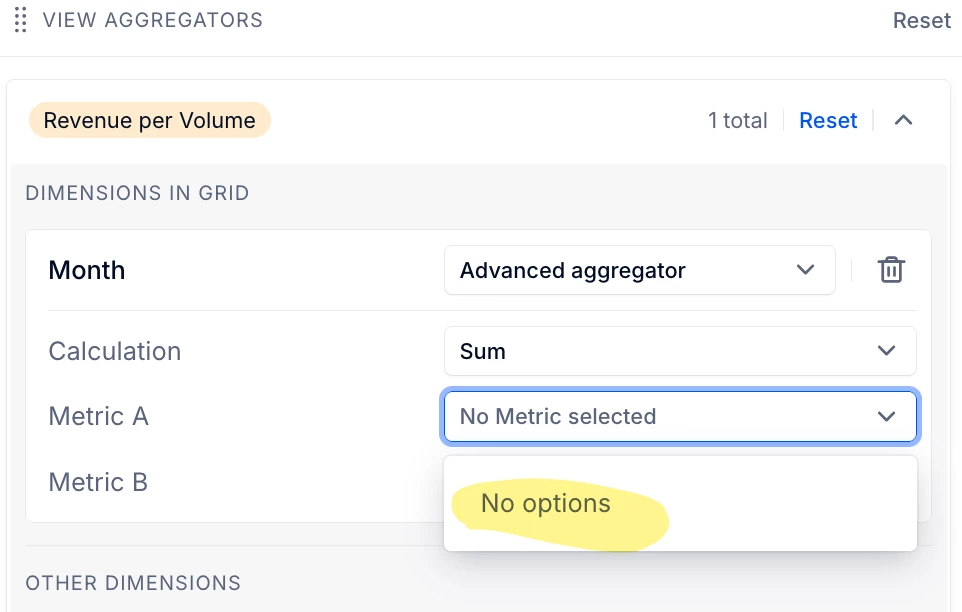
For example I have this metric called Revenue per Volume (Total Revenue / Total Volume), but when I use Advanced Aggregator I can not select this specific metric, the Metric A and Metric B options show all other metrics except this Revenue per Volume,
So, for this to work out, I need to add both Revenue metric and Volume metric, then setting these as Metric A and Metric B for my aggregator ? This sounds like duplicated works since I already have my Revenue per Volume metric built. Can you help me clarify my question here? Thank you!

Solved
Question on Pigment's New Advanced Aggregator
 +1
+1- Apprentice Author
Best answer by Gigi
Hi There!
Thank you for the positive feedback about the addition of the advanced aggregator, we’re happy to hear it!
Advanced Aggregator only lets you pick Metric A / Metric B from metrics that are available in the current table/view, and some metrics can also be hidden as operands if they already have an Advanced Aggregator or an incompatible “Show Value As” setup.
To make it work for “Revenue per Volume”, add the base metrics (Total Revenue and Total Volume) to the same view, then set:
- Metric A = Total Revenue
- Metric B = Total Volume
- Calculation = Ratio (A/B)
That way Pigment computes totals as Sum(Revenue) / Sum(Volume), rather than summing the already-calculated ratio.
We also have a useful Knowledge Base article in the link below which you may find useful.





Enter your E-mail address. We'll send you an e-mail with instructions to reset your password.