

Question

Scenario

  • June 2, 2026
  • 3 replies
  • 27 views

Forum|alt.badge.img+8

Hello!


I dropped in a table into another application, and somehow the scenarios are not available to choose. Is there anything I need to toggle on? Thanks for checking!


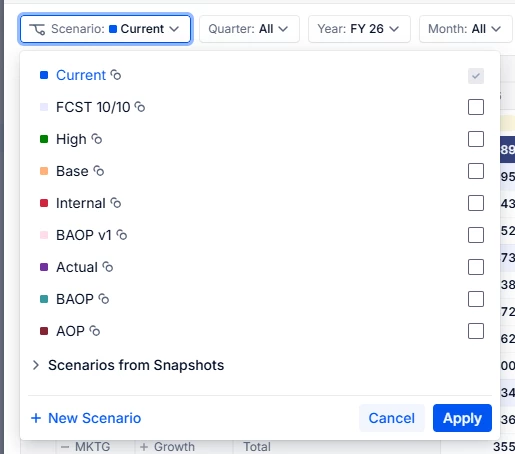
Scenarios shown in the original table:
 

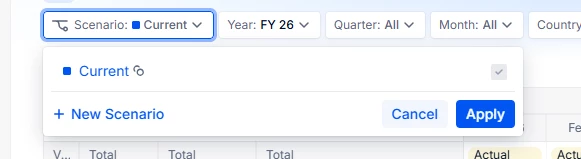
In another board page when I click Scenario:
 

3 replies

Julie Guérin
Employee
Forum|alt.badge.img+9

Hey ​@Yaejis,

Are these Scenarios configured as local or shared? Local Scenarios only exist within a single application and are not available across all applications where Scenarios are enabled.

I’d also recommend checking the relevant Role configuration in the application to ensure Scenario access permissions are set correctly to Read. Additionally, please double-check the page selector configuration on this board to confirm that the Available Items aren’t set to display only the Current Scenario.

Let us know if that helps!

Thanks!


Forum|alt.badge.img+8
  • Author
  • Master Author
  • June 4, 2026

Hi ​@Julie Guérin ! 


Thanks for the details! It is shared. Do you know if snapshot can be converted to a Scenario?


Julie Guérin
Employee
Forum|alt.badge.img+9

Hi ​@Yaejis,

No, a Snapshot cannot be converted into a Scenario.

As a workaround, you can create a new Scenario or Version or use an existing one in the live application, then use the Pigment-to-Pigment import to reload the required data from the Snapshot into the relevant blocks.

Hope this helps!