



Solved

Show Value As % of a Metric in a table

  • September 2, 2026
  • 1 reply
  • 66 views

Min Li
Master Helper
Forum|alt.badge.img+14

Hello Pigment community,

I recently found I can't use the "Show Value As" function in a table to calculate cost as a % of revenue at the department level. Maybe I'm missing something. Hoping someone can help explain.

For example, in a table I have Metric 1 (cost by department by month) and Metric 2 (total revenue by month), both added to the table. I tried setting "Show Value As" the % of Metric 2 for Metric 1, expecting to see cost as a % of revenue by each department. Instead, Pigment only gives me the total % of revenue. I believe this used to work at the department level.
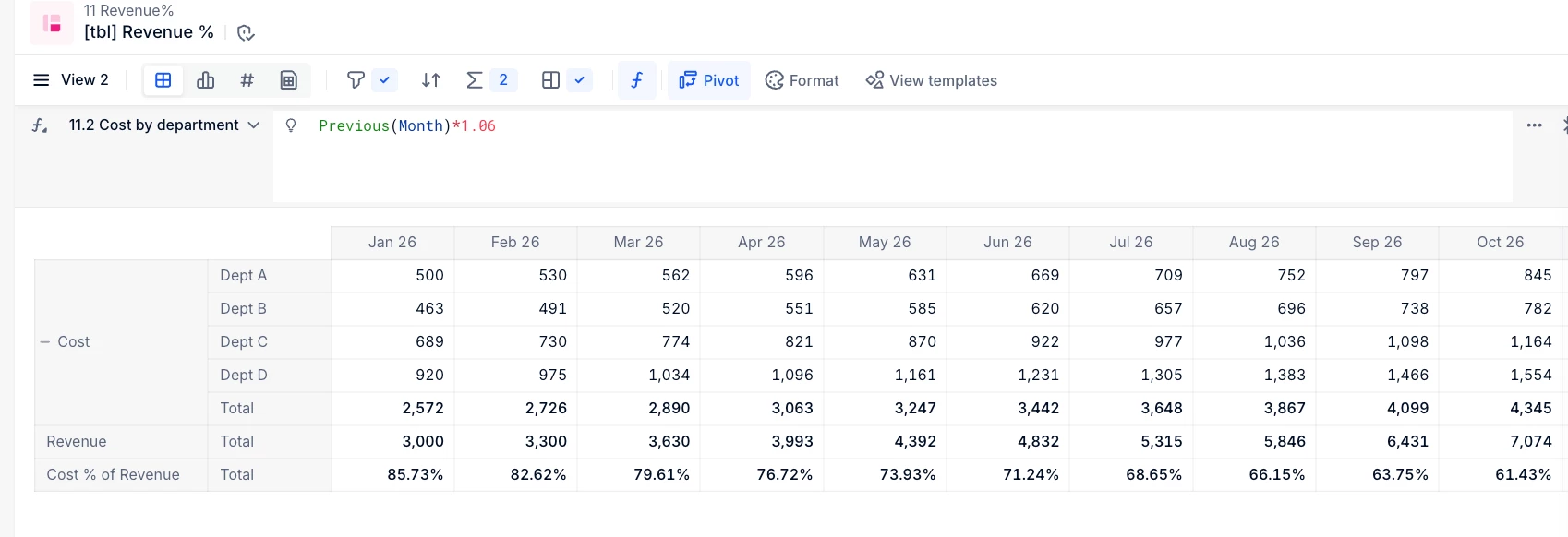
Any information is appreciated.


Thank you.

Best answer by Benoit

Hi,

this is because the metrics don’t have the same structure.


To fix it you can create a new ‘Revenue allocated by Department’ metric structured by the same dimensions as your Cost metric, and use a formula to allocate your Revenue accross all departments. The formula is as simple as calling your source ‘Revenue’ metric, it won’t be aligned but it’s not a problem.

Then you can take this new ‘Revenue allocated by Department’ metric in your table, hide it so it’s not displayed, but use it in your %of metric SVA to have the Cost % of Revenue. (It’s possible to use hidden metrics for SVAs, this way you keep your source Revenue metric as it is.)


Hope this works.

Please let us know.

Benoit

1 reply

Benoit
Community Manager
Forum|alt.badge.img+17
  • Community Manager
  • Answer
  • September 2, 2026

Hi,

this is because the metrics don’t have the same structure.


To fix it you can create a new ‘Revenue allocated by Department’ metric structured by the same dimensions as your Cost metric, and use a formula to allocate your Revenue accross all departments. The formula is as simple as calling your source ‘Revenue’ metric, it won’t be aligned but it’s not a problem.

Then you can take this new ‘Revenue allocated by Department’ metric in your table, hide it so it’s not displayed, but use it in your %of metric SVA to have the Cost % of Revenue. (It’s possible to use hidden metrics for SVAs, this way you keep your source Revenue metric as it is.)


Hope this works.

Please let us know.

Benoit