



Question

Show Value As % of a Metric in a table

  • September 2, 2026
  • 1 reply
  • 8 views

Min Li
Master Helper
Forum|alt.badge.img+14

Hello Pigment community,

I recently found I can't use the "Show Value As" function in a table to calculate cost as a % of revenue at the department level. Maybe I'm missing something. Hoping someone can help explain.

For example, in a table I have Metric 1 (cost by department by month) and Metric 2 (total revenue by month), both added to the table. I tried setting "Show Value As" the % of Metric 2 for Metric 1, expecting to see cost as a % of revenue by each department. Instead, Pigment only gives me the total % of revenue. I believe this used to work at the department level.
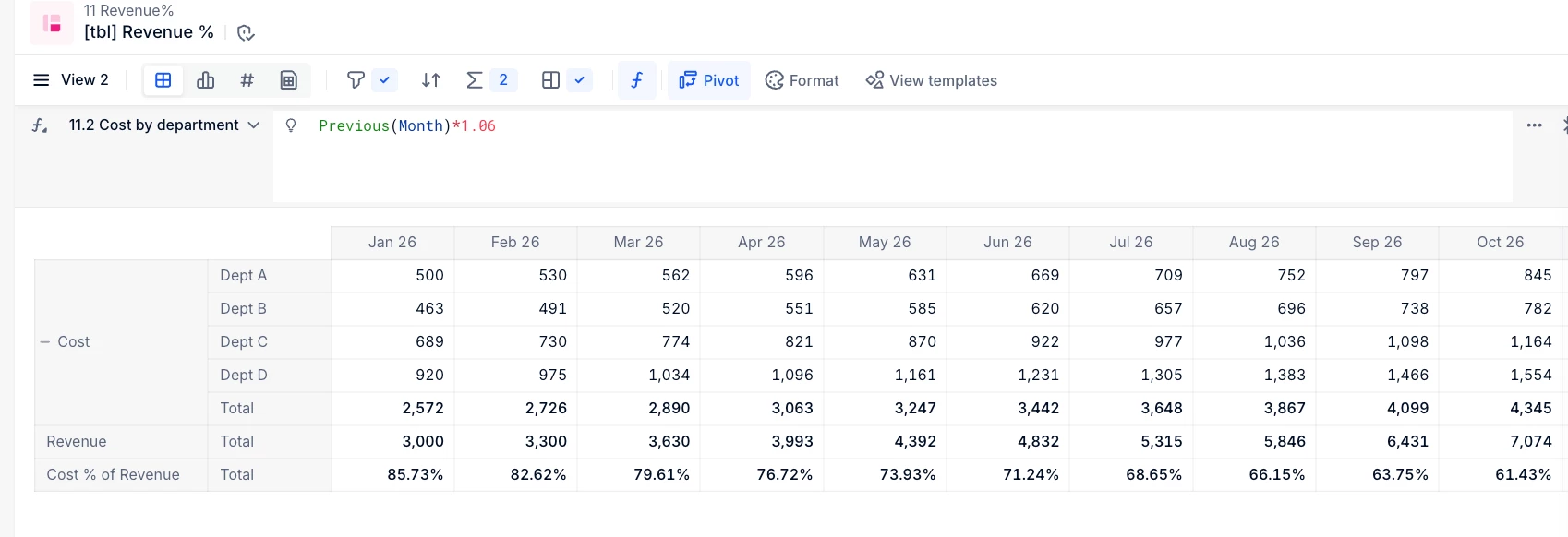
Any information is appreciated.


Thank you.

1 reply

Benoit
Community Manager
Forum|alt.badge.img+17
  • Community Manager
  • September 2, 2026

Hi,

this is because the metrics don’t have the same structure.


To fix it you can create a new ‘Revenue allocated by Department’ metric structured by the same dimensions as your Cost metric, and use a formula to allocate your Revenue accross all departments. The formula is as simple as calling your source ‘Revenue’ metric, it won’t be aligned but it’s not a problem.

Then you can take this new ‘Revenue allocated by Department’ metric in your table, hide it so it’s not displayed, but use it in your %of metric SVA to have the Cost % of Revenue. (It’s possible to use hidden metrics for SVAs, this way you keep your source Revenue metric as it is.)


Hope this works.

Please let us know.

Benoit