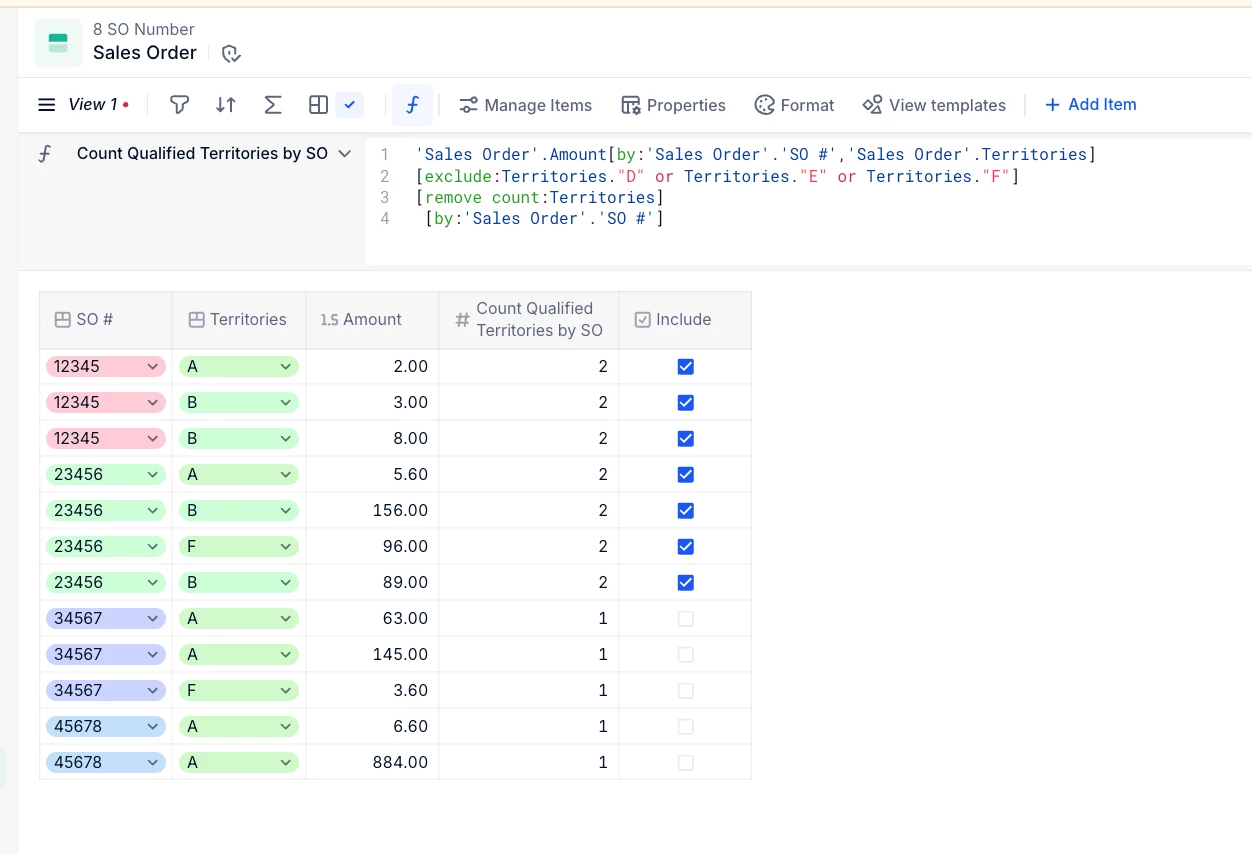


I am trying to build a board that identifies any sales orders (within the current fiscal year) that tie back to more than one sales territory, but with a catch, since there are only 3 out of 6 territories that I care about. So, I have a data set with a whole bunch of sales order numbers and the sales territories they tie back to...hundreds of thousands of rows of data. Each row has one SO#, one sales territory and the bookings that went to it., meaning one SO could be displayed in up to 6 rows in this data set.
But I only want to see the ones where a single SO ties to more than one of 3 specific territories, which should be a very small amount. But there are 6 territories that could be listed. Territories A, B and C are our geo territories that actually have salespeople assigned to them. Territories D, E and F are corp adjustments and misc territories. Any bookings tying to those generally net out to $0, but because bookings go in and then come out, the system still registers that bookings tied to those territories. So, I need to omit those from these lists.
Example 1, SO#12345 has bookings that tie to territories A & B. THAT is an SO number I want to see displayed in the board.
Example 2, SO# 23456 ties back to territories A, B and F. (Territory F is a misc territory that doesn’t matter.) THAT is still an SO number I want to see displayed, because it also ties to both A and B.
Example 3, SO#34567 ties back to territories A and F. I do not want this SO number displayed in the board because I don’t care about F.
Example 4, SO#45678 ties back to just territory A. I do not want to see this displayed in the board.
Do I create a board that is filtered at the page level to just territories A, B and C and then create a grid that has an IF formula where it groups territories by SO, and then counts the number of territories per SO and only displays ones where the count is greater than 1? Or do I create some nested/combo formula with modifiers where the territories=A or B or C [AND IF formula where COUNT of territories per SO are greater than 1]? I think the first avenue of filtering at the page level and then the grid being built on a simpler formula is the best one, but I’m just not sure. I’ve been watching the formulas training module for over 45 minutes and my brain hurts. I’m officially in analysis paralysis mode.
Also, if anyone thinks this is easy-peasy and just wants to throw out the right formula, for grins, you will forever be a superhero in my life story, lol.